
Gonzales County Appraisal District property search, taxes, exemptions and protest guide
Gonzales County property owners often search “Gonzales CAD” when they need one of four things: find a property record, understand an appraisal notice, apply for an exemption, or protest a value that looks too high. This guide gives you the practical route in one place, including the official property search, interactive map, online protest, forms, office contact details, tax office difference, county clerk records, and local tips for homes, rural acreage, farms, ranches, minerals and business personal property.
Quick navigation for Gonzales County property owners
How to use Gonzales CAD property search without wasting time
The official Gonzales CAD website is the safest starting point for appraisal records. You can use it to search property information, review values, open the map, use forms, access online protest and request account-related help. The key is to search with the right field and verify the result before using it for a protest, sale, purchase or tax estimate.
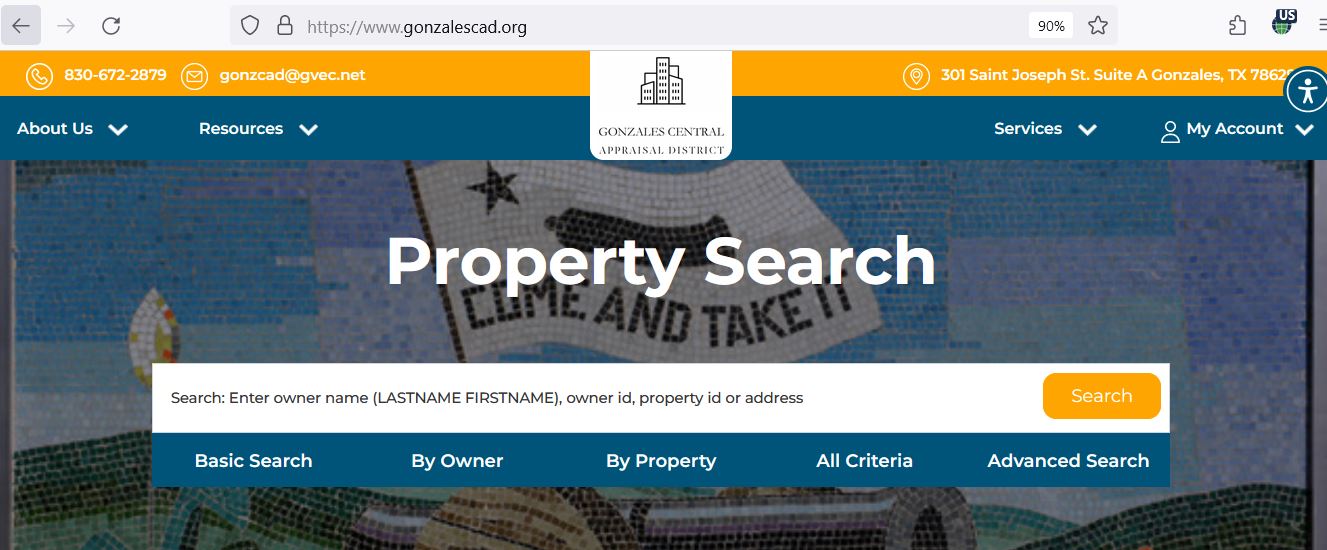
Gonzales CAD property search screenshot: what to check on the official lookup page
The screenshot below shows the Gonzales CAD property search layout and the type of search fields users should expect. Use it as a visual guide before opening the live official portal. Do not use any screenshot as final proof of current value, exemption status or tax balance because appraisal records and tax data can update.
What Gonzales CAD property record fields usually mean
A CAD record is not just a tax amount. It is an appraisal record. Read it like a checklist before you make a decision, file a protest or estimate future taxes.
| Field | What it helps you find | How to use it correctly |
|---|---|---|
| Property ID / account | Unique reference for the appraisal record | Use it when calling the CAD, filing a protest, checking exemptions or matching a tax statement. |
| Owner name | Owner currently shown on appraisal records | Recent transfers may not appear immediately. Use County Clerk records if recorded ownership must be verified. |
| Situs/property address | Physical location when available | For rural tracts, legal description and map location may be more useful than street address. |
| Legal description | Formal description of the property, tract, lot, abstract or subdivision | Compare with deed, survey, closing paperwork or county clerk records if boundaries are unclear. |
| Market value | CAD’s opinion of market value for appraisal purposes | Compare with sales, condition, land use, acreage, improvements and nearby similar properties. |
| Appraised value | Value after certain caps, limitations or appraisal rules may apply | For homestead properties, compare market value and appraised value before assuming your tax bill increased by the same amount. |
| Exemptions | Homestead, over-65, disability, veteran or other exemption indicators | Missing exemptions can be more costly than a small market value difference. Check early. |
| Land and improvement value | How the total value is divided between land and structures | Helpful for homes, commercial property, rural acreage, barns, outbuildings, improvements and protest evidence. |
Search Gonzales County property by address, owner name, property ID or legal description
Different property types need different search methods. A city house in Gonzales may be easy to find by address, while a rural acreage tract, farm, mineral account or older property may be easier by owner name, property ID or legal description.
- Use fewer words if the exact address fails.
- Try only the street number and road name.
- Remove punctuation, apartment symbols and extra abbreviations.
- Check nearby city or rural route naming if applicable.
- Start with last name only.
- Try business name variations for commercial property.
- Check multiple accounts under the same owner.
- Confirm mailing address before assuming it is the same property.
- Use legal description when available.
- Check abstract, subdivision, tract or acreage details.
- Use the map to confirm location.
- Call CAD if parcel identity is unclear.
Gonzales CAD interactive map: when to use it
The interactive map is useful when the written property record does not tell the full story. It can help you understand approximate parcel location, nearby tracts, road access, neighboring properties and boundary context. For legal ownership verification, still use official property records and the CAD/county office guidance.
Gonzales County homestead exemption and other appraisal exemptions
Exemptions reduce taxable value when you qualify. Homeowners should check homestead status first, especially after buying a home. Other common exemption-related searches include over-65, disability, disabled veteran, surviving spouse, agricultural valuation and other special appraisal forms.
How to protest a Gonzales County appraisal value
A strong protest is about evidence, not frustration. Gonzales CAD cannot reduce your tax bill just because it feels high. You need to show why the appraisal value is too high, why the property is unequally appraised, why property details are wrong, or why an exemption/special appraisal issue needs review.
Evidence checklist for a Gonzales CAD appraisal review
Gonzales County includes city homes, rural land, agricultural property, commercial property, minerals and personal property accounts. Evidence should match the property type. A weak protest uses general complaints; a strong protest uses clear proof.
- Recent comparable sales near the property
- Photos of damage or poor condition
- Repair estimates from contractors
- Proof of wrong square footage or features
- Closing statement if recently purchased
- Acreage documents and maps
- Land-use and agricultural records
- Fencing, access, water or terrain issues
- Productivity/special valuation documents
- Photos showing actual land condition
- Rendition and asset records
- Depreciation schedules
- Lease or production documents where relevant
- Inventory/equipment support
- Professional valuation or accounting support
Gonzales CAD vs Gonzales County Tax Assessor-Collector
Use Gonzales CAD for appraisal and exemption matters. Use the Gonzales County Tax Assessor-Collector for statements, receipts, property tax payment and collection questions. Many users lose time because they call the appraisal district to ask for payment receipts.
| Need | Correct office | What to ask or check |
|---|---|---|
| Property value, owner record or appraisal notice | Gonzales Central Appraisal District | Market value, appraised value, property characteristics, account details and appraisal notice questions. |
| Homestead, over-65, disability, veteran or ag valuation | Gonzales Central Appraisal District | Forms, application status, required documents and exemption deadlines. |
| Value protest or ARB hearing | Gonzales CAD / appraisal review process | Online protest access, PIN, deadline, evidence and hearing process. |
| Tax statement, payment or receipt | Gonzales County Tax Assessor-Collector | Tax balance, receipt, due date, payment method, penalty and collection questions. |
| Recorded deed or legal property document | Gonzales County Clerk | Official property records, deeds, liens and recorded instruments. |
Gonzales County rural land, farm, ranch, mineral and business property tips
Gonzales County property research is not only about residential lots. Many searches involve acreage, rural homes, agricultural land, mineral interests, business personal property, commercial accounts or older legal descriptions. This is where the interactive map, forms page and direct CAD contact become important.
- Check total acres, land class and special valuation indicators.
- Compare legal description with deed or survey papers.
- Review water, fencing, access, terrain and productivity factors.
- Keep agriculture-use documents organised.
- Call the CAD if classification or valuation is unclear.
- Check whether the account is real property, personal property or mineral-related.
- Keep rendition records and asset details.
- Confirm owner/business name variations.
- Use professional help for high-value or complicated accounts.
- Separate tax bill questions from appraisal record questions.
Gonzales CAD forms, records, reports and owner account tools
Use official Gonzales CAD forms and account tools instead of random PDF copies found on search engines. Forms, deadlines and instructions can change, and the CAD’s own website is the safer source.
| Official page | Use it for | Practical tip |
|---|---|---|
| Forms | Homestead, exemptions, special valuation, appraisal-related forms | Download the latest form and ask the CAD if you are unsure which one applies. |
| Records / Data / Reports | Public records, reports and appraisal district information | Useful for deeper research and official policy/resource checks. |
| Online Protest | Online protest account access and filing route | Use your notice and property account details; keep confirmation proof. |
| Get PIN | Requesting online account PIN access | Helpful when you need online protest or property-owner account access. |
| Contact staff | Chief appraiser, deputy chief appraiser, exemption clerk and other staff contacts | Use specific staff routing when your question is about exemptions, BPP, appraisals or account access. |
Gonzales Central Appraisal District contact details
Use the appraisal district for value, exemption, property record, map and protest questions. Call during business hours and avoid waiting until the last week of a deadline if you need forms, PIN help or evidence guidance.
| Contact item | Official detail | Best use |
|---|---|---|
| Office name | Gonzales Central Appraisal District | Use for appraisal, exemption, map and protest-related questions. |
| Street address | 301 Saint Joseph St. Suite A, Gonzales, TX 78629 | Use for in-person visits and map directions. |
| Mailing address | P.O. Box 867, Gonzales, TX 78629-0867 | Use for mailed forms and written correspondence. |
| Phone | 830-672-2879 | Use for account, exemption, search, map and protest procedure questions. |
| Fax | 830-672-8345 | Confirm before faxing any deadline-sensitive document. |
| gonzcad@gvec.net | Use for non-urgent written questions; call if your deadline is close. | |
| Chief appraiser | John Liford | Official directory and staff page identify him as chief appraiser. |
Gonzales CAD office map and visit planning
The Gonzales CAD office is located at 301 Saint Joseph Street, Suite A, in Gonzales. If you are driving from Nixon, Waelder, Smiley, Cost, Harwood, Belmont, Ottine or rural areas, call first so you do not make a long trip for the wrong office or missing document.
Official Gonzales County resources used in this guide
Use these official pages for final confirmation before filing forms, protesting a value, checking tax bills, searching deeds or visiting an office.
Gonzales Central Appraisal District official website Official Gonzales CAD forms page Official Gonzales CAD online protest portal Official Gonzales CAD Get PIN page Official Gonzales CAD interactive map Official Gonzales CAD records, data and reports Official Gonzales CAD contact/staff page Texas Comptroller Gonzales County property tax directory Gonzales County Tax Assessor-Collector Gonzales County property tax search/payment portal Gonzales County Clerk property recordsGonzales County Appraisal District FAQs
What is the official Gonzales County Appraisal District website?
The official Gonzales Central Appraisal District website is gonzalescad.org. Use it for property search, interactive map, forms, online protest, account PIN access, records, reports and CAD contact details.
How do I search Gonzales County property records online?
Start at the official Gonzales CAD website and use the property search box. You can search using owner name, property ID, address or legal description. For rural property, legal description or property ID may work better than address.
What is the Gonzales CAD phone number?
The main Gonzales Central Appraisal District phone number is 830-672-2879. Use it for property search help, exemption questions, appraisal notice questions, protest procedure and map/account guidance.
Where is Gonzales Central Appraisal District located?
Gonzales Central Appraisal District is located at 301 Saint Joseph St. Suite A, Gonzales, TX 78629. The mailing address is P.O. Box 867, Gonzales, TX 78629-0867.
How do I apply for a Gonzales County homestead exemption?
Open the official Gonzales CAD forms page, download the correct exemption form, complete it with required documents, and submit it to the appraisal district. Keep a copy and proof of submission.
Can I file a Gonzales CAD protest online?
Gonzales CAD provides an online protest/account portal and a Get PIN page. Use the official CAD site, your appraisal notice and your property account details to check online protest access for your property and tax year.
Does Gonzales CAD collect property tax payments?
Gonzales CAD handles appraisal values, exemptions and protest records. Property tax statements, receipts and payments should be checked with the Gonzales County Tax Assessor-Collector or the official Gonzales County tax portal.
What evidence helps in a Gonzales County appraisal protest?
Helpful evidence includes comparable sales, property-condition photos, repair estimates, closing statements, maps, proof of wrong square footage, acreage documents, agricultural-use records and documents showing record errors.
Why can I not find my Gonzales County property by address?
Some rural properties may not search cleanly by address. Try owner name, property ID, legal description, abstract, subdivision, acreage or the interactive map. You can also call Gonzales CAD with your available details.
Where can I search Gonzales County official property records or deeds?
For recorded deeds, liens and official property records, use Gonzales County Clerk resources. CAD records are appraisal records and may not replace official recorded documents.
Last editorial check: June 2026. Official details can change without notice; verify your account-specific information on GonzalesCAD.org and official county resources.

Founded by Mahesh Kumar, AppraisalDistrict.org is built on the belief that public information should be accessible and accurate. We have replaced AI-generated ‘fluff’ and automated scraping with 100% manual human verification. With over 15 years of experience in real estate and digital journalism, we help you find the right data without the frustration of broken links.
Search Smarter, Estimate Taxes, Check Exemptions and Prepare for a Protest
Use this free tool before you visit a county appraisal district, property search portal, tax office, or exemption page. It helps you understand property value, taxable value, possible savings, protest value, and the next official step.
What do you need help with today?
Choose your main reason for visiting. The tool will show the best next step and quick estimate.
Use this tool to check your appraisal notice, exemption savings, protest value, and official next step.
Use the tax calculator before trusting only the sale price or mortgage estimate.
Property Search Helper
Use this when a county property search portal is confusing. It shows which search method is usually best.
Property Tax Estimate Calculator
Estimate annual property tax using appraised value, assessment ratio, exemptions, and combined tax rate.
Homestead and Exemption Savings
Estimate how much a homestead, senior, disability, veteran, or local exemption may reduce tax.
Appraisal Notice Review
Compare last year value with this year value and see whether the increase deserves closer review.
Property Tax Protest Savings
Estimate possible savings if your appraised value is reduced after protest, correction, evidence review, or appraisal review board hearing.
Property Tax Protest and Exemption Checklist
Use this checklist before you file a protest, apply for exemption, or call the appraisal district.
Before calling, write your property ID, owner name, property address, and question on paper. It saves time.
Do not call the CAD to pay tax bills unless the local article says they collect taxes. In many counties, the tax office collects payment.
Official Resource Finder
Enter county and state to create safe searches for official CAD pages, property search, tax payment, exemptions, maps, forms, and protest help.
CAD vs Tax Office
- Appraisal District: value, exemptions, ownership records, maps, protest.
- Tax Office: tax bill, payment, receipt, delinquent balance, penalty.
Best place to use this
Add this tool after the first major content section or before the FAQ area. It gives visitors a reason to interact before leaving the page.
Important estimate note
This tool gives educational estimates only. Final values, exemptions, tax rates, bills, payments, and deadlines must be confirmed with official county sources.