
Trace a Kent County Property From Parcel Search to Value, Protest and Paid Tax
Kent County Appraisal District provides one portal for real estate, mineral interests and business personal property. The strongest search starts with a property ID, but the system also supports owner names, addresses, legal descriptions, abstracts, subdivisions, lease names and acreage.
This guide explains how to identify the correct account, interpret appraisal and tax fields, handle rural or mineral property, apply for exemptions, prepare a protest, pay through the correct collector and obtain the recorded deed from the County Clerk.
Cindy Watson, RPA, RTC.
155 S. Main St., Jayton, Texas 79528.
806-237-3066.
Real estate, minerals and personal property.
Local sources checked July 28, 2026.
What are you trying to find in Kent County?
Use property ID, owner name, street address, legal description, subdivision, lot or block.
Follow the property-search stepsUse mineral property type, lease name, lease number, owner, abstract or property ID.
Review mineral search tipsCompare acreage, abstract, tract, agricultural use, market value and productivity value.
Check agricultural requirementsConfirm the account, tax year, taxing units, balance and payment fee before submitting.
Open payment guidanceSave the property record, identify the exact error and organise comparable or condition evidence.
Build the protest fileUse recorded deeds, liens, releases and plats when the appraisal owner display is not enough.
Find the controlling recordSearch the correct account without confusing surface, mineral or personal property
Prepare the strongest available identifier
Use the existing Kent County Appraisal District visual with the updated workflow
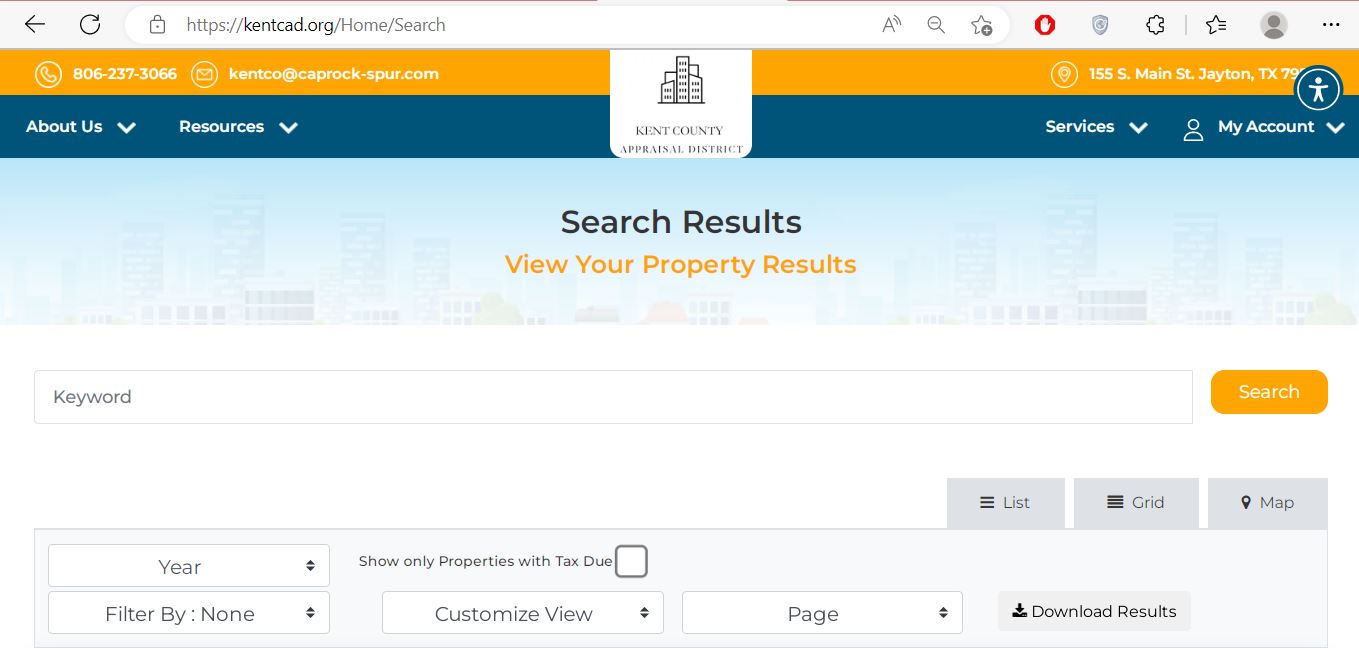
Enter an owner name, owner ID, property ID or address. Use this when you have one strong identifier.
Use property ID, Geo ID, address, legal description, abstract, subdivision, lease name or lease number.
Filter by previous owner, current owner, street, legal description, deed date, file number, abstract, acreage or value.
Choose the best Kent CAD search method before opening the portal
Select the property type and the information you already have. The recommendation is generated in your browser and does not transmit a name, address, lease or account number.
This helper does not replace the official record. Confirm the property type, year, legal description and account before acting.
Understand the important fields in a Kent CAD property result
| Field | What it helps identify | What it does not prove | Next action |
|---|---|---|---|
| Property ID | The appraisal account within Kent CAD. | That it is the County Clerk’s document number. | Save it for appraisal, protest and payment questions. |
| Property type | Real estate, mineral property or personal property. | That all interests connected to the land are in one account. | Search other account types when necessary. |
| Owner name | The owner displayed for appraisal and tax administration. | Complete legal title or ownership of every mineral interest. | Check the recorded deed or mineral instrument. |
| Property address | The assigned physical or situs location. | A surveyed boundary or complete legal description. | Compare the legal description and map. |
| Legal description | The abstract, survey, subdivision, lot, block, tract or lease connection. | That the shortened CAD text contains the full recorded instrument. | Match it to the deed, plat or lease document. |
| Market value | The district’s estimate of value for the selected year. | The sale price, taxable value or amount owed. | Review land, improvement and comparable evidence. |
| Tax value | The value used after applicable exemptions or appraisal treatment. | The final tax without the applicable rates. | Open the tax and taxing-entity details. |
| Base tax due | Tax shown in the selected search result before every possible collection adjustment. | The current payoff after penalties, interest or later corrections. | Verify the live balance before payment. |
| Acres | The land quantity connected to the account. | A surveyed acreage or agricultural qualification. | Compare the deed, survey and special-appraisal record. |
| Lease name or number | A mineral, oil or gas account connection. | The current decimal interest or complete mineral title. | Compare division orders, deeds and operator records. |
Fix a missing, duplicate or confusing Kent County result
| Problem | Likely reason | What to try |
|---|---|---|
| Owner name returns nothing | The portal uses last-name-first-name format or the account uses initials, a trust, estate or previous owner. | Search the surname or main business word only. |
| Address returns nothing | The property is rural, abbreviated differently or indexed by legal description. | Use the street number and main name, then legal description or owner. |
| Ranch has no useful situs address | The account is organised by abstract, survey, tract or owner. | Use By Property or Advanced Search. |
| Mineral account does not appear | Real Estate is selected, or the account uses a lease or separate owner record. | Select Mineral Property and search lease, abstract or property ID. |
| Several accounts have the same owner | The owner has several tracts, mineral interests or property types. | Compare property type, legal description, acreage and property ID. |
| New deed still shows former owner | The deed or CAD ownership update is still processing. | Confirm recording with the Clerk, then give CAD the instrument details. |
| 2026 value differs from a prior download | Current-year data can change before appraisal-roll certification. | Save a dated copy and verify the current notice or certified roll. |
| Tax balance seems wrong | Wrong year, wrong account, recent payment, correction, penalty or interest. | Confirm the live balance with Kent CAD before paying. |
Search mineral interests separately from the surface parcel
Kent CAD states that mineral, utility, industrial, real-estate and personal-property accounts are appraised with assistance from Pritchard & Abbott. The search portal contains dedicated mineral fields and categories.
Use the Kent CAD map to locate the account—not to replace a survey
The interactive map can help identify an acreage tract, subdivision lot, neighboring account or property without a reliable street address. It is especially useful when several parcels share an owner or when a legal description is unfamiliar.
Match the property to the correct Kent County taxing entities
Kent CAD’s current homepage publishes 2025 rate information for Kent County, the lateral-road levy, school taxation, the City of Jayton and portions of Kent County located in several neighboring school districts.
Submit the correct exemption and verify that it was applied
Kent CAD publishes residence-homestead, disabled-veteran and other Texas property-tax forms. Its forms page states that homestead applications must include a driver’s licence copy or other information required by the Tax Code, and an affidavit may be required in some situations.
Prepare evidence of qualifying use—not only proof of acreage
Kent CAD publishes local agricultural intensity standards, an agricultural-appraisal application and wildlife-management material. Special appraisal generally values qualifying land according to productivity rather than market value.
Document livestock, crops, grazing, cultivation, wildlife management or another qualifying agricultural activity.
Provide leases, receipts, livestock records, photographs, maps and prior-use evidence requested by the application.
Compare the operation with Kent CAD’s local standards. Acreage by itself does not establish qualification.
Build a focused Kent County protest instead of submitting only a complaint
Evidence checklist by property type
Pay through the collecting office connected to the Kent CAD account
Most Texas property taxes must be paid by January 31 and become delinquent February 1 unless the bill shows a postponed date.
Kent CAD currently states that its office charges a non-negotiable $25 returned-check fee.
Compare the collector’s account with the lender’s disbursement record before making a possible duplicate payment.
Use the Kent County Clerk when the CAD owner field is not enough
Kent CAD maintains ownership information for appraisal and taxation, but the Kent County Clerk maintains deeds, liens, releases, plats and other official property records.
Craig Harrison, who also serves as the 39th Judicial District Clerk.
P.O. Box 9101 Main Street
Jayton, Texas 79528
806-237-3881
Fax: 806-237-2300
- Deeds and ownership instruments
- Liens and releases
- Recorded plats and property documents
- Probate-connected property records
- Plain and certified copies
Adjust the workflow to the local property account
Verify the City of Jayton, Kent County and school-district lines instead of applying a countywide combined-rate estimate.
Search with owner, abstract, survey and acreage. Review market value and agricultural productivity value separately.
Use subdivision and lot information. Compare access, utilities, improvements, view and topography before selecting comparables.
Select Mineral Property and search by lease, property ID, owner or abstract. Do not use the surface account as the mineral record.
Select Personal Property and compare the asset class, owner, location and value. The general 2026 rendition deadline was April 15.
Kent County includes portions of Rotan, Spur, Snyder and Post ISDs. Verify the exact school line before estimating tax.
Search the deceased owner and heirs, review probate and deed records, then ask CAD about updating the account.
Search the old and new owner, legal description and property ID. A split or combination can create new accounts.
Remove seller-specific exemptions, appraisal caps and special valuations that may not continue after closing.
Contact the Kent County office that controls the record
Use for property search, values, exemptions, agricultural appraisal, property characteristics, protests, maps and the property-tax payment route.
155 S. Main St.Jayton, Texas 79528
Mailing: P.O. Box 68
Jayton, TX 79528-0068
806-237-3066
Fax: 806-237-3067
kentco@caprock-spur.com
Chief Appraiser: Cindy Watson, RPA, RTC.
The state directory says this office does not collect property taxes. Use it for duties the county assigns to the elected Tax Assessor-Collector and confirm property-tax collection with Kent CAD.
William D. Scogin227 S. Main St.
Jayton, Texas 79528
Mailing: P.O. Box 7
Jayton, Texas 79528
806-237-3746
Fax: 806-237-3306
wscogin@co.kent.tx.us
Use for deeds, recorded ownership documents, liens, releases, plats and certified copies.
Craig Harrison101 Main Street
Jayton, Texas 79528
Mailing: P.O. Box 9
Jayton, Texas 79528
806-237-3881
Fax: 806-237-2300
Kent CAD’s official contact page does not clearly publish daily lobby hours. Call before driving to Jayton, especially when submitting a deadline-sensitive application, protest, evidence packet or payment.
- Bring the property ID and tax year
- Bring copies rather than your only original
- Ask for a stamped receipt
- Confirm the collecting unit before paying
Open the exact Kent County property resource you need
Search real estate, minerals and personal property by owner, ID, address, legal description or lease.
Open property searchDownload homestead, veteran, agricultural, wildlife, protest, address-change and other forms.
Open Kent CAD formsUse the official protest system and preserve the filing confirmation.
Open protest serviceLocate parcels and compare appraisal accounts without treating map lines as a survey.
Open interactive mapUse the payment processor linked by Kent CAD and verify bureau code, account, year and fee.
Open online paymentReview certified appraisal rolls, tax rates, reports, reappraisal plans, ARB procedures and Truth-in-Taxation worksheets.
Open data and recordsFind contact information for deeds, liens, plats and certified recorded documents.
Open County Clerk pageVerify official CAD, Tax Assessor-Collector and collection information reported to the Comptroller.
Open Kent County directoryReview proposed and adopted local tax-rate information for the exact property.
Open Texas Property TaxesHow the existing Kent County article was improved

The Kent County image and the existing editorial image have been preserved. The article itself was rebuilt using current Kent CAD property-search fields, forms, contacts, data records, payment routing, county-office information and Texas Comptroller guidance.
Reviewed July 28, 2026. Property values, tax rates, account ownership, exemptions, payment balances, links, forms and office procedures can change after publication.
Kent County Appraisal District FAQs
What is the official Kent County Appraisal District property search?
The official portal is Kent CAD Property Search. It supports owner name, owner ID, property ID, address, legal description, abstract, subdivision, lease name, lease number, acreage and advanced-search filters.
How should I enter an owner name in the Kent CAD search?
Kent CAD labels the field in last-name-first-name format. Begin with the surname. Remove initials, punctuation, trust language, estate language or company suffixes when an exact full-name search produces no result.
Can I search Kent County mineral property online?
Yes. Select Mineral Property and search with the property ID, owner, lease name, lease number, abstract or legal description. Verify that you opened the mineral account rather than the surface real-estate account.
Who collects property taxes in Kent County?
The Texas Comptroller directory states that the elected Kent County Tax Assessor-Collector does not collect property taxes. Kent CAD provides the online payment link and performs collection services for participating taxing units. Confirm the collector shown on the exact account.
What is the Kent County property-tax protest deadline?
The usual deadline is May 15 or 30 days after Kent CAD mails the Notice of Appraised Value, whichever is later. Use the deadline printed on the notice. Contact Kent CAD immediately when the date may have passed because late remedies are limited.
How do I apply for a Kent County homestead exemption?
Download the residence-homestead application from the Kent CAD forms page, complete it and attach the identification or affidavit required by the instructions. Save filing proof and later verify the exemption on the property record.
How do I apply for agricultural appraisal in Kent County?
Use Kent CAD’s agricultural application and intensity standards. Document qualifying agricultural use, land-use history, acreage, production, livestock, leases, photographs or wildlife-management activity requested by the district.
Why does Kent CAD show separate real-estate and mineral accounts?
The surface estate, mineral interests and business personal property can be separately owned and appraised. Each account can have a different owner, property ID, value, legal description and tax status.
Where can I find a Kent County deed or recorded ownership document?
Contact the Kent County Clerk for deeds, liens, releases, plats and certified copies. The Kent CAD owner field is not a substitute for the recorded deed.
Are 2026 Kent CAD values final?
Kent CAD currently allows users to select 2026 in its property search, while its records page publishes 2025 certified appraisal rolls. Current-year data can change during appraisal, protest and certification, so confirm its status before relying on it.