
Route a Dimmit County Property From Appraisal Search to the Record That Controls It
Begin with Dimmit Central Appraisal District when you need a property ID, appraisal owner, geographic ID, legal description, acreage, market value, exemption, agricultural appraisal, mineral account or protest information.
Continue to the Dimmit County Tax Assessor-Collector for the live bill, payment and receipt, or to the County Clerk when you need a recorded deed, mineral conveyance, oil-and-gas lease, lien, release or plat.
203 Houston Street, Carrizo Springs, Texas 78834-3216.
Monday-Friday, 8 AM-noon and 1 PM-5 PM.
Use the property ID when available; otherwise begin with one name or street term.
The County Tax Office controls bills, payments and receipts.
Local portals and procedures reviewed July 2026.
What do you need from the Dimmit County property record?
Use owner, address, property ID or Advanced Search, then confirm the legal description and property type.
Follow the search stepsReview market, appraised and taxable values instead of treating one number as the full tax answer.
Understand the value fieldsConfirm the account, year, balance, payment fee and receipt through the Tax Assessor-Collector.
Use the payment workflowIdentify the exact value, exemption, acreage, property-characteristic or classification issue.
Build the evidence fileSearch deeds, mineral deeds, leases, assignments, liens and releases instead of relying on the CAD owner field.
Follow the mineral-record routeReview title, acreage, access, ag status, water, septic, mineral documents, taxes and taxing units.
Use the due-diligence checklistSearch Dimmit CAD without opening the wrong ranch, mineral or residential account
Use the Dimmit CAD screenshot to choose the correct search method
The existing article’s property-search image is preserved below. Use it to recognise the main search tabs and fields, then reopen the live portal for current values and account status.
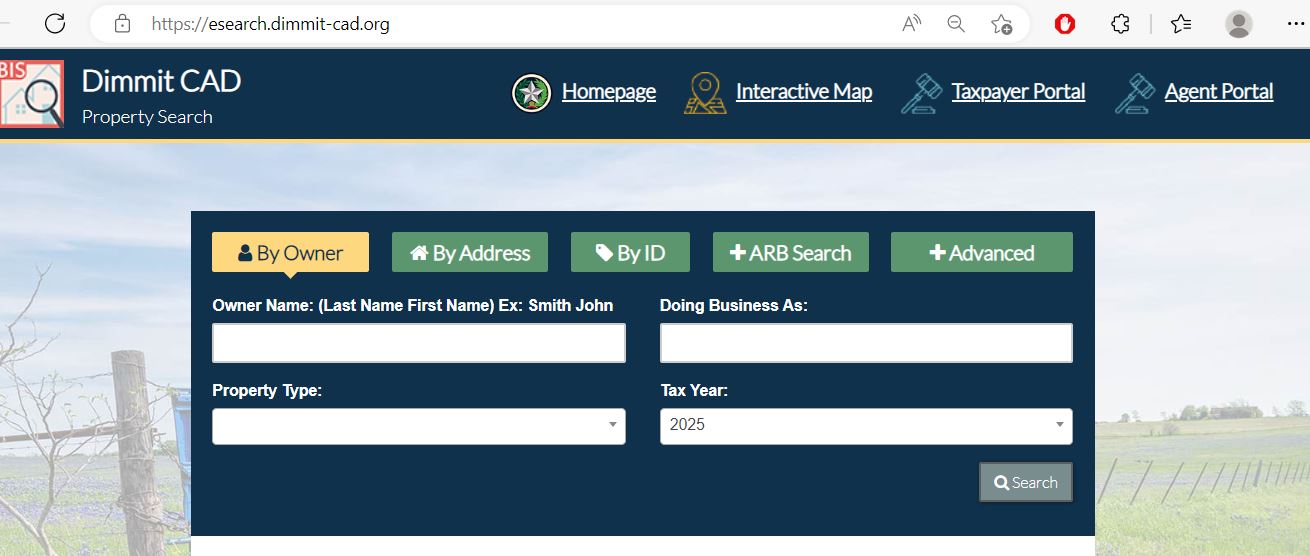
Use the Dimmit CAD filter that matches the property
| Search field | Best use | What to verify |
|---|---|---|
| Owner | Homeowner, ranch owner, mineral owner, estate, trust or company. | Name variation, property type and legal description. |
| Street name | Carrizo Springs, Asherton, Big Wells or an improved rural property. | Street suffix, number and situs-address format. |
| Property ID | You have an appraisal notice, tax statement or previous record. | Correct year and whether other related accounts exist. |
| Geographic ID | Matching a property to a parcel map, survey or abstract. | Recorded deed and survey before legal use. |
| Abstract | Ranch acreage, rural land and older legal descriptions. | Original survey, tract, acreage and adjoining parcels. |
| Subdivision | A recorded development, lot or block. | Subdivision name, phase, lot and block. |
| Mobile-home park | A manufactured home located in a named park. | Home owner, land owner and whether accounts are separate. |
| Property type | Separating real, personal, mobile-home, mineral and other accounts. | That you opened the controlling account for the task. |
| Doing Business As | Business personal property filed under a DBA. | Legal business name, situs and rendition year. |
| Tax year | Comparing notices, exemptions, hearings or prior values. | Whether current values are preliminary or certified. |
Understand what each Dimmit CAD field does and does not prove
| Field | What it identifies | What it does not prove | Next action |
|---|---|---|---|
| Property ID | The appraisal account in Dimmit CAD’s database. | That the Tax Office or Clerk uses the same identifier. | Save it and use it when contacting CAD. |
| Owner shown | The owner carried for appraisal administration. | Complete surface or mineral title. | Search recorded County Clerk instruments. |
| Situs address | The property location carried in the appraisal account. | A legal description, mailing address or surveyed location. | Compare the map and deed. |
| Legal description | An abstract, survey, subdivision, lot, block or tract reference. | A complete deed-ready legal description. | Open the recorded deed, plat or mineral instrument. |
| Acreage | The acreage carried for appraisal purposes. | A surveyed boundary or guaranteed acreage. | Use a professional survey for legal decisions. |
| Market value | CAD’s opinion of market value as of January 1. | A guaranteed sale price or final tax bill. | Compare sales, condition and equal-appraisal evidence. |
| Appraised value | Value after an applicable appraisal limitation. | The value after every exemption. | Review the taxable value for each taxing unit. |
| Taxable value | Value remaining after applicable exemptions. | The live balance, penalties or payment status. | Open the county tax search. |
| Property characteristics | CAD’s recorded land class, structures, size, age, condition and use. | That every detail is correct. | Document errors with photographs, measurements and records. |
| Mineral account | An appraised mineral interest or related account. | Complete mineral ownership, royalty decimal or lease status. | Review County Clerk and Railroad Commission records. |
Use the Dimmit CAD map without treating its lines as a survey
Separate market value, appraised value and taxable value
Dimmit CAD’s opinion of the property’s market value as of January 1.
The value after an applicable appraisal limitation, such as a homestead cap.
The value remaining after exemptions. It may differ for each taxing unit.
Read the 2026 appraisal notice before choosing a protest reason
Confirm owner, property ID, situs address, property type and legal description.
Review each component separately to identify what caused the value change.
Remember that the live search currently labels 2026 values as preliminary before certification.
Check homestead, senior, disability, veteran and other expected benefits.
Dimmit CAD announced June 8 for its main 2026 notice cycle. Follow the date printed on your notice.
Keep the credentials printed on the appraisal notice for taxpayer-portal registration and electronic filing.
Fix common Dimmit CAD search failures before calling
| Problem | Likely reason | Practical fix |
|---|---|---|
| Owner name returns no result | Different initials, name order, spouse, estate, trust, company or former owner. | Search only the first or last name, then try property ID or Owner ID. |
| Too many owner matches | The name is common or the search is too broad. | Add property type, geographic ID, abstract, subdivision or street name. |
| Full address fails | The portal may use a different suffix, rural format or situs description. | Use only the street name, as recommended by the official search. |
| Ranch tract has no normal address | The property may be indexed by abstract, survey, legal description or geographic ID. | Use Advanced Search and the parcel map. |
| Mineral account is missing | Mineral interests may be separate from the surface account or listed under another owner. | Change property type and search owner, property ID, operator-related details or legal description. |
| Manufactured home is missing | The home may have a separate account or be indexed by mobile-home park. | Use property type and mobile-home-park filters. |
| Recently purchased property shows seller | The deed may still be processing into the appraisal system. | Confirm recording with the County Clerk and save the instrument number. |
| CAD and tax records differ | The systems serve different purposes and may update on different schedules. | Match the property identifiers and contact the office controlling the disputed field. |
| 2026 value changes after saving | The search states that 2026 values are preliminary before certification. | Preserve the earlier copy and recheck the certified account. |
Local search tips for homes, ranches, minerals and business property
Confirm city, school district, hospital district, water district and exemption lines before estimating taxes.
Check the city and school taxing units and confirm whether the situs address matches the parcel.
Verify the correct city, legal description and taxing-unit combination rather than relying only on mailing city.
Search by owner, property ID, geographic ID, abstract or survey and verify usable acreage separately.
Review market value, productivity value, qualifying acreage, current use and application status.
Confirm prior open-space qualification, current plan, qualifying practices and annual evidence.
Search mineral and surface accounts separately and compare County Clerk and Railroad Commission records.
Determine whether the home and land are assessed together or through separate accounts.
Search the business, DBA and property type, then verify situs, rendered assets and tax year.
Send the question to the Dimmit County office that owns the record
| Your question | Correct starting point | What to prepare |
|---|---|---|
| What is the appraised value? | Dimmit Central Appraisal District | Property ID, tax year and disputed value field. |
| Why is an exemption missing? | Dimmit Central Appraisal District | Application, ID, qualification date and filing proof. |
| Does land qualify for agricultural appraisal? | Dimmit CAD agricultural appraisal staff | Use history, acreage, stocking, leases, maps and production evidence. |
| How much property tax is due? | Dimmit County Tax Assessor-Collector | Tax account, year, owner and property address. |
| Did my payment post? | Dimmit County Tax Assessor-Collector | Receipt, confirmation, date, amount and payment method. |
| Who owns the surface or minerals? | Dimmit County Clerk or a title professional | Grantor, grantee, legal description, date range and instrument numbers. |
| Where is an oil or gas well? | Railroad Commission of Texas | County, lease, operator, API number, survey or location. |
| Who sets the tax rate? | Each local taxing unit | The taxing-unit list from the property account. |
| Who handles a deed or lien copy? | Dimmit County Clerk | Names, instrument number, recording date and copy type. |
Correct the source of the inaccurate Dimmit County property information
Verify exemptions on the Dimmit CAD account before estimating taxes
An exemption can reduce taxable value without changing market value. Check every taxing-unit line because local exemption treatment may differ.
Confirm ownership, principal-residence status, address and the exemption shown on the current account.
Review the additional exemption, school-tax ceiling and possible payment or deferral options.
Check eligibility documentation, additional exemption and any applicable school-tax ceiling.
Use the correct exemption category and attach the required VA documentation.
Prepare occupancy, ownership, heirship and family-history documentation when a deed update is incomplete.
Use the official forms page for charitable, religious, cemetery, disaster and other property-specific filings.
What to prepare before applying
Use Dimmit CAD’s local land-use standards instead of relying on acreage alone
Prepare stocking records, leases, fencing, water, photographs, veterinary or feed receipts and management history.
Document animal units, acreage, duration of use, fencing, water and normal management practices.
Breeding and raising may qualify when standards are met; recreational keeping, showing or riding alone may not.
Document commercial use, stocking, management, fencing, sales and the local intensity standard.
Keep planting, harvesting, sales, lease, equipment and production evidence.
Confirm prior open-space qualification and preserve the wildlife plan, activities, maps and annual report.
Land-application evidence checklist
Do not confuse the surface account with mineral ownership or well records
Mineral research can involve several separate systems. Dimmit CAD may show an appraised mineral account, the County Clerk records ownership and lease instruments, and the Railroad Commission maintains regulated well, lease, operator and pipeline information.
| Your question | Best starting source | Important limitation |
|---|---|---|
| Is there a mineral appraisal account? | Dimmit CAD property search | An appraisal entry does not prove complete mineral title. |
| Who received or conveyed minerals? | Dimmit County Clerk | A complete chain may require older instruments and professional title research. |
| Is there an oil-and-gas lease? | County Clerk official records | Check assignments, amendments, releases and pooling documents too. |
| Where is a regulated well or pipeline? | Railroad Commission GIS Viewer | The map does not determine private mineral ownership. |
| What original survey or grant applies? | Texas General Land Office Land Grant Database | A land-grant record is a historical source, not a current title opinion. |
| Is the royalty decimal correct? | Lease, deed, division order and title review | CAD cannot replace legal or landman analysis. |
Keep equipment, inventory and business assets separate from the real-property account
Build a Dimmit CAD protest around one clear issue and supporting evidence
Evidence by property type
Comparable sales, condition photographs, repair estimates, closing documents and correct measurements.
Access, terrain, water, fencing, brush, usable acreage, easements and comparable land sales.
Use history, stocking, production, leases, maps, management and qualification evidence.
Ownership instruments, lease details, production or valuation records and correct decimal-interest evidence.
Asset schedules, original cost, age, condition, disposal records and location evidence.
Comparable accounts with similar class, size, use, location, acreage and condition.
Prepare the hearing file before the appointment day
Move from the appraisal account to the Dimmit County tax ledger
The Dimmit CAD account explains values and exemptions. The Dimmit County tax-property search controls the bill, payment status, delinquent balance and online payment route.
| Service | Official route | What to verify |
|---|---|---|
| Search tax account | Dimmit Tax Property Search | Owner, property, account, tax year and balance. |
| Online payment | Green Pay Taxes button inside the tax account | Payment total and processing charge. |
| Electronic tax statements | Dimmit County Taxpayer Portal | Owner ID, PIN, enrolled property and email. |
| Receipt or posting problem | Dimmit County Tax Assessor-Collector | Confirmation, amount, date and tax year. |
| Delinquent balance | Tax Office live payoff | Penalty, interest, collection charges and payoff date. |
Use the Dimmit County Clerk for deeds, mineral instruments, liens and releases
Complete these checks before buying, inheriting or developing Dimmit County property
Match property ID, geographic ID, legal description, abstract, acreage and map location.
Check current and delinquent balances, payment history and every applicable tax year.
Review deeds, liens, easements and releases through the County Clerk and title company.
Determine what mineral, royalty and executive rights are included, excluded or reserved.
Use Railroad Commission records and obtain professional review of surface-use and access documents.
The seller’s homestead exemption, appraisal cap or tax ceiling may not transfer.
Review current qualification, productivity value, use history and change-of-use exposure.
Use title documents and a professional survey for roads, easements, boundaries and usable acreage.
Investigate groundwater-district, well, water-supply and on-site sewage requirements.
Confirm city, school, county, hospital and groundwater-district boundaries.
Compare homes, barns, tanks, commercial structures and manufactured homes with the CAD account.
Keep the deed, survey, title policy, closing statement, tax certificate and exemption confirmation.
Important Dimmit County appraisal and tax dates
Dimmit County appraisal, tax and recorded-property offices
Carrizo Springs, Texas 78834-3216
Phone: (830) 876-3420
Fax: (830) 879-5137
Email: carrillo@dimmit-cad.org
Hours: Monday-Friday, 8:00 AM-12:00 PM and 1:00 PM-5:00 PM.
Chief Appraiser: Norma Carrillo, RPA
A document drop box is available outside the office and is checked Monday through Friday.
Carrizo Springs, Texas 78834-3242
Mailing: P.O. Box 425, Carrizo Springs, Texas 78834-6425
Phone: (830) 876-9904
Fax: (830) 876-4211
Email: taxassessorcollector@dimmitcounty.org
Tax Assessor-Collector: Mary E. Sandoval
Call before visiting to confirm current hours, payment methods and holiday closures.
103 N. 5th Street
Carrizo Springs, Texas 78834
Phone: (830) 876-2323
Email: countyclerk@dimmitcounty.org
Use for deeds, mineral documents, oil-and-gas leases, liens, releases, plats and certified copies.
Confirm current hours, record availability and copy fees before travelling.
GIS and mapping: Felicia Asbury, asbury@dimmit-cad.org
Business property: Laura Perez, perez@dimmit-cad.org
Residential and exemptions: Amy Vargas, vargas@dimmit-cad.org
Agricultural appraisal: Enrique Mata, mata@dimmit-cad.org
Front office: frontoffice@dimmit-cad.org
Staff assignments can change. Verify the current staff page before sending sensitive or deadline-dependent documents.
Official Dimmit County property resources
Use for announcements, contact information, forms, meetings and appraisal resources.
Open Dimmit CADSearch owners, addresses, property IDs, ARB data and advanced fields.
Open property searchReview parcel location and nearby appraisal-map context.
Open interactive mapRegister with Owner ID and E-file PIN for eligible electronic appraisal services.
Open CAD portalFind exemption, protest, agricultural, rendition and property-tax forms.
Open formsReview local qualifications, intensity standards and management practices.
Open agricultural policiesUse the official electronic protest route when eligible.
Open online protestSearch bills, balances and online payment options.
Open tax searchRequest electronic tax-office communications and access enrolled property details.
Open county portalReview local taxing-unit and tax-rate transparency information.
Open tax-rate portalFind deeds, mineral documents, liens, releases and plats.
Open County ClerkCross-check CAD, Tax Office and active taxing-unit information.
Open Dimmit County directoryHow this Dimmit County guide was researched and improved

Independent review of appraisal, tax, title, agricultural and mineral resources
This version preserves the images used in the existing article while rebuilding the content around complete user tasks: property search, screenshot guidance, account interpretation, preliminary-value warnings, exemption preparation, agricultural documentation, mineral research, protest filing, tax-payment verification and deed lookup.
Official resources reviewed include Dimmit Central Appraisal District, Dimmit County Tax Assessor-Collector, Dimmit County Clerk, Texas Comptroller, Railroad Commission of Texas and Texas General Land Office.
AppraisalDistrict.org is an independent informational website and is not operated by Dimmit Central Appraisal District or Dimmit County.
10 common Dimmit County appraisal and property-search questions
1. What is the official Dimmit County Appraisal District website?
The official website is dimmit-cad.org. Use it for appraisal records, property search, maps, forms, exemptions, agricultural guidance and protests.
2. How do I search Dimmit County property records?
Open the official Dimmit CAD search. Choose Owner, Address, ID, ARB Search or Advanced Search and confirm the property ID, legal description, property type and tax year.
3. Why does a Dimmit CAD address search show no result?
The property may use a rural address, different suffix, abstract, subdivision, mobile-home park or legal description. Search only the street name, then try owner, property ID, geographic ID or Advanced Search.
4. Are the 2026 values in Dimmit CAD final?
The official portal states that displayed 2026 values are preliminary and subject to change before certification. Save the date viewed and recheck the account when a final value is required.
5. Does Dimmit CAD collect property taxes?
No. Dimmit CAD handles appraisal records, values, exemptions, maps, agricultural appraisal and protests. The Dimmit County Tax Assessor-Collector handles bills, payments and receipts.
6. Where can I pay Dimmit County property taxes?
Use the official Dimmit tax-property search. Locate the correct account, verify the year and balance, select Pay Taxes and save the confirmation and receipt.
7. What was the Dimmit County protest deadline for 2026?
Dimmit CAD announced June 8, 2026 for its main appraisal-notice cycle, or 30 days after the individual notice was mailed when applicable. The deadline printed on the property owner’s notice controls.
8. How do I verify a Dimmit County homestead exemption?
Open the complete Dimmit CAD property account and review the exemption and taxable-value fields. If the exemption is missing, use the current official form, attach required identification and keep filing proof.
9. Where can I search Dimmit County deeds and mineral documents?
Use the Dimmit County Clerk and its official records system for deeds, mineral deeds, oil-and-gas leases, assignments, liens, releases and plats.
10. Where is Dimmit Central Appraisal District located?
The office is at 203 Houston Street, Carrizo Springs, Texas 78834-3216. Call (830) 876-3420. Hours are Monday-Friday, 8:00 AM-noon and 1:00 PM-5:00 PM.