
Bring Every Delta County Property Record Into One Clear Search and Action Route
Start with Delta County Appraisal District when you need a property ID, owner lookup, geographic ID, legal description, land value, improvement details, exemption status, agricultural appraisal, business-property account, map or protest information.
Continue to the Delta County Tax Assessor-Collector for tax bills, balances, payments, receipts and tax certificates. Use the County Clerk when you need the recorded deed, lien, plat, deed of trust or certified property document.
Use the property ID or geographic ID when one is available.
1280 W. Dallas Avenue, Cooper, Texas 75432.
200 W. Dallas Avenue, Cooper, Texas 75432.
Use the County Clerk’s official deed and land-record portal.
Local offices and online resources reviewed July 31, 2026.
What do you need from the Delta County property account?
Use owner, address, property ID or Advanced Search, then confirm the legal description and parcel.
Follow the search workflowReview land, improvements, market value, appraised value, taxable value and exemptions.
Understand the account valuesConfirm the taxing unit, year, balance, electronic-payment fee and receipt before submitting.
Use the payment workflowIdentify the exact value, exemption, property-description or ownership problem before filing.
Build the protest fileSearch recorded deeds, liens, plats, deeds of trust and other official instruments.
Search deed and land recordsRural land, mobile homes and business assets may require different filters, forms and evidence.
Review local property scenariosSearch Delta County appraisal records without opening the wrong tract
Use the Delta CAD screenshot as a practical search guide
The existing article’s Delta CAD search image is preserved below and placed inside the search workflow. The live portal can change, so use the image to recognise the important tabs and fields rather than as a substitute for the current database.
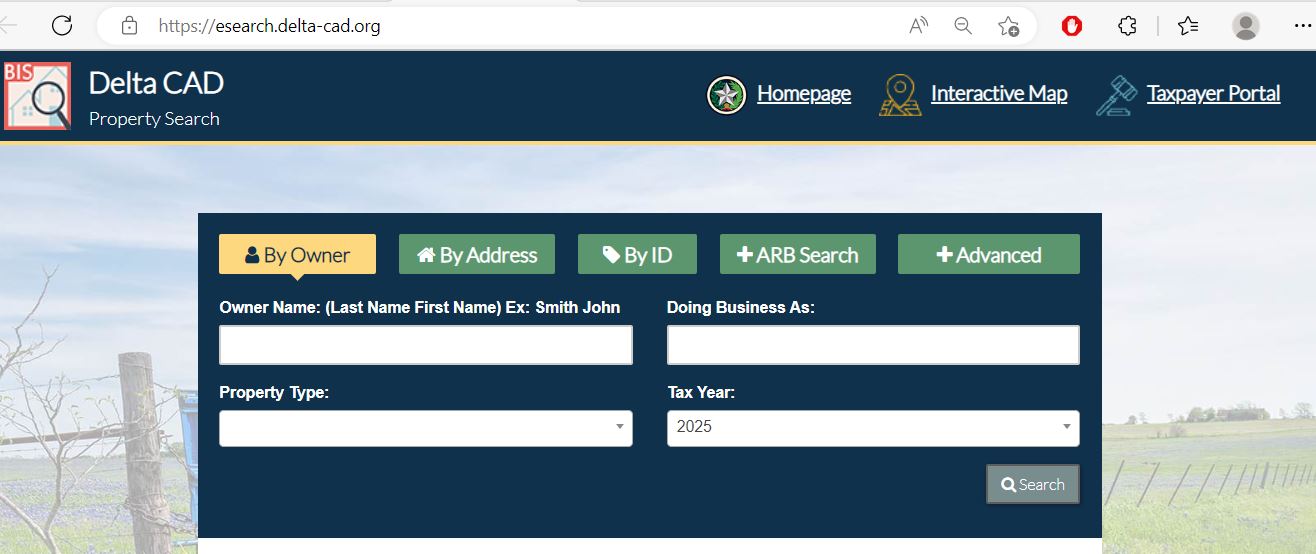
Choose the Delta CAD filter that matches the property
| Search field | Best use | What to verify |
|---|---|---|
| Owner name | A person, spouse, trust, estate, company or DBA. | Try current and former owner-name variations. |
| Street number and name | A known home, business or assigned physical address. | Remove the number and search only the street name when needed. |
| Property ID | An identifier from a notice, tax statement or prior property record. | Confirm the tax year and property type. |
| Geographic ID | Parcel, mapping, abstract and legal-description research. | Do not treat it as a surveyed legal boundary. |
| Property type | Separate real property, mobile homes, business personal property and other account categories. | More than one account may relate to the same location. |
| Abstract | Rural acreage, older surveys and tracts without a normal address. | Match the survey, tract, acreage and geographic ID. |
| Subdivision | Lots in a named development, addition or recorded subdivision. | Compare the lot, block, phase and legal description. |
| Mobile-home park | A manufactured home maintained separately from the land. | Determine whether the land and home have separate accounts. |
| Neighborhood | Nearby-property and equal-appraisal research. | A CAD neighborhood may differ from a subdivision or sales market. |
| ARB fields | Protest status, informal date, formal date, hearing date and board information. | The written hearing notice controls the appointment. |
Understand what each Delta CAD field does—and does not—prove
| Field | What it identifies | What it does not prove | Best next action |
|---|---|---|---|
| Property ID | The appraisal account maintained by Delta CAD. | That every outside database uses the same number. | Use it when contacting CAD and matching the tax account. |
| Owner shown | The owner carried for appraisal and tax administration. | Complete legal title, liens, heirship or deed history. | Search County Clerk records when legal ownership matters. |
| Situs address | The physical location shown in the appraisal record. | The owner’s mailing address or a full legal description. | Compare the map and legal description. |
| Legal description | An abbreviated abstract, survey, tract, subdivision, lot or block. | A complete description suitable for a deed or boundary decision. | Obtain the recorded deed, plat or survey. |
| Acreage | The acreage used in appraisal administration. | Surveyed or guaranteed legal acreage. | Verify with recorded records and a licensed surveyor. |
| Market value | CAD’s opinion of market value as of January 1. | A guaranteed selling price or final tax bill. | Compare property facts, sales and equal-appraisal evidence. |
| Appraised value | Value after an applicable appraisal limitation. | The value after every taxing-unit exemption. | Continue to the taxable-value lines. |
| Taxable value | The value remaining after qualifying exemptions. | The live balance, payment, penalty or receipt. | Use the collecting office’s account and bill. |
| Productivity value | A special value for qualifying agricultural or open-space land. | Continued qualification after a change in ownership or use. | Review application status, land-use history and rollback exposure. |
| Exemptions | Homestead, age, disability, veteran or other benefits applied to the account. | That every taxing unit grants the same amount. | Review each taxing-unit taxable value separately. |
Use Delta CAD’s interactive map without treating it as a survey
Separate market value, appraised value and taxable value
Delta CAD’s opinion of the property’s market value as of January 1 for that tax year.
The value after an applicable homestead or qualifying non-homestead appraisal limitation.
The value remaining after exemptions. It may differ by county, city, school and special district.
Read the Notice of Appraised Value before deciding what to protest
Confirm the owner, property ID, mailing address, situs address and legal description.
Review land value, building value, class, area, condition and completion separately.
Identify whether the increase came from land, improvements, new construction or another change.
Check homestead, age, disability, veteran and every other expected exemption.
Compare market value, productivity value, acreage and qualifying land use.
Use the deadline and online-filing instructions printed on the individual notice.
Fix common Delta CAD search problems before calling
| Problem | Likely reason | Practical fix |
|---|---|---|
| Owner search returns no result | The account may use another name order, initial, spouse, trust, estate, company or former owner. | Search only the first or last name, then try owner ID or property ID. |
| Too many owner matches | The name is common or the search is too broad. | Add property type, street name, abstract, subdivision or geographic ID. |
| Complete address fails | The record may use a different suffix, direction or county-road format. | Search only the street or road name, as recommended by the portal. |
| Rural acreage has no normal address | The tract may be indexed by abstract, survey, subdivision or geographic ID. | Use Advanced Search and the interactive map. |
| Manufactured home is missing | The home may be a separate mobile-home or personal-property account. | Change the property-type filter and check the mobile-home-park field. |
| Recently purchased property shows the seller | The recorded deed may still be processing into the appraisal system. | Confirm recording with the County Clerk and provide documentation requested by CAD. |
| Acreage differs from deed or survey | CAD acreage is maintained for appraisal administration. | Use the recorded deed, plat, title records and professional survey. |
| Tax Office does not show a school account | The parcel may be in Commerce ISD or Chisum ISD, which are not listed among Delta County’s consolidated collection units. | Check the tax statement and contact the school district’s collector. |
| Taxpayer portal will not load | The session may have expired or the external provider may be undergoing maintenance. | Return through delta-cad.org, try another browser and call CAD when a deadline is close. |
Local search tips for Cooper, Pecan Gap, rural acreage and school-district edges
Confirm City of Cooper, Cooper ISD, county, MUD and ESD taxable-value lines where applicable.
Check the City of Pecan Gap and applicable school district in addition to county and special districts.
Confirm that the correct school taxable value and exemption appear and that the county collector includes the account.
The property can be appraised by Delta CAD while the school taxes require a collector outside the county’s consolidated list.
Do not assume the Delta County payment route includes the Chisum ISD bill. Verify the tax statement.
Use owner, abstract, survey, geographic ID and legal description rather than a mailing address alone.
Compare market value and productivity value and confirm qualifying use, acreage and filing status.
Determine whether the home is appraised with the land or under a separate mobile-home account.
Confirm the business name, DBA, situs, asset account, tax year and rendition status.
Send each Delta County property question to the correct office
| Your question | Correct starting point | What to prepare |
|---|---|---|
| What is the property value? | Delta County Appraisal District | Property ID, tax year and disputed value field. |
| Why is an exemption missing? | Delta County Appraisal District | Application, filing proof, qualification date and supporting evidence. |
| Why is agricultural appraisal missing? | Delta County Appraisal District | Land-use history, leases, receipts, photographs and acreage information. |
| How much county-collected tax is due? | Delta County Tax Assessor-Collector | Tax account, property ID, owner, year and taxing-unit list. |
| Did a tax payment post? | The collector that received the payment | Receipt, confirmation, amount, date and tax year. |
| Who legally owns the property? | Delta County Clerk or title professional | Grantor, grantee, recording date, instrument number and legal description. |
| Where can I obtain a deed, lien or plat? | Delta County Clerk | Names, date range, document type and property description. |
| Is the acreage or boundary legally correct? | Licensed surveyor, title company or attorney | Deed, plat, prior survey and title documents. |
| Do I need subdivision or septic approval? | Delta County Development Services | Parcel, project plan, road access, proposed use and site information. |
| Who sets the tax rate? | Each county, city, school or special taxing unit | The taxing-unit list from the appraisal account. |
Correct the Delta County record that controls the inaccurate information
Verify Delta County exemptions before estimating the tax bill
An exemption reduces taxable value rather than market value. Review each taxing-unit line because county, city, school and special-district exemption amounts can differ.
Confirm that the home is the owner’s principal residence and that the exemption appears on the correct account.
Review the additional school exemption, school-tax ceiling and possible instalment or deferral options.
Check eligibility evidence, the additional exemption and any applicable school-tax ceiling.
Use the correct application and attach the VA documentation required for the exemption category.
Prepare the death certificate, affidavit, utility bill and available court or ownership records.
Delta CAD provides forms for charitable, religious, cemetery, solar, wind, disaster and other qualifying property.
What to prepare before applying
Review agricultural appraisal separately from market value
Shows what the land may be worth without the productivity appraisal.
Reflects qualifying agricultural or open-space use rather than speculative or development value.
A change to a nonqualifying use can create additional tax for the previous three years.
Evidence that may support the application
Check rendition requirements for equipment, inventory and business assets
Owners of taxable tangible personal property used to produce income generally file an annual rendition.
Inventory, furniture, fixtures, machinery, equipment and other business assets located in the county.
Most business personal property renditions are due April 15, with a timely written extension generally available to May 15.
Rendition preparation checklist
Build a Delta CAD protest around one clear problem
Evidence packet checklist
Prepare for the Delta County Appraisal Review Board hearing
Confirm the date, time, location, hearing method and evidence instructions.
Explain the error and requested result before adding background information.
Retain every document, photograph, table and estimate submitted to the ARB.
| Before the hearing | What to do | Why it matters |
|---|---|---|
| Confirm the hearing method | Check whether the hearing is in person, by phone, videoconference or affidavit. | Participation and evidence-submission instructions can differ. |
| Review district evidence | Mark incorrect facts, unsuitable sales and unsupported adjustments. | Your response should address the evidence actually offered. |
| Write the requested result | State the exact value, exemption or property correction requested. | A clear outcome is easier for the board to evaluate. |
| Practise a short statement | Explain the property, error, proof and requested result in a few minutes. | Hearing time is limited. |
| Save the ARB order | Keep the written decision and record the date received. | Further appeal deadlines may run from that order. |
Check whether the Delta County Tax Office collects every unit on the account
| Taxing unit | Published collection route | What to do |
|---|---|---|
| Delta County | Delta County Tax Assessor-Collector | Use the county Tax Office and official payment link. |
| Cooper ISD | Delta County Tax Assessor-Collector | Confirm the school line and tax year before paying. |
| Fannindel ISD | Delta County Tax Assessor-Collector | Match the school taxable value to the tax statement. |
| City of Cooper | Delta County Tax Assessor-Collector | Confirm that the parcel is inside the city. |
| City of Pecan Gap | Delta County Tax Assessor-Collector | Check the city line and property location. |
| Delta County MUD | Delta County Tax Assessor-Collector | Confirm the MUD appears on the correct parcel. |
| Delta County ESD Number 1 | Delta County Tax Assessor-Collector | Check the ESD taxable value and payment status. |
| Commerce ISD | Not listed among Delta County’s consolidated collection units | Use the collector shown on the school tax statement or contact Commerce ISD. |
| Chisum ISD | Not listed among Delta County’s consolidated collection units | Use the collector shown on the school tax statement or contact Chisum ISD. |
Pay Delta County property taxes through the official Tax Office route
Use the Delta County Clerk for deeds, liens, plats and certified copies
| Service | Published information | Practical action |
|---|---|---|
| Official-record first page | $25 is currently posted. | Confirm the current total before filing. |
| Second page | $4 is currently posted. | Ask about longer documents and additional indexing fees. |
| Court-record name search | $5 per name per court is currently posted for written searches. | This is separate from the online deed and land-record search. |
| Office inspection | Contact the Clerk for document access and certified copies. | Prepare the instrument number, names and date range. |
Complete these checks before buying or relying on Delta County property data
Match property ID, geographic ID, abstract, survey, legal description, map location and acreage.
Check the county collector and any separate Commerce ISD or Chisum ISD collection route.
Review recorded instruments and use a title professional for a complete title examination.
The seller’s homestead exemption, appraisal cap and school-tax ceiling may not transfer.
Confirm qualifying use, intensity, history, acreage, application status and rollback exposure.
Identify the county, city, school district, MUD and ESD attached to the parcel.
Compare CAD area, age, class, condition, completion and improvement descriptions with the property.
Review subdivision, driveway, septic, utility and flood-related requirements before building or dividing land.
Keep the deed, title policy, survey, closing statement, tax receipts and exemption filing confirmation.
Important Delta County appraisal and tax dates
Delta County appraisal, tax and recorded-property offices
Cooper, Texas 75432
Mailing: P.O. Box 47, Cooper, Texas 75432
Phone: (903) 395-4118
Fax: (903) 395-4455
Email: support@delta-cad.org
Hours: Monday-Thursday 8:00 AM-4:30 PM; Friday 8:00 AM-4:00 PM.
Chief Appraiser: Jana Herrera, RPA, CCA
The Texas Comptroller directory lists Jana Herrera as Chief Appraiser; the CAD website still displays the title Interim Chief Appraiser.
Rebecca Jones
Phone: (903) 395-4118
The liaison can help property owners understand access, procedures, complaint routes and appraisal-review-board matters without deciding the property value.
Cooper, Texas 75432
Mailing: P.O. Box 388, Cooper, Texas 75432
Main: (903) 395-4400
Property Tax Extension: 9317
Fax: (903) 395-4638
Email: deltatac@deltacountytx.com
Tax Assessor-Collector: Dawn Moody
Call to confirm public-counter hours, payment methods and document requirements.
Dawn Moody, Tax Assessor-Collector: extension 9317
Renee Booth, Chief Deputy: extension 9318
Brandon Spangler, Deputy: extension 9319
Prepare the tax account, property ID, tax year and exact payment or bill question before calling.
Cooper, Texas 75432
Direct: (903) 395-9302
County main: (903) 395-4400, extension 9302
Fax: (903) 395-4260
County / District Clerk: Grace Crabb
Hours: Monday-Thursday 8:00 AM-5:00 PM; Friday 8:00 AM-3:00 PM.
Bring the property ID, owner name, address or legal description, tax year and a short description of the task.
For deed research, also prepare grantor and grantee names, approximate recording date and instrument number when known.
Official Delta County property resources
Use for property search, map, portal, forms, reports, notices and district contacts.
Open Delta CADSearch owner, address, property ID, ARB and advanced property fields.
Open property searchConfirm parcel location and surrounding appraisal-map context.
Open interactive mapAccess eligible electronic communication, account and online-appeal services.
Open taxpayer portalFind homestead, veteran, agricultural, rendition, protest and correction forms.
Open Delta CAD formsReview tax rates, ARB procedures, depreciation tables, reappraisal plans and public reports.
Open data and reportsReview proposed rates, estimated taxes and public-hearing information.
Open tax-rate portalUse for county-collected tax bills, payments, receipts and tax certificates.
Open Tax OfficeUse for deeds, liens, plats, official records and certified copies.
Open County ClerkSearch recorded real-property instruments through the official county portal.
Search land recordsReview subdivision, septic, driveway, utility and county development requirements.
Open Development ServicesCross-check appraisal, collection and active taxing-unit information.
Open Delta County directoryHow this Delta County guide was rebuilt

Independent research using current official property resources
This version preserves the Delta CAD property-search screenshot and editor image used in the original page while replacing the earlier brief guidance with complete search, map, exemption, agricultural, business-property, protest, tax-payment and deed workflows.
The article also corrects outdated office information, explains the difference between appraisal and collection records, identifies the current chief appraiser, and warns that Commerce ISD and Chisum ISD tax collection may require a separate route.
Official resources reviewed include Delta County Appraisal District, Delta County Tax Assessor-Collector, Delta County Clerk, Delta County Development Services and the Texas Comptroller’s property-tax guidance.
AppraisalDistrict.org is an independent informational website and is not operated by Delta County Appraisal District or Delta County.
10 common Delta County appraisal and property-search questions
1. What is the official Delta County Appraisal District website?
The official website is delta-cad.org. Use it for property search, interactive maps, forms, taxpayer portal access, online appeals and appraisal reports.
2. How do I search Delta County property records?
Use the official Delta CAD property search. Search by owner, address or property ID, or use Advanced Search for geographic ID, property type, abstract, subdivision and neighborhood.
3. Why does a Delta CAD owner or address search show no result?
The account may use another name order, trust, estate, company, former owner or rural-road format. Search only the first or last name, or use only the street name before adding more details.
4. Can Delta CAD acreage or map boundaries be used for legal documents?
No. Delta CAD states that legal descriptions and acreage are for appraisal-district research and should be verified before legal use. Obtain the recorded deed, plat and professional survey.
5. Does Delta County Appraisal District collect property taxes?
No. Delta CAD handles values, exemptions, maps and protests. The Delta County Tax Assessor-Collector handles collected tax bills, payments, receipts and tax certificates.
6. Does the Delta County Tax Office collect every school tax?
Not necessarily. The county collector serves Cooper ISD and Fannindel ISD, but Commerce ISD and Chisum ISD are active in parts of the appraisal district and are not listed among the county collector’s consolidated units. Check the tax statement.
7. Can I file a Delta CAD protest online?
Delta CAD provides a taxpayer portal and online-appeals route. Eligibility and login information may appear on the appraisal notice. Save the submission confirmation.
8. What is the Delta County property-tax protest deadline for 2026?
Most protests are due by May 15 or the 30th day after Delta CAD mailed the Notice of Appraised Value, whichever is later. Follow the deadline printed on the individual notice.
9. Where can I search Delta County deeds and liens?
Use the official Delta County deed and land-record portal. Compare names, recording dates, instrument references and legal descriptions.
10. Where is Delta County Appraisal District located?
Delta County Appraisal District is located at 1280 W. Dallas Avenue, Cooper, Texas 75432. Its phone number is (903) 395-4118.