
Montgomery CAD Property Search, Tax Office, Exemptions and Protest Help
This Montgomery County guide helps property owners use the official MCAD search, check value and exemption details, understand tax-office payments, and prepare before filing a protest or calling the wrong office.
Use Montgomery CAD for property value, exemptions, appraisal records, maps, and protests. Use the Montgomery County Tax Office for tax statements, online payments, receipts, balances, penalties, and collection questions.
Quick Answer: What MCAD Handles
Montgomery Central Appraisal District, often called MCAD or Montgomery CAD, handles appraisal records for Montgomery County. It appraises property, reviews exemptions, maintains appraisal account records, and supports the protest and appraisal review process.
MCAD does not collect your property tax payment. The Montgomery County Tax Office uses certified appraisal values and adopted tax rates to issue tax statements, collect payments, and answer balance or receipt questions.
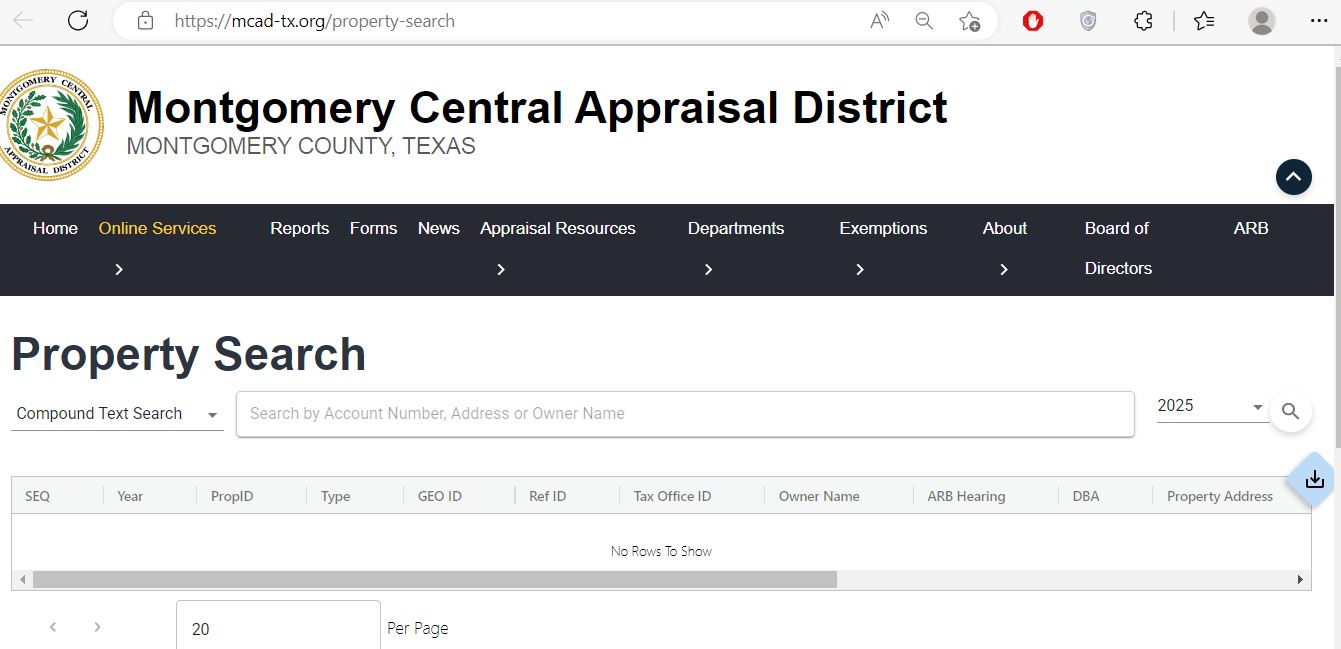
Official Montgomery CAD and Tax Office Links
Start with official resources first. This helps you avoid outdated forms, wrong payment links, paid copies of free public records, and third-party pages that may not match your current account.
| Need | Official Resource | Use It For |
|---|---|---|
| Property lookup | MCAD property search | Search by account number, owner name, address, property details, and available record fields. |
| MCAD homepage | Montgomery Central Appraisal District | Official appraisal district updates, online services, forms, reports, ARB details, exemptions, and contact information. |
| Forms | MCAD forms | Homestead, over-65, disabled, disabled veteran, ag, business personal property, protest, and other official forms. |
| Tax office | Montgomery County Tax Office | Tax bills, online payments, receipts, payment plans, balances, vehicle services, branch offices, and tax office support. |
| Tax statement / payment | Tax statements and online payment | Search by owner, address, account number, CAD reference number, or fiduciary number before paying. |
| Property tax information | Montgomery County property tax information | Understand how appraisal values and tax rates become property tax statements. |
| State verification | Texas Comptroller Montgomery directory | Verify chief appraiser, taxpayer liaison, CAD phone, address, email, and tax-office directory information. |
How to Search Montgomery CAD Property Records
The official MCAD property search is the first place to check an appraisal record in Montgomery County. It is useful for homeowners, buyers, landlords, agents, builders, investors, and anyone reviewing a property before filing an exemption or protest.
Open the official MCAD property search
Go directly to the official MCAD property search. Avoid paid record sites until you have checked the free official appraisal record.
Choose the cleanest search field
If you have the account number or property ID, use that first. If not, search by property address or owner name. For owner names, try last name first and keep the spelling simple.
Do not overtype the address
If the full address does not work, remove unit text, direction words, punctuation, or extra words. A shorter street number and street name often works better than a full mailing-style address.
Review the correct account carefully
Confirm owner name, property address, legal description, account details, property type, land value, improvement value, exemptions, value history, and taxing units.
Save proof before taking action
Save the property detail page as a PDF or screenshot before calling MCAD, filing an exemption, preparing a protest, or comparing the record with a tax statement.
Local search tip: Montgomery County includes Conroe, The Woodlands, Magnolia, Montgomery, Willis, New Caney, Porter, Splendora, Spring, Shenandoah, Oak Ridge North, lake-area property, new subdivisions, and rural acreage. If one search does not work, try account number, owner last name, street name only, or a simpler property address.
Start Here: MCAD, Tax Office or County Clerk?
Many Montgomery County property questions sound similar, but different offices handle different jobs. Use this simple split before calling or filing anything.
| Your Question | Best Office | Why |
|---|---|---|
| I need owner, address, account number, or appraisal value | Montgomery CAD | MCAD maintains public appraisal records and property account details. |
| My value increased or property details look wrong | Montgomery CAD | The appraisal district handles value, property characteristics, and protest-related appraisal matters. |
| I need homestead, over-65, disabled, veteran, or ag forms | Montgomery CAD | Exemptions and special appraisals are filed with the appraisal district. |
| I need to pay taxes or view a tax statement | Montgomery County Tax Office | The tax office handles billing, payment, receipts, balances, penalties, and collection. |
| I need deed, lien, plat, or recorded document history | County Clerk | Recorded documents are different from CAD appraisal records. |
How to Read MCAD Market Value, Appraised Value and Taxable Value
Many property owners see one high number and panic. In Texas property tax, market value, appraised value, assessed value, and taxable value can be different because of exemptions, caps, property type, and taxing-unit rules.
Before protesting, check which part changed. Did land value increase? Did improvement value increase? Did an exemption disappear? Was there new construction? Did the property class or neighborhood change?
| Field | Simple Meaning | What to Check |
|---|---|---|
| Market value | MCAD’s estimate of the property’s market value for appraisal purposes. | Compare with similar recent sales, size, condition, neighborhood, school district, and property type. |
| Appraised value | Value after certain appraisal rules may apply. | Check whether a homestead cap or special appraisal rule affects the value. |
| Assessed / taxable value | Value after exemptions and tax-specific adjustments are applied. | Confirm homestead, over-65, disabled, veteran, or other expected exemptions are present. |
| Improvement value | Value assigned to buildings and improvements. | Review square footage, building type, condition, pool, garage, remodels, and extra structures. |
| Land value | Value assigned to the land portion. | Watch for large land increases, acreage errors, subdivision issues, or wrong land classification. |
Montgomery CAD Homestead, Over-65, Disabled and Veteran Exemptions
Exemptions can reduce taxable value and may make a large difference in your tax bill. For most homeowners, the first exemption to review is the residence homestead exemption.
New homeowners should not assume the title company, lender, agent, or prior owner handled the exemption. Search your MCAD account, check mailing address, and file the correct form if you qualify.
Deadline reminder: The general Texas property tax exemption application deadline is before May 1, often treated as April 30. Some residence homestead situations may have late-filing rules, but always confirm with MCAD or Texas Comptroller instructions.
How to Prepare a Montgomery CAD Protest
A protest is strongest when it is organized and evidence-based. Do not only say “my taxes are too high.” Show whether the issue is value, unequal appraisal, incorrect property details, missing exemption, new construction, or condition problems.
Save your notice and MCAD record
Download your property detail page and keep the Notice of Appraised Value. These documents show account number, value, deadline, and the issue you are protesting.
Check whether the property facts are wrong
Look for incorrect square footage, wrong property class, extra improvements, missing exemption, wrong land size, condition issues, or incorrect mailing details.
Collect comparable evidence
Use comparable sales or unequal appraisal examples that match size, age, condition, school district, subdivision, lot type, and sale date as closely as possible.
Document condition problems
If the property needs major repairs, collect photos, contractor estimates, inspection reports, dated notes, insurance documents, or other proof.
File before the deadline
Use official MCAD instructions and the deadline printed on your notice. Filing on time protects your right to be heard while you organize supporting evidence.
Deadline warning: The usual Texas protest deadline is May 15 or 30 days after the appraisal district mails the Notice of Appraised Value, whichever is later. Always follow the exact date on your own notice.
Montgomery County Tax Office: Bills, Payments and Balances
MCAD appraises property, but the Montgomery County Tax Office handles tax statements and payments. If you want to pay taxes, view a statement, check a balance, or search payment information, use the official tax office resources.
Conroe, TX 77301
Phone: 936-539-7897
Tax email: tax@mctx.org
Motor vehicle email: mvd@mctx.org
Main services: property tax, online payments, statements, balances, registration, titles, branch offices, and appointments.
Payment safety warning: Do not pay from a random email, ad, text message, or unofficial search result. Open the official Montgomery County Tax Office or official payment page manually before entering bank or card details.
Common Montgomery CAD Search Problems and Practical Fixes
| Problem | Likely Reason | Try This |
|---|---|---|
| Address does not show | The situs address may be stored differently from USPS, Google Maps, or a real estate listing. | Use fewer address words, remove unit text, or search by account/property ID. |
| Owner name search fails | The name may be stored last-name-first, abbreviated, trust-owned, company-owned, or recently changed. | Try last name only, business keyword, spouse name, prior owner name, or address search. |
| Tax bill is not on MCAD | MCAD is the appraisal office, not the tax collection office. | Use the Montgomery County Tax Office tax statement and payment page. |
| Homestead exemption is missing | The application may not be filed, processed, approved, or reflected yet. | Check official MCAD forms, save filing proof, and contact MCAD with your account number. |
| Value looks wrong | Property details, market data, improvements, land class, or exemptions may need review. | Save the record, collect evidence, review comparable properties, and protect your protest deadline. |
Documents to Keep Ready Before You Call
Calling with the right details saves time, especially during exemption and protest season. Keep one clear question ready and have the property record open.
- Account number or property ID
- Owner name shown on the record
- Property address or legal description
- Notice of Appraised Value
- Saved MCAD property record
- Photos, repair estimates, comparable sales, or exemption documents
- Tax year and account number
- Owner name and mailing address
- Tax statement or delinquency notice
- Online payment confirmation or receipt
- One clear question about payment, balance, penalty, or receipt status
Montgomery CAD Contact, Address and Map
Conroe, TX 77301-4236
Mailing: P.O. Box 2233, Conroe, TX 77305-2233
Phone: 936-756-3354
Fax: 936-539-8695
Email: inquiries@mcad-tx.org
Chief Appraiser: Sherry Hunter
Taxpayer Liaison: Ric Metts
FAQs About Montgomery CAD Property Search
How do I search Montgomery CAD property records?
Use the official Montgomery CAD property search. Search by account number, owner name, property address, property ID, or other available fields, then confirm the account details before relying on the record.
Is Montgomery CAD property search free?
Yes. The official MCAD property search is free for public appraisal record lookup. Check MCAD first before paying a third-party site for basic property record information.
Where is Montgomery Central Appraisal District located?
The Texas Comptroller directory lists MCAD at 109 Gladstell St., Conroe, TX 77301-4236. The mailing address is P.O. Box 2233, Conroe, TX 77305-2233.
What is the Montgomery CAD phone number?
The Montgomery CAD phone number is 936-756-3354. The fax number is 936-539-8695.
Who is the Montgomery CAD chief appraiser?
The Texas Comptroller directory lists Sherry Hunter as Chief Appraiser for Montgomery Central Appraisal District.
Does Montgomery CAD collect property tax payments?
No. MCAD handles appraisal records, values, exemptions, and protests. The Montgomery County Tax Office handles property tax statements, online payments, balances, and collections.
Where do I pay Montgomery County property taxes?
Use the official Montgomery County Tax Office website or the official Tax Statements and Online Payment page.
What is the usual Montgomery CAD protest deadline?
The usual Texas protest deadline is May 15 or 30 days after the appraisal district mails the Notice of Appraised Value, whichever is later. Always check the date and deadline printed on your own notice.
What should I do if my MCAD owner or address search does not work?
Try fewer words. Use last name only, remove punctuation, search by account number, or use only the street number and street name if the full address does not show results.
Is AppraisalDistrict.org the official Montgomery CAD website?
No. AppraisalDistrict.org is an independent public guide. Always verify values, exemptions, deadlines, tax bills, payment status, and office instructions with official Montgomery CAD, Montgomery County Tax Office, or Texas Comptroller resources.
Important Note
AppraisalDistrict.org is an independent public guide and is not the official Montgomery Central Appraisal District website.
Always verify property values, exemptions, protest deadlines, tax bills, payment status, tax rates, deed records, and office procedures with Montgomery CAD, the Montgomery County Tax Office, the County Clerk, or Texas Comptroller resources before taking action.

Founded by Mahesh Kumar, AppraisalDistrict.org is built on the belief that public information should be accessible and accurate. We have replaced AI-generated ‘fluff’ and automated scraping with 100% manual human verification. With over 15 years of experience in real estate and digital journalism, we help you find the right data without the frustration of broken links.
Search Smarter, Estimate Taxes, Check Exemptions and Prepare for a Protest
Use this free tool before you visit a county appraisal district, property search portal, tax office, or exemption page. It helps you understand property value, taxable value, possible savings, protest value, and the next official step.
What do you need help with today?
Choose your main reason for visiting. The tool will show the best next step and quick estimate.
Use this tool to check your appraisal notice, exemption savings, protest value, and official next step.
Use the tax calculator before trusting only the sale price or mortgage estimate.
Property Search Helper
Use this when a county property search portal is confusing. It shows which search method is usually best.
Property Tax Estimate Calculator
Estimate annual property tax using appraised value, assessment ratio, exemptions, and combined tax rate.
Homestead and Exemption Savings
Estimate how much a homestead, senior, disability, veteran, or local exemption may reduce tax.
Appraisal Notice Review
Compare last year value with this year value and see whether the increase deserves closer review.
Property Tax Protest Savings
Estimate possible savings if your appraised value is reduced after protest, correction, evidence review, or appraisal review board hearing.
Property Tax Protest and Exemption Checklist
Use this checklist before you file a protest, apply for exemption, or call the appraisal district.
Before calling, write your property ID, owner name, property address, and question on paper. It saves time.
Do not call the CAD to pay tax bills unless the local article says they collect taxes. In many counties, the tax office collects payment.
Official Resource Finder
Enter county and state to create safe searches for official CAD pages, property search, tax payment, exemptions, maps, forms, and protest help.
CAD vs Tax Office
- Appraisal District: value, exemptions, ownership records, maps, protest.
- Tax Office: tax bill, payment, receipt, delinquent balance, penalty.
Best place to use this
Add this tool after the first major content section or before the FAQ area. It gives visitors a reason to interact before leaving the page.
Important estimate note
This tool gives educational estimates only. Final values, exemptions, tax rates, bills, payments, and deadlines must be confirmed with official county sources.