
Trace a Lamb County Property From High Plains Parcel to Paid Tax Account
Start with Lamb County Appraisal District when you need an owner record, Property ID, appraisal value, exemption, agricultural classification, business account, legal description, acreage or interactive parcel map.
Lamb County has an important office difference: the county Tax Assessor-Collector does not collect property taxes. Lamb CAD provides the official property-tax payment route, while the County Clerk controls recorded deeds, liens, releases and other land documents.
1500 E. Delano Avenue, Littlefield, Texas 79339.
806-385-6474 or toll-free 800-748-8782.
8:00 AM–12:00 PM and 1:00–5:00 PM, Monday–Friday.
Lesa Kloiber.
Search, payment, forms and county records checked July 28, 2026.
Choose the Lamb County property task you need to complete
This helper runs inside the browser. It does not submit an owner name, address, Property ID or account number to AppraisalDistrict.org.
Search Lamb CAD and confirm the Property ID, property type, tax year and legal description.
Follow the search workflowUse Advanced Search and the interactive map when a normal address is unavailable.
Review rural parcel guidanceUse the official forms page and prepare land-use or business-asset evidence.
Choose the correct filing routeFind the correct account first, then use Lamb CAD’s official Gov-Pay link.
Follow payment stepsCheck the notice deadline and organise evidence around the exact appraisal issue.
Build a protest packetThe CAD owner field is not a title opinion. Use County Clerk land records.
Search recorded documentsSearch the complete appraisal account before paying or filing
Prepare these property details
Use the Lamb CAD search visual with updated 2026 guidance
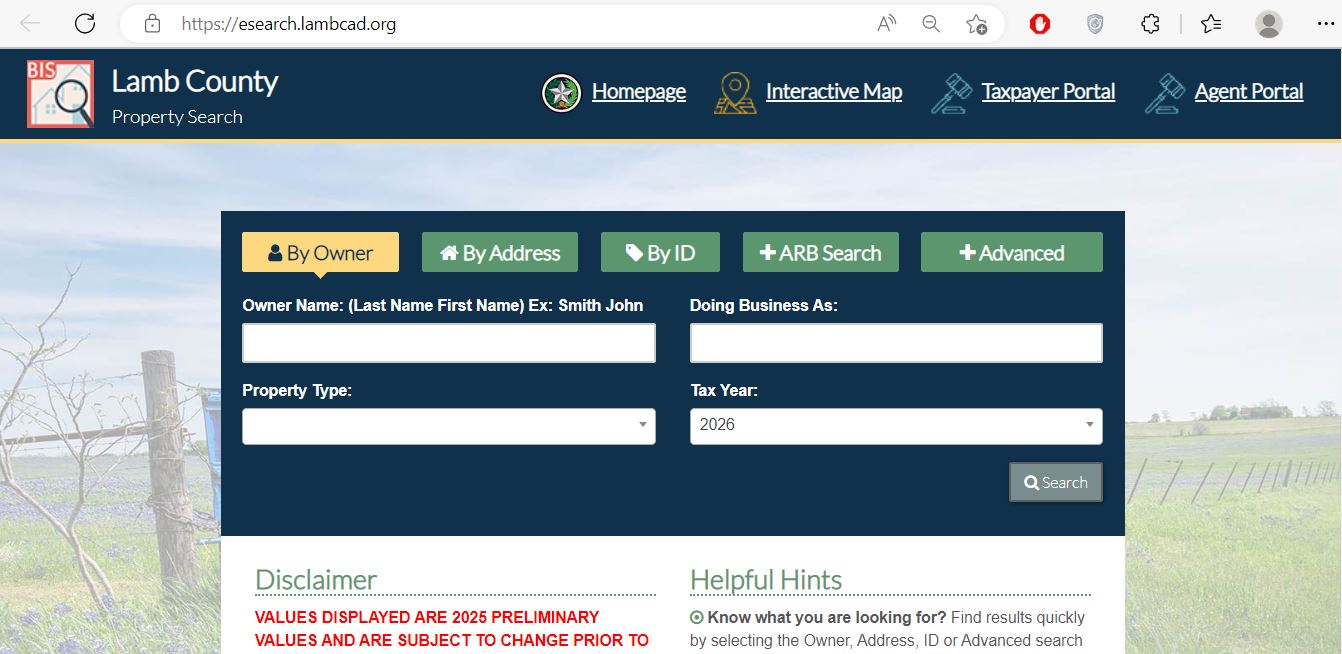
Use Owner, Address or ID for a direct lookup. Use Advanced when a broad name or road search produces too many results.
Confirm whether you need a real estate, business personal property, mineral, automobile or mobile-home account.
Do not compare two values until the same appraisal year is selected on both records.
Choose the field that removes the most uncertainty
Best when copied from an appraisal notice, tax statement or verified prior record.
Enter Last Name First Name or begin with only the surname.
Use the street number and main street name without extra location wording.
Use abstract, subdivision, property type, Geographic ID, mobile-home park or neighborhood.
Understand what each Lamb CAD field can prove
| Field | What it helps identify | What it does not prove | Next action |
|---|---|---|---|
| Property ID | The Lamb CAD appraisal account. | That the Clerk uses the same document number. | Save it for CAD, payment and protest questions. |
| Owner name | The owner displayed for appraisal administration. | Complete title, liens or every ownership interest. | Verify the recorded deed through the County Clerk. |
| Situs address | The assigned physical property location. | A complete legal description or surveyed boundary. | Compare the legal description and map. |
| Legal description | Abstract, survey, subdivision, lot, block or tract. | That abbreviated CAD text reproduces the full deed. | Match it with the recorded instrument. |
| Market value | The district’s value estimate for the selected year. | The sale price or final tax amount. | Review characteristics, evidence and certification status. |
| Appraised value | Value after an applicable statutory limitation. | That market value cannot be protested. | Compare market value, limitations and prior years. |
| Taxable value | The value remaining after exemptions for a taxing unit. | The amount owed without the adopted rate. | Review the tax account and rate database. |
| Exemptions | Homestead, over-65, disability, veteran or another approved benefit. | That each taxing unit applies the same amount. | Review each entity’s taxable-value line. |
| Land details | Acreage, land class, use and special-appraisal treatment. | Surveyed acreage or continued agricultural qualification. | Compare the deed, map and land-use records. |
| Improvements | Buildings, size, age, class and appraisal characteristics. | That every measurement or condition entry is correct. | Document factual errors with photographs and records. |
| Taxing entities | County, city, school and water-district jurisdictions. | The final adopted rate or current balance. | Use Truth in Taxation and the payment account. |
Fix the most common Lamb County property-search failures
| Problem | Likely reason | Better next attempt |
|---|---|---|
| Full owner name finds nothing | The record uses Last Name First Name, initials, trust, estate or business wording. | Search only the surname or main business word. |
| Address does not match | A direction, road suffix, county-road format or city name differs. | Use the main street name or number plus street name. |
| Rural tract has no address | The property is indexed by abstract, survey, owner or Geographic ID. | Use Advanced Search and the interactive map. |
| Too many owner results | The name is common or the owner has several properties. | Add property type, subdivision, street or tax year. |
| New owner is not displayed | The deed or ownership update is still processing. | Confirm the recording and contact Lamb CAD with the instrument details. |
| Manufactured home is missing | The home and land may be separate or indexed under a mobile-home park. | Select Mobile Home and search the owner or park. |
| Mineral account is missing | The mineral interest may use a separate account or owner record. | Select Mineral and search owner, Property ID or Geographic ID. |
| Payment page rejects the account | The wrong account number, formatting or tax account was entered. | Return to the property record or call Lamb CAD before paying. |
| Search year and disclaimer conflict | The portal’s disclaimer has not been updated to match the current selector. | Save the screen and ask CAD whether the value is preliminary or certified. |
Use the parcel map for High Plains acreage and road-based properties
The map is especially useful for farm and ranch tracts, irrigated land, inherited acreage, county-road property, manufactured-home sites and parcels whose mailing address differs from their physical location.
Choose the Lamb CAD form that matches the property use
| Situation | Official form category | Prepare before filing | Important check |
|---|---|---|---|
| Principal residence | Residence Homestead Exemption | Property ID, ownership, occupancy and required identification. | Verify the exemption later appears on the correct account. |
| Disabled veteran | Disabled Veteran’s Exemption | Eligibility documents, ownership details and identification. | Confirm the approved percentage or exemption treatment. |
| Traditional agricultural land | Agricultural Appraisal 1-D | Income, ownership, agricultural use and occupation information. | 1-d requirements differ from open-space 1-d-1. |
| Open-space agricultural land | Agricultural Appraisal 1-D-1 | Land-use history, acreage, production records, leases, maps and photographs. | Ownership of acreage alone does not establish qualification. |
| Timber use | Timber Land Appraisal or Restricted-Use Timber | Timber-use history, management records and maps. | Use the form matching the actual timber activity. |
| Business equipment or inventory | Personal Property Rendition | Inventory, machinery, fixtures, costs, age and location records. | The normal 2026 filing and extension dates have passed. |
| Dealer inventory | Applicable special-inventory declaration and statement | Monthly sales and category-specific inventory records. | Vehicles, vessels, heavy equipment and manufactured housing use different forms. |
| Value or exemption disagreement | Notice of Protest | Appraisal notice, factual corrections, photographs, estimates and sales. | Use the deadline on the appraisal notice. |
Build a Lamb County protest around the exact appraisal issue
Evidence checklist
Find the account number before opening the payment page
Follow the value from Lamb CAD to the final tax amount
The district’s estimate of the property’s market value for the selected appraisal year.
The value remaining for a taxing entity after applicable exemptions and limitations.
The taxable value multiplied by each taxing entity’s adopted rate, plus applicable delinquency charges.
Use the Lamb County Clerk when legal ownership matters
Rene Trevino
Littlefield, Texas 79339
Send the property question to the office with authority to resolve it
| Your question | Correct starting office | Prepare before contacting |
|---|---|---|
| What is the appraised value? | Lamb CAD | Property ID, owner, address and tax year. |
| Why is an exemption missing? | Lamb CAD | Application, filing proof and eligibility documents. |
| Does the land qualify for agricultural appraisal? | Lamb CAD | Use history, acreage, leases, production and maps. |
| How do I protest? | Lamb CAD and ARB process | Notice, deadline, evidence and filing proof. |
| How much property tax do I owe? | Lamb CAD collection staff | Tax account number, year and property details. |
| Did my Gov-Pay transaction post? | Lamb CAD | Confirmation email, account, amount and date. |
| Who legally owns the property? | Lamb County Clerk | Names, legal description and date range. |
| I need vehicle registration or voter-registration help | County Tax Assessor-Collector | Applicable vehicle or voter documentation. |
| Where is the surveyed property boundary? | County Clerk records and licensed surveyor | Deed, plat, easements and prior survey. |
Adjust the search for local cities, school boundaries and agricultural land
Check the city, Littlefield ISD, county and water-district entries before estimating total tax.
Confirm the City of Olton, Olton ISD and High Plains water-district lines on the account.
Review the city and Springlake-Earth ISD entries rather than relying only on the mailing city.
Check whether the account includes the City of Sudan, Sudan ISD and applicable special district.
Verify City of Amherst and Amherst ISD entries and save separate accounts for adjoining parcels.
Some Lamb CAD accounts may involve Muleshoe ISD, Whiteface CISD or Anton ISD. Confirm the actual taxing entities.
Keep crop, lease, irrigation, production, acreage and land-use records for special-appraisal review.
Document historical use and intensity rather than assuming all rural acreage qualifies identically.
Review whether High Plains Underground Water Conservation District #1 appears among the taxing entities.
Determine whether the home and land are one account or separate accounts and use the Mobile Home property type.
Separate machinery, inventory, equipment and fixtures from the real-estate account and review rendition status.
Do not assume the seller’s homestead cap, senior benefit or agricultural appraisal will continue after transfer.
Call with the Property ID and one clearly stated question
Use for appraisal records, values, exemptions, agriculture, business personal property, maps, protests, tax accounts and property-tax payments.
1500 E. Delano AvenueLittlefield, Texas 79339
Mailing: P.O. Box 950
Littlefield, TX 79339
806-385-6474
Toll-free: 800-748-8782
Fax: 806-385-6944
lambcad@lambcad.org
Hours: Monday–Friday, 8:00 AM–12:00 PM and 1:00–5:00 PM.
Chief Appraiser: Lesa Kloiber
Deputy Chief Appraiser: Melete White
Appraiser: Nichole Doty
Customer-service staff can route search, exemption, mailing-address, account and payment questions.
Use for deeds, liens, releases, official public records, copies and recording.
100 6th Drive, Room 103Littlefield, Texas 79339
County Clerk: Rene Trevino
806-485-0053
Fax: 806-385-6485
This office does not collect property taxes. Use it for services such as vehicle title, registration and voter registration.
100 6th Drive, Room 105Littlefield, Texas 79339
Tammy Kirkland
806-485-0062
Open the exact property resource needed for the next step
Search owner, address, ID, ARB and advanced fields.
Open property searchReview property details, electronic communication, documents and applications.
Open Taxpayer PortalResearch rural parcels, nearby accounts and approximate locations.
Open parcel mapDownload exemptions, agriculture, timber, rendition and protest forms.
Open official formsEnter the verified tax account number and review payment fees.
Open Gov-PayReview adopted rates, exemptions, utility reports and ARB material.
Open tax informationReview proposed and adopted tax-rate information during rate season.
Open tax transparencyFind document requests, land-record access, fees and recording requirements.
Open County ClerkHow this existing Lamb County article was regenerated

The existing Lamb County property-search image and editorial-review image remain in this improved version. The article was rebuilt from current Lamb CAD, Texas Comptroller, Lamb County Clerk and County Tax Assessor-Collector resources.
The revised guide corrects the most important local office issue: property-tax payments go through Lamb CAD’s collection route, not the county Tax Assessor-Collector.
Official review completed July 28, 2026. Search disclaimers, values, certification status, account balances, rates, convenience fees, forms, staff and office procedures can change after publication.
Lamb County Appraisal District CAD tax FAQs
What is the official Lamb County Appraisal District website?
The official website is lambcad.org. It links to property search, the Taxpayer Portal, interactive map, forms, tax information, Truth in Taxation and online property-tax payment.
How do I search Lamb County property records?
Open Lamb County Property Search and choose Owner, Address, ID or Advanced. Owner names use Last Name First Name order. Simplify an address to the main street name when no result appears.
Are the Lamb CAD 2026 values final?
The portal offers 2026 in its tax-year selector, but its disclaimer still states that 2025 values are preliminary. Because those messages conflict, confirm the displayed year and certification status directly with Lamb CAD before relying on the value.
Who collects property taxes in Lamb County?
Lamb County Appraisal District provides the property-tax payment route and collection contact. The county Tax Assessor-Collector does not collect property taxes and primarily handles services such as vehicle and voter registration.
How do I pay Lamb County property taxes online?
Find and verify the property account first, save the tax account number, then use Lamb CAD’s official Gov-Pay page. Review the amount and fee, submit the payment and save the confirmation email.
What is the online card fee for Lamb County property-tax payments?
The current Gov-Pay page states that credit-card convenience fees are 2.50% of the payment amount with a $3 minimum. The live checkout total controls, and the fee appears separately as a GovPayFee charge.
How do I apply for a Lamb County homestead exemption?
Use the Residence Homestead Exemption application on the Lamb CAD forms page. Confirm the Property ID, complete the ownership and occupancy sections, attach required identification and keep proof of filing.
When is the Lamb County property-tax protest deadline?
Most protests are due by May 15 or by the later deadline stated on the Notice of Appraised Value. The normal 2026 deadline has passed for many accounts, but a later notice or another statutory circumstance may create another deadline.
Where can I search Lamb County deeds and liens?
Use the Lamb County Clerk page and select Texas Land Records. Search by current or prior owner, instrument number or legal description and compare the document with the CAD account.
Why did I receive a suspicious check connected with Lamb CAD?
Lamb CAD has posted a warning that the district has been involved in a fraudulent check scam. Do not deposit or cash a suspicious check. Call the official office at 806-385-6474 before taking action.