
Verify a Jones County Parcel Before You File, Protest or Pay
Jones County property records can involve a home in Anson, a Stamford commercial account, farmland near Hawley, a ranch tract without a normal street address, business equipment or a separate oil-and-gas interest. The search method that works for one account may fail for another.
This guide explains the live 2026 Jones CAD search filters, shows how to identify the right property and year, routes appraisal and payment questions correctly, and gives practical preparation steps for homestead exemptions, agricultural appraisal, business renditions, mineral accounts, protests and recorded deeds.
1137 E. Court Plaza, Anson, Texas 79501.
325-823-2422 for appraisal, exemption, protest and tax-account help.
Tammy Smith is listed by Jones CAD and the Texas Comptroller.
Monday–Friday, 9:00 AM–4:00 PM; phone service 8:00 AM–5:00 PM.
Official local sources checked July 28, 2026.
What do you need from Jones County Appraisal District?
Use the property ID first, or search by owner, address, legal description, abstract or subdivision.
Follow the search walkthroughMatch the property, year, account and total before opening the Certified Payments checkout.
Review payment stepsPrepare identification, ownership and qualification proof before filing a Jones CAD form.
Prepare an applicationFile before the notice deadline and match evidence to the exact disputed value or record.
Build a protest fileUse abstracts, geographic IDs, leases and property-type filters instead of relying on a street address.
Review special accountsUse the County Clerk for deeds, liens, releases, probate records and certified land documents.
Follow the deed workflowChoose a task before opening a portal
This helper runs in your browser. It does not collect an owner name, address, property ID, login, email or payment information.
Search the property without opening the wrong account
Prepare these details before searching
Recognise the official Jones CAD search layout
The existing article’s Jones CAD image is useful because it shows the search bar, the five search tabs and the separate pay-tax control. It is retained here beside instructions that explain what each element is for.
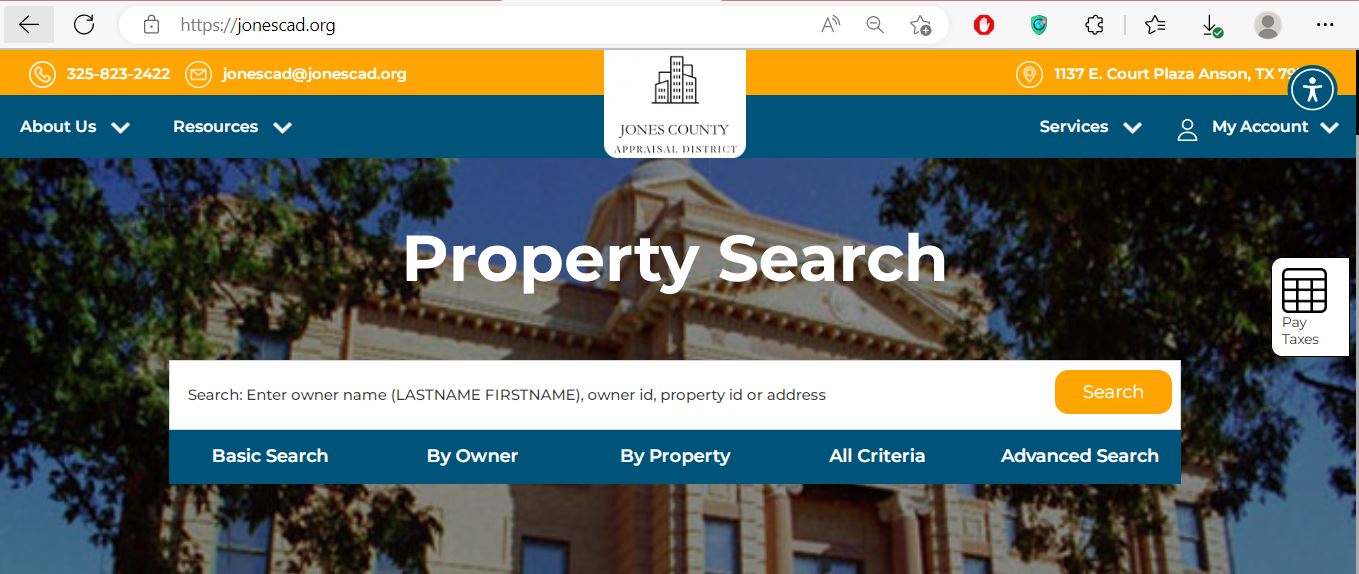
Enter an owner name, owner ID, property ID or address. Use fewer words when the first attempt fails.
Best for a quick search when you have one strong identifier or a recognisable owner or address.
Use surname-first order and add the first name only when too many results appear.
Use property ID, geographic ID, street, legal description, abstract, subdivision or lease fields.
Combine owner, property, acreage, value, protest-status and property-type filters.
Open the payment route only after confirming the correct property ID, tax year and amount due.
Understand what each result field controls
| Field | What it helps identify | What it does not establish | Best next action |
|---|---|---|---|
| Property ID | The primary Jones CAD appraisal or collection record. | A County Clerk instrument number or complete title. | Use it for CAD, payment and protest questions. |
| Owner ID | An owner record that can connect several accounts. | That every account uses the same spelling or mailing address. | Search the owner and verify every property separately. |
| Owner display | The owner currently shown for appraisal administration. | Legal title, lien priority, mineral title or probate rights. | Use recorded documents for legal ownership. |
| Situs address | The physical or assigned property location. | A complete legal description or surveyed boundary. | Compare the map, legal description and deed. |
| Geographic ID | A location-based appraisal identifier useful for maps and rural records. | That a parcel split, combination or ownership update is complete. | Use it in By Property or Advanced Search. |
| Legal description | An abbreviated lot, block, subdivision, abstract or tract description. | Every deed call, easement, exception or legal boundary. | Match it with the recorded deed or plat. |
| Market value | Jones CAD’s estimate of value as of January 1. | The sale price, mortgage appraisal or tax bill. | Review property facts and market evidence. |
| Appraised or limited value | The value after an applicable appraisal limitation. | That market value is correct or cannot be protested. | Compare market and limited values separately. |
| Taxable value | The value remaining after the exemption treatment for a taxing unit. | The amount due without the unit’s adopted rate. | Match it with the current tax statement. |
| Base tax due | The base amount displayed for the selected account and year. | The final checkout total, fees, penalties or every separate account. | Open the full account and payment page. |
| Lease name or number | A mineral or oil-and-gas account connected to a lease. | Complete mineral ownership or decimal-interest accuracy. | Verify mineral documents and the interest being appraised. |
Fix a missing, duplicate or confusing Jones CAD result
| Problem | Likely cause | What to try |
|---|---|---|
| Full owner name returns nothing | The record may use surname-first order, initials, spouse, trust, estate or company wording. | Search only the surname or main business word. |
| Complete address returns nothing | The record may omit a suffix, direction, city or ZIP code. | Use only the street number and main street name. |
| Too many owner results | The owner name is common or several accounts belong to one owner. | Add the city, owner ID, property type or address. |
| Rural tract has no normal address | The property may be indexed by abstract, legal description, geographic ID or owner. | Use By Property, Advanced Search and the parcel map. |
| Mineral account is missing | Mineral records often do not follow the surface address. | Select Mineral and use the owner, property ID, lease name or lease number. |
| Business account is missing | The taxable assets may be listed under a DBA or separate personal-property account. | Select Personal and search the DBA, owner ID or business location. |
| New owner is not displayed | The deed or CAD ownership update may still be processing. | Confirm recording with the County Clerk and provide the instrument details to Jones CAD. |
| One parcel appears paid but another bill arrived | The owner may have a separate tract, mineral interest, mobile home or business account. | Search by owner ID and review every property ID. |
Use the interactive map without treating it as a survey
Register, request a PIN and preserve every confirmation
Create an account using a monitored email address and a secure password.
Open account registrationJones CAD provides a unique online account PIN for a property. Have the property ID and owner information ready.
Request an account PINUse the official sign-in page to review supported owner services and account activity.
Open account sign-inVerify the account before opening Certified Payments
Estimate taxable value, annual tax and possible exemption savings
Use the combined rate for the specific property and year. Jones County properties can be located in different cities, school districts and hospital districts, so one countywide rate will not reproduce every bill.
Educational estimate only. The official statement can include different unit-level taxable values, tax ceilings, corrections, omitted property, rollback taxes, penalties, interest, collection charges or processor fees.
File the correct Jones CAD form and verify approval
For a home owned and occupied as the applicant’s principal residence. Verify ownership, occupancy and address requirements.
Can provide an additional school exemption and tax ceiling. Additional local benefits can differ by taxing unit.
The applicant must meet the disability, ownership and residence requirements described by the official application.
The benefit depends on the qualifying disability or surviving-spouse category and supporting documentation.
Texas law allows a qualifying residence-homestead application to be filed up to two years after the taxes become delinquent.
Ask whether the application is pending, incomplete, denied, cancelled or attached to a different property ID or year.
Meet the acreage, history, principal-use and intensity requirements
Agricultural or open-space appraisal is a special valuation based on the land’s productivity rather than its full real-estate market value. It is not the same as a tax exemption.
| Qualification issue | Why it matters | Evidence to prepare |
|---|---|---|
| Acreage | Jones CAD publishes a local 25-acre minimum. | Deed, survey, parcel map and legal description. |
| Principal use | Agriculture must be the land’s principal use rather than incidental recreation. | Production, grazing, crop or lease records. |
| Use history | Open-space appraisal includes historical-use requirements. | Prior leases, receipts, photographs and owner records. |
| Degree of intensity | The operation should be typical for the local agricultural area. | Stocking, cultivation, acreage and management details. |
| Wildlife management | Wildlife use requires a qualifying plan and statutory management practices. | Plan, maps, activity log and annual report. |
| Change of use | A non-agricultural use can create rollback-tax consequences. | Dates, acreage affected and new-use documentation. |
Search specialised property with lease and ownership identifiers
Search by owner, property ID, lease name or lease number. Do not expect the mineral account to follow the surface-property address.
Utility property can involve specialised appraisal schedules and identifiers rather than a conventional residential parcel search.
Industrial real and personal property can include several related accounts, equipment categories and appraisal components.
Mineral account verification checklist
Start here for the property ID, appraisal year, exemption or tax-account routing.
Jones CAD publishes this contact for mineral appraisal questions.
File the rendition for taxable income-producing assets
A business personal property account can be separate from the building or land. Jones CAD’s forms page includes the Business Personal Rendition of Taxable Property and specialised dealer inventory forms.
File before the notice deadline, then organise the evidence
Evidence checklist
Separate Jones CAD’s value from each taxing unit’s rate
Determines market value, administers exemptions and special appraisal, and maintains appraisal records.
County, cities, school districts and hospital districts adopt budgets and tax rates.
Applies taxable values and adopted rates to produce the amount due for each unit.
Track the deadlines that affect the account
Use the Jones County Clerk when the CAD record is not legal proof
Jones CAD’s owner display, parcel map and legal-description summary support appraisal administration. The County Clerk maintains the recorded land documents that show conveyances, liens, releases and other legal instruments.
County Clerk: LeeAnn Jennings
Jones County Courthouse100 Courthouse Square
Anson, Texas 79501
Mailing: P.O. Box 552, Anson, TX 79501
325-823-3762
Fax: 325-823-3979
Hours:
8:00 AM–12:00 PM and 1:00 PM–5:00 PM
- Recorded deeds
- Liens and releases
- Oil-and-gas instruments
- Land-record copies
- Certified recorded documents
- Probate record access
Adjust the workflow to the account and location
Verify the City of Anson, Anson ISD, county and Anson Hospital District lines rather than using only a county tax rate.
Check City of Stamford, Stamford ISD, Stamford Hospital District and every related real or business account.
Review City of Hamlin, Hamlin ISD and Hamlin Hospital District taxable values and rates separately.
Confirm Hawley city limits, Hawley ISD and any county or special-district lines applying to the tract.
Use the legal description and school-district information rather than assuming the mailing city controls every tax unit.
Search by owner, abstract and geographic ID; compare market value with agricultural productivity value.
Select Mineral and use the lease name, lease number, owner and property ID instead of the surface address.
Search the Personal account separately from the real-estate account and confirm who owns the taxable equipment.
Confirm deed recording, file the buyer’s exemption application and estimate taxes without benefits belonging only to the seller.
Review Jones CAD’s current trust-property policies and bid sheet, then investigate title, possession, taxes and redemption risks independently.
Search the deceased owner, estate and heirs, then verify probate and recorded deeds before requesting an ownership update.
Use the owner ID and map to identify every parcel, then confirm each separate tax balance and receipt.
Contact the office that controls the task
Use for property search, appraisal values, exemptions, agricultural appraisal, maps, business property, mineral-account routing, protests, tax balances and property-tax payment access.
1137 E. Court PlazaAnson, Texas 79501-4314
Mailing: P.O. Box 348, Anson, TX 79501-0348
325-823-2422
Fax: 325-823-2424
jonescad@jonescad.org
Chief Appraiser: Tammy Smith
Public hours: Monday–Friday, 9:00 AM–4:00 PM
Phone hours: Monday–Friday, 8:00 AM–5:00 PM
Use primarily for county vehicle-registration, title and other Tax Assessor-Collector services. The Texas Comptroller states that this office does not collect property taxes.
Tax Assessor-Collector: Gloria J. Little
Jones County Courthouse100 Courthouse Square
Anson, Texas 79501
Mailing: P.O. Box 511, Anson, TX 79501-0511
325-823-2437
Fax: 325-823-4246
Use for deeds, liens, releases, land records, probate records and certified recorded documents.
100 Courthouse SquareAnson, Texas 79501
325-823-3762
Hours: 8:00 AM–12:00 PM and 1:00 PM–5:00 PM
- Write down the property ID.
- Confirm the tax year.
- Identify Real, Personal or Mineral.
- Bring the notice, form, statement or receipt.
- Check the 2026 holiday schedule.
- Call before travelling from outside Anson.
Map to Jones County Appraisal District
The map is not loaded automatically, which reduces third-party requests and helps the article open faster on mobile data.
Open the exact Jones County resource you need
Official notices, taxing entities, search access, forms, payments and district information.
Open Jones CADSearch by owner, owner ID, property ID, address, legal description, abstract, subdivision or lease.
Open property searchLocate rural tracts, adjacent parcels and properties without conventional addresses.
Open parcel mapHomestead, agricultural, rendition, protest, confidentiality and specialised exemption forms.
Open formsRegister or sign in to file and manage supported protest activity.
Open online protestJones CAD’s current Certified Payments route using Bureau Code 2492811.
Open payment providerReview property-specific taxing entities and proposed or adopted tax-rate information.
Open Jones tax noticesCertified rolls, annual reports, meeting records, appraisal reports and district data.
Open records and reportsFind deeds, liens and land records from 1991 forward through the service linked by the Clerk.
Open County ClerkRelated AppraisalDistrict.org guides
Write down these details before contacting Jones CAD
How this Jones County article was rebuilt

The Jones CAD screenshot now appears inside the search walkthrough, where it helps readers recognise the official tabs and pay-tax control. The editorial image remains in this review section.
The original article was expanded with current 2026 public and phone hours, a privacy-friendly map loader, search-field decoding, account and PIN instructions, Certified Payments verification, a tax calculator, agricultural and mineral guidance, business rendition steps, protest evidence preparation, tax transparency, deed routing and exactly 10 Jones County-specific FAQs.
Official-source review completed July 28, 2026. Live property data, values, forms, rates, balances, fees, staff, portal providers, office schedules and collection procedures can change.
Jones County Appraisal District FAQs
What is the official Jones County Appraisal District website?
The official website is jonescad.org. It provides the property search, interactive map, forms, online protest, account registration, PIN request, tax-payment access, reports and Jones CAD contact information.
How do I search Jones County property records?
Open the official Jones CAD search and use Basic Search, By Owner, By Property, All Criteria or Advanced Search. You can search with an owner name in last-name-first-name order, owner ID, property ID, address, geographic ID, legal description, abstract, subdivision, lease information or other available filters.
Does Jones CAD collect property taxes?
Jones CAD provides the official online property-tax payment route and states that it collects ad valorem taxes for local taxing authorities. The Texas Comptroller directory states that the Jones County Tax Assessor-Collector does not collect property taxes and advises taxpayers to contact the appraisal district.
How do I apply for a Jones County homestead exemption?
Locate the correct property account, open the Jones CAD forms page, complete the residence homestead application and attach the identification or affidavit required by the form. Keep proof of filing and verify the exemption and taxable values after processing.
What is the Jones CAD protest deadline?
The usual Texas protest deadline is May 15 or 30 days after the appraisal district mails the Notice of Appraised Value, whichever is later. The date printed on the notice controls. Jones CAD provides an online protest account and accepts completed protest forms through its official filing routes.
What can I do when Jones CAD search returns no result?
Shorten the owner name or address, remove punctuation and street suffixes, verify the tax year and property type, and try the property ID, owner ID, geographic ID, abstract, subdivision or Advanced Search. Mineral accounts may require a lease name or lease number instead of a street address.
Does 25 acres automatically qualify for agricultural appraisal in Jones County?
No. Jones CAD states that its Agricultural Advisory Board adopted a 25-acre minimum, but acreage alone does not establish qualification. The land must also meet the applicable principal-use, history, intensity and documentation requirements.
Who handles Jones County mineral property appraisal questions?
Jones CAD states that mineral, utility and industrial accounts are appraised for the district by Pritchard & Abbott. Start with the Jones CAD property search or office and prepare the mineral property ID, owner name, lease name, lease number and tax year.
Where do I find a Jones County deed or land record?
Use the Jones County Clerk rather than the appraisal record. The Clerk provides access to land records from 1991 to the present through the records service linked on the official county page. Older records or certified copies may require direct assistance from the Clerk.
What are the Jones CAD public office hours?
Jones CAD’s 2026 office information states that its doors are open Monday through Friday from 9:00 AM to 4:00 PM and that phone service is available Monday through Friday from 8:00 AM to 5:00 PM. A payment drop box is located on the south side of the front entrance. Check the holiday schedule before travelling.