Route a Grayson County Parcel From Texoma Map to Verified Appraisal, Deed and Tax Record
Start with Grayson Central Appraisal District when you need an owner lookup, property ID, geographic ID, legal description, land or improvement details, exemption, agricultural valuation, business account, appraisal notice or protest information.
Move to the Grayson County Tax Assessor-Collector when the question becomes a tax statement, payment, receipt, penalty or delinquent balance. Use the County Clerk when legal ownership, deeds, liens, plats or recorded documents control the answer.
Grayson Central Appraisal District.
Grayson County Tax Assessor-Collector for listed consolidated units.
Use the exact property ID when available.
The taxable-value exemption increased to $125,000.
Local resources reviewed July 31, 2026.
Which Grayson County property service do you need?
Use owner, address, property ID, geographic ID, subdivision, abstract or Advanced Search.
Follow the search workflowCompare land, improvements, condition, exemption, cap loss, assessed value and property type.
Understand GCAD valuesMatch the appraisal district number, tax account, owner, year and collector before paying.
Follow the payment stepsThe timely period has passed, and late submissions follow a separate route.
Review current protest helpPrepare homestead, agricultural, wildlife, rendition, address or agent documents.
Prepare the correct filingThe appraisal owner and map are not substitutes for deeds, liens, plats or title work.
Search recorded documentsUse the correct Grayson County portal for each live action
Search owner, address, property ID, ARB and advanced appraisal records.
Open official property searchAccess property details, available online protests, electronic communication, documents and applications.
Open taxpayer portalReview parcel location, surrounding accounts, road context and approximate boundaries.
Open GCAD mapFind homestead, agricultural, rendition, protest, agent, mapping and other forms.
Open GCAD formsSearch paid or unpaid accounts, review tax statements and submit payment.
Search and pay property taxesSearch deeds, mortgages, judgments, tax liens and other official records.
Search official recorded documentsSearch Grayson County property records without opening the wrong account
Use the published GCAD screenshot to choose the correct search tab
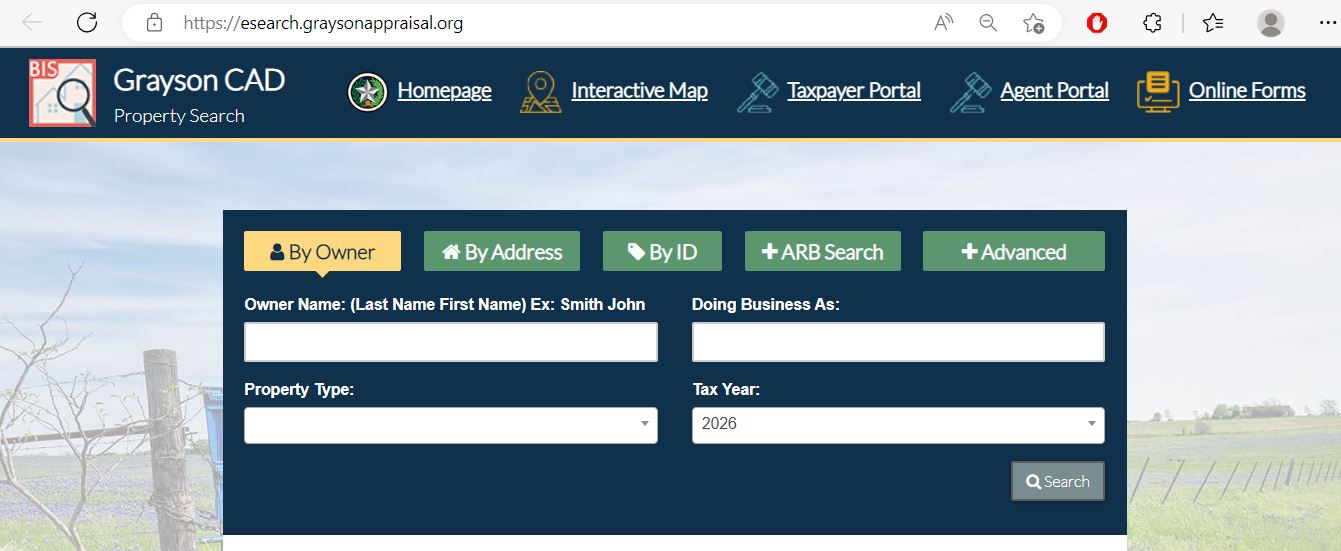
Do not search only real estate when the account could be personal property, mineral, commercial or a manufactured-home record.
The screenshot shows a year selector. Confirm it before comparing ownership, value or protest details.
Business-personal-property accounts may be easier to find through the DBA rather than the legal entity name.
Understand what the Grayson CAD record does—and does not—prove
| Field | What it helps identify | What it does not prove | Best next action |
|---|---|---|---|
| Property ID | The GCAD appraisal account. | That the Tax Office uses an identical account format. | Match it with the appraisal district number and tax account. |
| Geographic ID | A parcel-related geographic reference. | A surveyed boundary, access right or exact acreage. | Compare the map, deed, plat and survey. |
| Owner shown | The owner maintained for appraisal administration. | Complete legal title or absence of liens. | Search County Clerk Official Records. |
| Situs address | The physical location carried by GCAD. | The mailing address, school boundary or legal parcel limits. | Check the legal description, map and taxing units. |
| Property type | Real, personal, mineral, commercial or another account category. | That all property owned by the taxpayer appears in one account. | Search each relevant property type separately. |
| Legal description | Subdivision, lot, block, abstract, survey or tract references. | That abbreviated CAD wording is sufficient for a deed. | Compare the recorded deed and professional survey. |
| Market value | GCAD’s opinion of market value as of January 1. | A guaranteed sale price or final tax bill. | Compare sales, condition and equal-appraisal evidence. |
| Appraised or assessed value | Value after an applicable limitation or special appraisal. | That market value was reduced. | Check homestead-cap loss, circuit breaker and agricultural use value. |
| Taxable value | Value remaining after applicable exemptions. | The live bill, penalty, interest or payment status. | Open the Tax Office account. |
| ARB information | Available protest, informal or hearing information. | That every filing or evidence requirement has been completed. | Confirm through the notice, portal and ARB communication. |
Use the Grayson CAD map without treating it as a survey
What to do when Grayson CAD returns no property result
| Problem | Likely reason | Practical fix |
|---|---|---|
| Owner name is not found | The account may use a spouse, trust, estate, LLC, DBA or former owner. | Search only the last name or one distinctive business word. |
| Address search fails | The situs format may differ from the postal or listing address. | Use only the street number and main street name. |
| Rural tract has no standard address | The parcel may be indexed by abstract, survey, owner or geographic ID. | Use Advanced Search or the interactive map. |
| Lake property is difficult to match | The subdivision, lot, situs and mailing address may differ. | Compare subdivision, property ID, map position and legal description. |
| Recently purchased property shows seller | The deed may still be processing into GCAD records. | Confirm County Clerk recording and retain the instrument number. |
| Manufactured home is separate | The home and land may have different accounts or owners. | Use the mobile-home-park field and search the home owner separately. |
| Business account is missing | The account may use a DBA or personal-property category. | Search the DBA, legal entity and business location. |
| Tax account does not match GCAD | The appraisal and tax systems use different account formats or update schedules. | Match the appraisal district number, owner, legal description and tax year. |
Search tips for Sherman, Denison, Lake Texoma and the US 75 growth corridor
Review City of Sherman, Sherman ISD, county, Grayson College and other units attached to the parcel.
Confirm City of Denison, Denison ISD, county and any subdivision or special-district line.
Use the subdivision, lot, geographic ID and map rather than relying on a mailing address alone.
Check the city, school district and every MUD or utility district shown on the individual property.
Search by owner, property ID, abstract or road and confirm agricultural status separately.
Verify the municipality, school district, county and collector listed for the account.
These school districts can cross county lines. Do not determine the county or collector from the school name alone.
Check completion percentage, square footage, quality, condition, outbuildings and the appraisal year in which improvements were added.
Search the deceased owner, estate, trust, heirs and County Clerk recording history.
Separate GCAD market value, assessed value and taxable value
GCAD’s opinion of the property’s market value as of January 1.
The value after a homestead cap, circuit breaker or qualifying special appraisal.
The amount remaining after exemptions for each taxing unit.
Check the homestead cap or non-homestead circuit breaker before estimating tax
The appraisal limitation generally restricts annual appraised-value growth to 10%, plus qualifying new improvements, after the limitation becomes effective.
The market-value field can still increase by more than 10%.
Qualifying non-homestead real property valued at $5.32 million or less can receive the temporary 20% limitation, plus new improvements.
Agricultural, timber and certain other specially appraised property is excluded.
Use GCAD, the Tax Office or County Clerk for the right question
| Your question | Correct starting point | What to prepare |
|---|---|---|
| What is the appraised value? | Grayson Central Appraisal District | Property ID, tax year and disputed value field. |
| Why is my exemption missing? | Grayson Central Appraisal District | Application proof, identification and qualification date. |
| Where do I file a protest? | GCAD and the Grayson Appraisal Review Board | Notice, filing date, protest reason and evidence. |
| Where do I pay property tax? | Grayson County Tax Assessor-Collector or collector shown on the statement | Tax account, property ID, year and payment method. |
| Did my payment post? | The collecting office shown on the tax account | Receipt, confirmation, amount, date and year. |
| Who legally owns the property? | Grayson County Clerk or title professional | Grantor, grantee, legal description and recording period. |
| Is a deed, lien or mortgage recorded? | County Clerk Official Records Search | Names, document type, date range and property description. |
| Is the property boundary correct? | Surveyor plus recorded deed and plat | Survey, deed, plat, easements and title records. |
| Who collects a MUD or cross-county school tax? | Collector named on the live tax statement | Property account and complete taxing-unit list. |
Correct the Grayson County record that controls the error
Prepare Grayson County homestead, senior, disability and veteran applications
Confirm ownership, principal-residence status, occupancy date and identification requirements.
Review additional exemptions, school-tax ceilings, quarter payments and deferral rules.
Prepare qualifying documentation and review ceiling, payment and deferral provisions.
Use the appropriate veteran or surviving-spouse application and attach current eligibility records.
An heir may need deed, probate, heirship, ownership-percentage and occupancy information.
GCAD publishes charitable, cemetery, disaster, vehicle, airport and other statutory forms.
Prepare these items before filing
Document qualifying Grayson County land use before filing
Document qualifying agricultural use during the required historical period.
Explain grazing, crops, hay, livestock, beekeeping or another claimed agricultural activity.
Identify qualifying acreage, residential areas, improvements, water and excluded land.
Keep written leases, livestock records, feed, seed, equipment, expense and sales records.
Prepare the wildlife plan, qualifying practices, photographs, maps and annual report.
Ask about rollback-tax consequences before changing qualifying land to another primary use.
Prepare a 2026 Grayson County business-property rendition correctly
Renditions and extension requests are normally due April 15 by 11:59:59 p.m. Central Time.
GCAD states that an approved extension moves the rendition deadline to May 15.
A 10% tax-liability penalty can apply when a required rendition is not filed timely.
Follow Grayson CAD’s late-protest route instead of the closed online protest workflow
Format Grayson CAD hearing evidence so the ARB can open it
PDF, Microsoft Word and Microsoft Excel files.
JPEG, PNG and TIFF images.
The total combined upload cannot exceed 20 MB per property.
The ARB states that it cannot view or listen to audio or video files.
Upload evidence separately for each property ID.
GCAD instructs users to enter the property ID in the First Name field and the owner’s last name in the Last Name field.
Use the Grayson CAD portal for documents, communication and applications
Pay Grayson County property taxes through the official Tax Office
Official tax-search formatting
| Search option | Recommended format | Important check |
|---|---|---|
| Account number | Use the dashes shown on the tax statement. | Confirm owner, property and tax year. |
| Owner name | Enter last name, space, then first name or initial. | Compare mailing and property addresses. |
| Mailing address | Enter the street number and street name. | Do not confuse mailing address with situs. |
| Property address | Enter street number and name without direction or street type. | Match the appraisal district number. |
| Legal description | Use subdivision, lot, block, abstract or tract wording. | Compare the GCAD legal description. |
Payment and delinquency rules worth checking
January 31 is normally the last day to pay without penalty and interest.
Eligible over-65, disabled and qualifying disaster accounts can use instalments due January 31, March 31, May 31 and July 31.
The Tax Office accepts partial payments, but the unpaid balance accrues penalty and interest after January 31.
An additional 20% attorney fee can be added April 1 to unpaid business-personal-property and mobile-home taxes.
An additional 20% attorney fee can be added July 1 to unpaid real-property accounts.
Failure to receive a statement does not cancel the tax, due date, lien, penalty or interest.
Confirm whether the county Tax Office collects every unit on the account
Pilot Point ISD or Trenton ISD property can require additional collector verification.
Van Alstyne, Gunter, Heritage Ranch, Noble Ridge and other MUD-area parcels can have special-district taxes.
Do not discard a second statement until each account, year and taxing unit has been reconciled.
Use the Grayson County Clerk when legal ownership matters
100 W. Houston Street, Suite 17
Sherman, Texas 75090
Real Property: 903-813-4239
Email: deeds@co.grayson.tx.us
County Clerk: Deana Patterson
Monday, Tuesday, Thursday and Friday: 8:00 a.m.-4:30 p.m.
Wednesday: 8:30 a.m.-4:30 p.m.
The county advises that Property Records may close from noon to 1:00 p.m.; call ahead.
Complete these checks before relying on a Grayson County property record
Compare the property ID, geographic ID, legal description, acreage and map location.
Review paid, unpaid and inactive accounts and every available tax year.
Check whether any MUD or cross-county taxing unit uses a separate collection route.
Review official recorded documents and obtain a title examination when appropriate.
The seller’s homestead, senior exemption, tax ceiling and appraisal limitation may not transfer.
Confirm whether agricultural or wildlife valuation continues after the transaction.
Compare houses, additions, pools, garages, shops, barns and manufactured homes.
Use a recorded deed, plat and professional survey rather than the appraisal map alone.
Keep the deed, title policy, survey, closing statement, tax documents and exemption filing proof.
Request GCAD records only after checking available online data
GCAD publishes a compressed appraisal-data export with current property, ownership and certified-value information.
Experienced GIS users can download shapefiles, but GCAD does not provide technical support for loading or manipulating them.
GCAD publishes state, entity, exemption, subdivision and neighborhood code resources.
Important Grayson County appraisal and tax dates
Grayson CAD, Tax Office and County Clerk contact details
Sherman, Texas 75090
903-893-9673
Fax: 903-892-3835
webmaster@graysonappraisal.org
Chief Appraiser: Shawn Coker, RPA, CCA
Office: Monday-Friday, 8:00 a.m.-5:00 p.m.
Open to the public: 8:00 a.m.-4:00 p.m.
Sherman, Texas 75090
Mailing: P.O. Box 2107
Sherman, Texas 75091
903-892-8297
Fax: 903-868-1295
Tax Assessor-Collector: Bruce Stidham
Monday: 8:00 a.m.-5:00 p.m.
Tuesday-Friday: 8:00 a.m.-4:30 p.m.
Denison: 101 W. Woodard, 903-465-2101, weekdays 9:00 a.m.-4:30 p.m.
Whitesboro: 509 N. Union, 903-564-7786, weekdays 9:00-11:00 a.m. and 1:00-4:00 p.m.
Van Alstyne: 117 S. Main, 903-482-6004, weekdays 9:00-11:00 a.m. and 1:00-4:00 p.m.
Sherman, Texas 75090
903-813-4239
deeds@co.grayson.tx.us
County Clerk: Deana Patterson
Call ahead because the Property Records counter may close from noon to 1:00 p.m.
Useful GCAD email routing
Official Grayson County appraisal, tax and deed resources
Official news, appraisal information, reports, forms and contact details.
Open Grayson CADSearch by owner, address, ID, ARB information or advanced fields.
Search property recordsReview available property documents, applications and electronic services.
Open taxpayer portalReview approximate parcel location and nearby appraisal accounts.
Open GCAD mapFind exemption, agricultural, rendition, protest, agent and mapping forms.
Open official formsReview file formats, account-separation rules and the 20 MB limit.
Open evidence-upload helpSearch paid and unpaid accounts and continue to official payment.
Search and pay taxesResearch deeds, mortgages, judgments, liens and recorded instruments.
Search official recordsCross-check GCAD, Tax Office, active units and consolidated collectors.
Open Grayson County directory10 common Grayson County Appraisal District questions
1. What is the official Grayson County Appraisal District website?
The official website is GraysonAppraisal.org. Use it for appraisal records, forms, exemptions, maps, protests and district contacts.
2. How do I search Grayson County property records?
Open the official GCAD property search. Choose By Owner, By Address, By ID, ARB Search or Advanced and verify the complete property account.
3. Can I file a Grayson CAD protest online?
The taxpayer portal supports available online protests, electronic communication, documents and applications. Registration can remain pending until GCAD approves it.
4. What can I do after the protest deadline?
Review GCAD’s late-protest instructions. The online protest portal does not accept late filings, so use an accepted email, fax, drop-box or upload route and include an explanation.
5. Where do I pay Grayson County property taxes?
Use the Grayson County Tax Office search and payment portal. Verify the owner, appraisal district number, account, collector and tax year before paying.
6. What are the online tax-payment fees?
The Tax Office publishes a credit-card fee of up to 2.15% and a $1.50 e-check charge. Review the live payment total because vendor fees can change.
7. What changed for business personal property in 2026?
GCAD states that the business-personal-property exemption increased to $125,000 beginning January 1, 2026. Renditions or extension requests are normally due April 15.
8. What is the 2026 circuit-breaker threshold?
The temporary 20% limitation applies to qualifying non-homestead real property valued at $5.32 million or less. Agricultural, timber and certain other specially appraised land is excluded.
9. Where can I search Grayson County deeds and liens?
Use the Grayson County Official Records Search. The County Clerk maintains deeds, mortgages, judgments and tax liens.
10. What is the Grayson CAD phone number and address?
Grayson Central Appraisal District is at 512 N. Travis Street, Sherman, Texas 75090. Call 903-893-9673. The fax number is 903-892-3835.