
Follow a Gonzales County Property From “Come and Take It” Parcel Map to Appraisal, Tax Receipt and Deed
Start with Gonzales Central Appraisal District—Gonzales CAD—when you need a Property ID, Geo ID, appraisal owner, address, legal description, acreage, improvement details, market value, exemption, agricultural treatment, mineral account, business account or protest information.
Move to the Gonzales County Tax Assessor-Collector when you need the amount due, tax statement, payment, receipt, delinquent balance or installment information. Use the County Clerk when you need a recorded deed, lien, release, easement, plat or legal ownership document.
301 Saint Joseph Street, Suite A, Gonzales, Texas 78629.
Use the Property ID from an appraisal notice or tax statement.
The ordinary May 15 deadline has passed for most properties.
The search separates real, personal and mineral records.
Local links and procedures reviewed July 31, 2026.
What do you need to complete for the Gonzales County property?
Use Property ID, owner, address, legal description, abstract, subdivision or Geo ID.
Follow the search workflowReview land, improvements, agricultural loss, homestead cap and exemptions.
Understand the valuesCheck current and delinquent years, payment options, receipts and fees.
Use the payment stepsConnect the correct property, submit the protest and preserve confirmation.
Prepare an online protestGonzales CAD publishes agricultural, fencing, wildlife and timber documents.
Prepare special-appraisal evidenceUse the mineral filter, lease number, lease name, owner and legal description.
Research mineral accountsUse Gonzales CAD, the Tax Office or County Clerk for the correct task
| Your task | Correct office or portal | Prepare before contacting |
|---|---|---|
| Search appraisal values and property characteristics | Gonzales Central Appraisal District | Property ID, Geo ID, owner, address, legal description or lease. |
| Apply for homestead or another exemption | Gonzales Central Appraisal District | Application, identification, ownership and qualification documents. |
| Apply for agricultural, wildlife or timber appraisal | Gonzales CAD appraisal staff | Use history, acreage map, leases, production and local-intensity evidence. |
| Protest value or another appraisal action | Gonzales CAD and the Gonzales County ARB | Notice, property account, deadline, requested result and evidence. |
| Find a tax bill, receipt or balance | Gonzales County Tax Assessor-Collector | Tax account, owner, property, year and payment information. |
| Pay a cross-county school tax | Collector shown on the tax statement | Account, school district and bill because the county office does not collect every cross-county unit. |
| Search a deed, lien, release, easement or plat | Gonzales County Clerk | Grantor, grantee, date range, document number or legal description. |
| Confirm legal ownership or boundary | Title company, attorney, surveyor and recorded documents | Deed, title commitment, survey, plat and field notes. |
Search Gonzales CAD by Property ID, owner, address, legal description or lease
Use the Gonzales CAD screenshot to choose the correct search tab
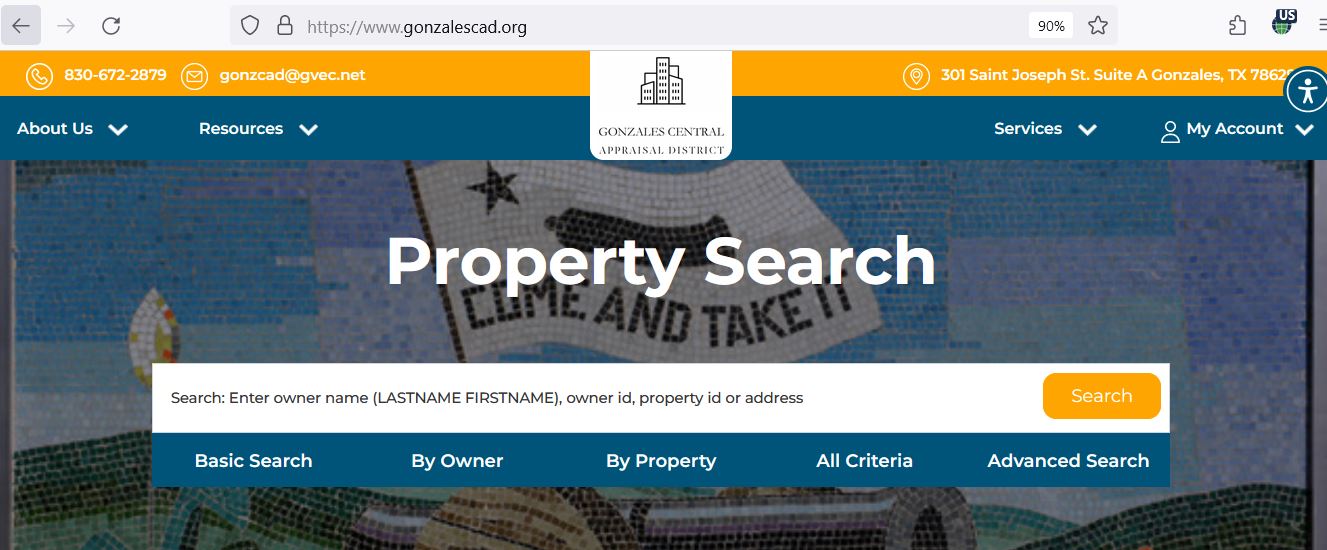
Use legal, abstract, subdivision and lease fields when a normal search fails
| Search field | When it helps | What to verify |
|---|---|---|
| Owner ID | Finding multiple properties connected with one owner record. | Owner name and mailing information. |
| Geo ID | Matching the account with the interactive parcel map. | Property ID, legal description and mapped tract. |
| Legal description | Rural acreage, older property, family land and property without a standard address. | Survey, abstract, tract, lot, block and acreage. |
| Abstract | Locating rural land by the survey or abstract reference. | Correct abstract, owner and deeded acreage. |
| Subdivision | Repeated street names, new phases and lots in Gonzales, Nixon, Smiley or Waelder. | Subdivision, phase, lot, block and recorded plat. |
| Lease number | Locating a mineral or energy-related account with a known lease identifier. | Owner, operator, lease, unit and property type. |
| Lease name | Finding a mineral account when the owner or surface address produces no result. | Interest owner and production-related account. |
| Protest status | Narrowing records marked new, open, field, closed or pending. | Tax year and the correct protest account. |
| Tax due | Identifying records flagged with an unpaid amount. | Live balance and payment posting with the Tax Office. |
Use the Gonzales CAD map for ranches, rural tracts and parcel context
Understand what each Gonzales CAD field does and does not prove
| Account field | What it helps identify | What it does not prove | Best next action |
|---|---|---|---|
| Property ID | The primary Gonzales CAD appraisal account. | That every tax, lease or deed system uses the same number. | Save it for CAD, protest and tax communication. |
| Geo ID | The geographic mapping reference maintained by the district. | A surveyed boundary. | Compare the map, deed and survey. |
| Owner shown | The owner carried for appraisal administration. | Complete title, heirship, mineral ownership or absence of liens. | Search County Clerk records. |
| Situs address | The physical location used in the appraisal account. | The mailing address or surveyed parcel limits. | Compare Geo ID and legal description. |
| Legal description | Subdivision, lot, block, survey, abstract or tract references. | That an abbreviated CAD description is sufficient for conveyance. | Open the recorded deed and plat. |
| Acreage | The area used for appraisal administration. | Surveyed acreage or the amount receiving productivity appraisal. | Compare deed, survey and ag-acreage breakdown. |
| Property type | A real, personal or mineral appraisal record. | That one account includes every interest at the location. | Search all applicable property types. |
| Taxing entities | County, city, school, water, hospital and emergency-service jurisdictions. | The current balance, adopted rate or payment status. | Open the tax ledger and current transparency database. |
Separate market value, appraised value and taxable value
Gonzales CAD’s opinion of what the property would sell for under normal conditions as of January 1.
The value after an applicable homestead cap, circuit-breaker limit or agricultural productivity calculation.
The value remaining after exemptions applicable to each taxing unit are deducted.
| Change | What to inspect | Evidence to prepare |
|---|---|---|
| Land market value increased | Acreage, access, location, river influence, subdivision, land class and sales. | Survey, deed, land sales, access and flooding information. |
| Home or improvement value increased | Area, construction, age, class, condition, additions and completion. | Measurements, photographs, plans and repair estimates. |
| Taxable value increased | Homestead, cap status, ownership change, new improvements and exemptions. | Exemption approval, deed date and prior-year account. |
| Agricultural value disappeared | Application, current use, qualifying history, ownership and local intensity. | Leases, livestock, crop, hay, wildlife, timber and expense records. |
| Mineral value changed | Lease, ownership interest, production, operator information and price assumptions. | Division orders, royalty statements, production and recorded conveyances. |
| Tax bill increased | Taxable value, adopted rates, prior balance, penalties and payments. | CAD account, tax statement and payment history. |
Local search tips for Gonzales, Nixon, Smiley, Waelder and rural property
Verify the city, Gonzales ISD, county, hospital, underground-water and emergency-service jurisdictions shown on the exact account.
Check City of Nixon, Nixon-Smiley CISD, Nixon Hospital District and the correct emergency-service unit separately.
Confirm whether the parcel is inside city limits and whether the mailing address matches the physical taxing jurisdiction.
Use the address, subdivision or legal description and verify Waelder ISD and city status before estimating taxes.
Cuero, Yoakum, Moulton and Shiner districts can appear on Gonzales County parcels. Verify the collector printed on the bill.
Separate the residence and improvements from land receiving open-space appraisal and document the current operator and use.
Review access, flooding, topography, easements and usable acreage rather than comparing only gross acreage.
Search MINERAL records by owner, lease number and lease name in addition to the surface-land account.
Search the deceased owner, estate, trust, heirs and prior owners, then compare the deed and probate records.
Review surface, mineral, exemption and tax records before closing
Use the official form, include the required identification and preserve delivery proof
For a qualifying owner’s principal residence. A sale, deed or mortgage does not automatically file the application.
Can provide an additional exemption, school-tax ceiling and qualifying installment or deferral options.
Can provide an additional exemption and school-tax ceiling when statutory requirements are met.
Use the correct veteran or surviving-spouse application with current VA documentation.
An inherited residence can require death, heirship, utility, occupancy and available court documents.
Gonzales CAD publishes forms for damaged property and other qualifying property uses.
Residence-homestead filing workflow
Use Gonzales CAD’s local agricultural, fencing and land-use documents
Most 1-d-1 land must have qualifying agricultural use during five of the preceding seven years.
Agriculture must be an active primary use rather than a token, future or recreational activity.
The operation must meet the management and production level generally accepted for a similar Gonzales County use.
Document livestock, fencing, water, pasture, feeding, veterinary care, leases and sales.
Preserve planting, fertiliser, cutting, harvest, equipment, expense and marketing records.
Prepare management, planting, thinning, harvest, income intent and productive-acreage evidence.
Application evidence checklist
Submit the correct plan, annual report and local qualification evidence
Wildlife management normally continues qualifying open-space appraisal rather than creating it for previously nonqualifying land.
Gonzales CAD links both state and local wildlife guidance plus the official wildlife-management plan.
Document activities actually completed, their dates, locations, costs and measurable results.
Use the required number of recognized habitat, erosion, predator, water, food, shelter or census practices.
Prepare active-hive records, location maps, photographs, inspections, production and local-intensity confirmation.
Review the district’s fencing guidelines and document fencing suitable for the claimed operation.
Wildlife or beekeeping file
Register, request the property PIN and complete the final submission
Evidence that may help a Gonzales County protest
Prepare a focused case for the Gonzales County ARB
The ARB hears qualifying disputes that remain unresolved after appraisal-district review.
Follow the date, time, place, attendance method and document instructions on the official notice.
State the exact value, exemption, acreage, property type or factual correction requested.
Label every sale, photograph, estimate, survey page, lease or operational record.
Review the district’s proposed comparables, schedules and property-characteristic information.
Save the ARB decision and immediately review further appeal and payment requirements.
Five-part hearing presentation
Use the Gonzales County Tax Office for the live collection balance
| Method | Published guidance | What to verify |
|---|---|---|
| In person | Main Tax Office at 427 Saint George Street, Suite 100. | Account, tax year, amount and receipt. |
| Drive-through | Main-office drive-through operates during published weekday hours. | Current closure or line information. |
| Online | Official county processor accepts credit-card or eCheck payment. | Live processor fee and correct property. |
| Telephone card payment | The Tax Office publishes 830-453-1114 for telephone credit-card payments. | Account, amount, fee and confirmation. |
| Mail to Crystal Cedillo, Tax Assessor-Collector, P.O. Box 677, Gonzales, Texas 78629. | Payee, tax year, account and USPS postmark. | |
| Waelder substation | 1812 U.S. Highway 90, Waelder; Saturday service under the published schedule. | Closure notice and lunch period before travelling. |
Use the county’s published schedule and confirm eligibility before the first payment
January 31 is the ordinary last day to pay without penalty and interest, subject to calendar and delayed-bill rules.
The Tax Office publishes November 30 and June 30 as its half-payment dates.
Qualifying owners can use January 31, March 31, May 31 and July 31 installments.
Ask how a payment will be allocated when several years or taxing units are open.
Charges generally begin February 1 on an unpaid balance that is not protected by another rule.
Request a live amount before paying a delinquent account because the balance changes over time.
Verify every county, city, school, water, hospital and emergency-service unit
| Jurisdiction group | Examples shown by Gonzales CAD | What to check |
|---|---|---|
| County | Gonzales County | County taxable value, exemptions and adopted rate. |
| Cities | Gonzales, Nixon, Smiley and Waelder | Whether the parcel is actually inside city limits. |
| School districts | Gonzales, Nixon-Smiley, Waelder, Cuero, Yoakum, Moulton and Shiner | School district, collector and homestead or tax-ceiling benefit. |
| Water district | Gonzales County Underground Water Conservation District | Taxable value and current adopted rate. |
| Hospital districts | Gonzales, Nixon and Yoakum hospital-related districts | The exact district shown on the property account. |
| Emergency services | Gonzales County ESD-related units | Which emergency-service district covers the parcel. |
Search the personal-property account and document the new 2026 exemption
The ordinary 2026 rendition deadline has passed.
A timely written request normally extends the deadline to May 15, with limited further relief for good cause.
Qualifying income-producing tangible personal property at or below this value is exempt in a taxing unit beginning in 2026.
Follow Gonzales CAD’s instructions for reporting the account and supporting the new exemption.
Rendition information is generally confidential except in circumstances allowed by law.
A late or missing rendition can create a penalty generally equal to 10% of the property taxes.
Rendition preparation checklist
Search the lease account separately from the surface property
Correct the record system that controls the inaccurate information
Search Gonzales County Clerk records for deeds, liens, releases and plats
Fix common Gonzales CAD search, protest, exemption and payment problems
| Problem | Likely reason | Best fix |
|---|---|---|
| Full address finds nothing | The account uses rural, legal or simplified address wording. | Search the street name, owner, Property ID, Geo ID, abstract or legal description. |
| Owner search returns no record | The account uses a spouse, estate, trust, LLC, ranch or prior owner. | Use the surname or one entity-name word and try all known variations. |
| Only surface property appears | The mineral interest is maintained as a separate account. | Select MINERAL and search the lease number, lease name and owner. |
| Business equipment is missing | The assets are in a PERSONAL account rather than the real-property account. | Select PERSONAL and search the legal or DBA name. |
| Recently purchased property shows the seller | The recorded deed has not yet been reflected in the appraisal system. | Confirm Clerk recording and provide the instrument information to Gonzales CAD. |
| Homestead is missing | The application is pending, incomplete, filed for another year or never delivered. | Contact the exemption clerk with the Property ID and delivery proof. |
| Online protest will not show the property | The owner account is not connected or a property PIN is needed. | Use Request a PIN or contact Gonzales CAD before the controlling deadline. |
| Tax-due filter conflicts with receipt | Payment posting is pending or the search is showing another year or account. | Check the Tax Office collection ledger and contact tax staff with the receipt. |
| Ag or wildlife treatment disappeared | Ownership changed, a new application was required or evidence did not meet local guidelines. | Review the denial, forms, local guidance and protest deadline immediately. |
| County Clerk search shows no deed | Name spelling, date range, document type or indexing differs. | Search all spelling variations and contact the Clerk with the legal description. |
Important Gonzales County appraisal and property-tax dates
Gonzales County appraisal, tax and deed-record offices
Gonzales, Texas 78629
Mailing: P.O. Box 867, Gonzales, Texas 78629-0867
(830) 672-2879
Fax: (830) 672-8345
gonzcad@gvec.net
Hours: Monday-Friday, 8:00 AM-5:00 PM.
Chief Appraiser: John Liford, extension 201
Deputy Chief Appraiser Nick Rapoza: Ext. 207
Business Personal Property Appraiser Kathryn Bradley Walker: Ext. 206
Exemption Clerk Kimberly Teague: Ext. 214
Main telephone: (830) 672-2879
Gonzales, Texas 78629
Mailing: P.O. Box 677, Gonzales, Texas 78629
(830) 672-2841
Fax: (830) 519-4256
tac@co.gonzales.tx.us
Property-tax email: taxclerk@co.gonzales.tx.us
Tax Assessor-Collector: Crystal Cedillo
Lobby: Monday-Friday, 8:00 AM-4:30 PM
Drive-through: Monday-Friday, 8:00 AM-4:30 PM
Telephone credit-card payment: (830) 453-1114
Waelder, Texas 78959
Published Saturday hours: 8:00 AM-5:00 PM
Lunch closure: 12:30 PM-1:30 PM
Check the county closure list before travelling.
427 Saint George Street, Suite 200
Gonzales, Texas 78629
(830) 672-2801
Fax: (830) 672-2636
County Clerk: Lona Ackman
Official Gonzales County appraisal, tax and property-record resources
Official district news, contacts, forms, reports, property search and owner-account access.
Open Gonzales CADSearch real, personal and mineral accounts using owner, property, legal and lease fields.
Search appraisal recordsReview parcel location, neighboring accounts and rural land context.
Open parcel mapHomestead, agricultural, wildlife, timber, rendition, protest and address-change forms.
Open Gonzales CAD formsRegister, sign in, request a property PIN and submit an eligible protest.
Open owner protestReview certified rolls, depreciation schedules, tax rates, annual reports and appraisal plans.
Open records and reportsFind tax balances and print property-tax statements or receipts.
Search county taxesReview online, telephone, mail, in-person and Waelder payment options.
Open Tax Assessor-CollectorSearch deeds, liens, releases, easements, plats and other official records.
Search recorded documentsHow this Gonzales County guide was researched and rebuilt

Existing images preserved while unsupported claims were removed
The original Gonzales CAD screenshot and editor image have been retained. The previous page was too short and included unsupported promises about approvals, savings and website performance.
This replacement adds real, personal and mineral search paths, legal and lease filters, map guidance, account-field explanations, current exemption amounts, agricultural and wildlife preparation, account registration and PIN steps, ARB preparation, Tax Office payment rules, installment dates, cross-county school routing, County Clerk research and local contact details.
Official sources reviewed include Gonzales Central Appraisal District, its property search, forms, online protest, interactive map, contact, news and data pages; Gonzales County Tax Assessor-Collector; Gonzales County Clerk; Gonzales County District Clerk; and Texas Comptroller property-tax guidance.
AppraisalDistrict.org is an independent informational website and is not operated by Gonzales Central Appraisal District, Gonzales County or any taxing unit.
10 common Gonzales Central Appraisal District questions
1. How do I search Gonzales CAD property records?
Use the official Gonzales CAD property search. Start with Basic Search or Property ID. The portal also supports owner, address, Geo ID, legal description, abstract, subdivision, lease number and lease name.
2. Does Gonzales Central Appraisal District collect property taxes?
No. Gonzales CAD determines appraisal values, administers exemptions and special appraisals and handles protests. The Gonzales County Tax Assessor-Collector handles statements, payments, receipts and delinquent balances for the units it serves.
3. Where can I pay Gonzales County property taxes?
Begin at the official Gonzales County Tax Office page or the property-tax search. Confirm the owner, account, tax year, balance and fee before paying.
4. What is the Gonzales CAD protest deadline for 2026?
The ordinary deadline was May 15, 2026, or 30 days after the appraisal notice was delivered, whichever was later. A later notice or another appealable action can carry a different deadline.
5. Can I file a Gonzales CAD protest online?
Yes. Use the official online protest system. Register with an email address, sign in or request a PIN, connect the property, complete the submission and save confirmation.
6. How do I apply for a Gonzales County homestead exemption?
Download the current application from the official forms page. Complete the ownership and occupancy details, attach the driver-license copy or other information required by the form and mail or deliver the complete package to Gonzales CAD.
7. How does agricultural appraisal work in Gonzales County?
Qualification depends on current principal use, qualifying history and local degree of intensity. Gonzales CAD publishes agricultural-use, fencing, wildlife and timber guidance. Prepare maps, leases, production, expense, sale and land-use records.
8. How do I find a Gonzales County mineral or lease account?
Select the MINERAL property type in the Gonzales CAD search. Search by Property ID, owner, legal description, lease number or lease name. The mineral account can be separate from the surface property.
9. Where can I search Gonzales County deeds and liens?
Use the Gonzales County Clerk Records Public Access system. Accept the disclaimer and search all possible spelling variations. The online index is not a certified title report.
10. Where is Gonzales Central Appraisal District located?
Gonzales CAD is located at 301 Saint Joseph Street, Suite A, Gonzales, Texas 78629. Call (830) 672-2879. Published hours are Monday-Friday from 8:00 AM to 5:00 PM.