Trace a Goliad County Property From Ranch Parcel to Tax Receipt
Use Goliad County Appraisal District for property search, market and appraised value, exemptions, agricultural appraisal, maps, property characteristics, renditions and appraisal protests.
Use the Goliad County Tax Assessor-Collector for the actual tax bill, online payment, receipt and delinquent balance. Use the County and District Clerk when you need a recorded deed, lien, release, plat or legal ownership document.
Property ID or Geo ID provides the most precise search.
Real Estate, Minerals and Personal Property.
Goliad County Tax Assessor-Collector.
161 N. Welch Street, Goliad.
Local links and procedures reviewed July 2026.
Which Goliad County property task are you completing?
Use Basic Search, By Owner, By Property, All Criteria or Advanced Search.
Follow the search workflowConfirm the account, year, amount, penalties and payment receipt through the official collection portal.
Review payment stepsCheck acreage, legal description, productivity value, land-use history and rollback risk.
Review rural-land guidanceUse lease name, lease number, owner, property ID and the Minerals property-type filter.
Review mineral guidanceIdentify the exact value, classification, exemption or property-description issue.
Build a protest fileUse County Clerk records rather than treating the CAD owner field as proof of title.
Search official recordsSearch Goliad CAD without opening the wrong property account
Use the Goliad CAD search screenshot as a navigation guide
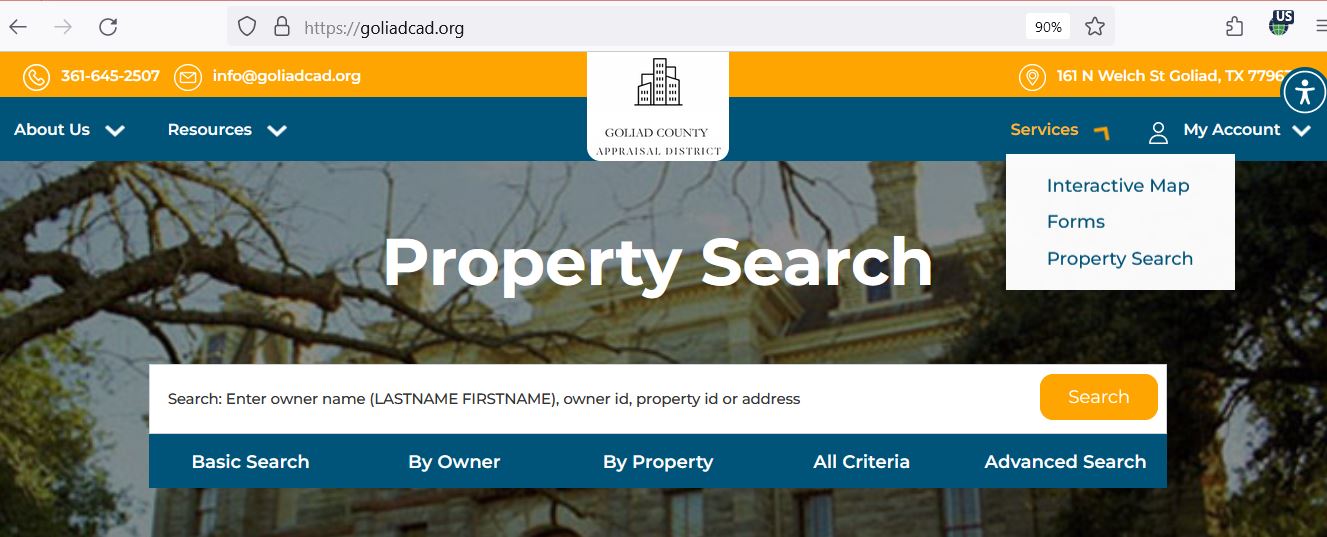
Understand what each Goliad CAD field does and does not prove
| Field | What it identifies | What it does not prove | Best next step |
|---|---|---|---|
| Property ID | The appraisal account in the Goliad CAD database. | That the tax-payment or deed system uses the identical number. | Save it and compare it with the tax account. |
| Geo ID | A geographic identifier associated with parcel location or mapping. | A surveyed boundary, legal acreage or access right. | Use the interactive map, deed, plat and survey. |
| Owner shown | The owner carried for appraisal administration. | Clear legal title, lien status or complete ownership history. | Search County Clerk records for recorded documents. |
| Situs address | The physical location recorded by the appraisal district when one is assigned. | A mailing address, legal description or emergency-service address. | Compare it with the legal description and map. |
| Legal description | The abstract, survey, tract, subdivision, lot, block or other legal reference. | That an abbreviated CAD description is sufficient for conveyance. | Open the recorded deed or plat. |
| Acreage | The acreage carried for appraisal purposes. | A surveyed boundary or guaranteed legal acreage. | Compare the deed, survey, plat and GIS. |
| Market value | CAD’s opinion of market value as of January 1. | A guaranteed sale price or final tax bill. | Compare sales, condition and equal-appraisal evidence. |
| Appraised value | The value after an applicable appraisal limitation or special appraisal. | The final taxable value for every local entity. | Review exemptions and taxing-unit lines. |
| Taxable value | The value remaining after applicable exemptions for a taxing unit. | The amount currently due after payments or penalties. | Open the Tax Office payment portal. |
| Lease name or number | Mineral or lease-related information associated with an account. | Current mineral title, decimal interest or payment ownership. | Compare the mineral account with deeds, leases and operator records. |
| Protest status | A portal status associated with an appraisal protest. | That all evidence was received or a final order was issued. | Open the account portal and save official correspondence. |
Follow a Goliad property from market value to the tax bill
Goliad CAD’s opinion of market value as of January 1 for the tax year.
The value after a qualifying homestead limitation or agricultural, wildlife or other special appraisal.
Taxable value reflects exemptions. Each taxing unit’s adopted rate is then used to calculate the bill.
Use the Goliad CAD map for rural research, not legal boundary proof
Use the map to understand parcel position, road frontage and surrounding appraisal accounts.
Open nearby records to compare property type, acreage, classification and appraisal information.
Use the map when the mailing address, rural route and actual parcel location are different.
Fix common Goliad CAD search problems
| Problem | Likely reason | Practical fix |
|---|---|---|
| Owner name returns nothing | The record may use last-name-first-name order, a spouse, trust, estate, company or different spelling. | Search the surname alone, then use Property ID, address or All Criteria. |
| Address is not recognised | A rural route, county road, direction, suffix or abbreviated situs address may be used. | Use the street name only, then switch to owner, Geo ID, legal description or map. |
| Ranch has no normal address | The record may be indexed by abstract, survey, tract or owner. | Use Property ID, Geo ID, legal description, abstract and interactive map. |
| Mineral account does not appear | The search may still be filtered to Real Estate or the account may use a lease name. | Select Minerals and search owner, lease name, lease number or Property ID. |
| Business account is missing | The account may be classified as Personal Property rather than Real Estate. | Select Personal Property and search the business or owner name. |
| Recently purchased property shows seller | The deed may not yet have completed processing into the appraisal database. | Confirm recording with the Clerk and save the instrument number before contacting CAD. |
| Tax balance differs from CAD value | Appraised value, taxable value and the collection ledger are different records. | Use CAD for value and exemption questions; use the Tax Office for the amount due. |
| Protest portal does not open | Registration, PIN access, eligibility or the filing window may be involved. | Request a PIN or call CAD immediately without waiting past the notice deadline. |
Review Goliad County open-space land differently from a normal home
Check the land’s ordinary market value separately from any productivity or special-use value.
Confirm the acreage, qualifying category, use history and value assigned under the special appraisal.
Keep evidence of grazing, crops, livestock, leases, wildlife activities or other qualifying agricultural use.
Maintain the wildlife-management plan and documented activities supporting continued qualification.
Ask about rollback-tax exposure before converting qualified land to residential, commercial or another nonqualifying use.
Do not assume the seller’s agricultural or wildlife appraisal automatically continues after closing.
Evidence to keep organised
Use the correct property type and appraisal contact
| Account | Search details | Evidence or records |
|---|---|---|
| Mineral interest | Owner, Property ID, lease name, lease number and Minerals property type. | Division order, deed, lease, decimal interest, operator statement and prior notice. |
| Utility or industrial | Owner, agent, property ID, category and relevant property type. | Asset schedules, appraisal reports, operating data and valuation correspondence. |
| Business personal property | Business name, owner, address and Personal Property filter. | Asset list, purchase year, original cost, inventory, location and obsolescence information. |
| Special inventory | Dealer or business name and personal-property account. | Monthly statements, annual declaration, sales and inventory documentation. |
Send each Goliad County property question to the office that controls it
| Your question | Correct office | Information to prepare |
|---|---|---|
| What is my appraised value? | Goliad CAD | Property ID, tax year and the value field in question. |
| Why is my exemption missing? | Goliad CAD | Application, submission proof, qualification date and supporting documents. |
| Is my agricultural appraisal active? | Goliad CAD | Property ID, acreage, use history and prior application. |
| How much tax do I owe? | Goliad County Tax Office | Tax account, year, owner and payment date. |
| Did my payment post? | Goliad County Tax Office | Receipt, confirmation number, amount, account and year. |
| Who legally owns the property? | County and District Clerk or title professional | Grantor, grantee, date range, legal description and instrument number. |
| Where can I obtain a deed or lien? | County and District Clerk | Names, document type, recording date or document number. |
| Where is the legal boundary? | Licensed surveyor, deed and plat records | Deed, plat, survey and title information. |
| Who sets my tax rate? | Each taxing unit | The list of taxing units from the property record. |
Choose the correct Goliad CAD filing and prepare the evidence first
| Situation | Official starting form | What to prepare |
|---|---|---|
| Principal residence | Residence Homestead Exemption Application | Owner information, property ID and required Texas driver licence or identification documentation. |
| Address mismatch or special ID situation | Residence Homestead Exemption Affidavit | Facts explaining why the identification address differs or another statutory exception applies. |
| Disabled veteran | Disabled Veteran Exemption Application | VA documentation, qualification date, ownership and residence details. |
| Farm, ranch or open-space land | Application for 1-d-1 Open-Space Agricultural Use Appraisal | Acreage, use history, leases, production evidence, maps and photographs. |
| Business assets | Personal Property Rendition | Asset description, acquisition year, original cost, inventory and business location. |
| Rendered real estate | General Real Estate Rendition | Property description, ownership and the owner’s opinion of value. |
| Value or appraisal dispute | Notice of Protest | Notice, property ID, protest reason, requested correction and evidence. |
| Electronic notices | Request for Electronic Delivery of Communications | Owner, property, email and tax-official information. |
| Protected address | Request for Confidentiality under Tax Code Section 25.025 | Evidence that the applicant qualifies for statutory confidentiality. |
Know what a Goliad CAD appraiser may review at the property
Goliad CAD explains that an appraiser must visit or review property parcels and may record changes such as new buildings, removed structures or additions.
The appraiser may verify building dimensions and additions visible from the exterior.
The account may reflect construction type, class, materials and observed features.
Exterior condition and visible depreciation may be considered during review.
Prepare a Goliad CAD protest around one specific appraisal issue
Evidence packet checklist
Use the 2026 Goliad ARB procedures before the hearing
Goliad CAD’s Data and Records page publishes 2026 ARB hearing procedures, 2026 protest and appeal procedures, the taxpayer-assistance pamphlet, mass-appraisal information and certified appraisal-roll resources.
Check the current order for hearing format, evidence exchange, check-in and conduct requirements.
Identify every incorrect comparable, property characteristic or assumption in the CAD packet.
State the issue, evidence and requested value or correction without unrelated background.
Pay a Goliad County property-tax bill through the official Tax Office route
Goliad CAD states that the County Tax Office now collects taxes for all Goliad County entities. Use the Tax Office portal for current balances, payments, receipts and collection questions.
Use the Goliad County Clerk for deeds, liens and recorded ownership history
| Item | Published detail | Practical note |
|---|---|---|
| Real-property filing | $25 first page and $4 each additional page | Confirm the current total before filing or mailing payment. |
| Additional indexed names | $0.25 for each name over five | The Clerk should calculate the final filing charge. |
| Clerk phone | 361-645-3294 | Have the parties, document type, date and instrument number ready. |
| Hours effective June 1, 2026 | Monday-Friday, 7:00 AM-5:30 PM; closed 12:00-12:30 PM | Monetary transactions are not processed after 5:00 PM. |
Complete these checks before relying on a Goliad property record
Compare Property ID, Geo ID, legal description, acreage, abstract, survey and map location.
A transaction may involve separate real-estate, mineral and personal-property accounts.
Check current and delinquent years, payments, penalties and the correct account.
Review deeds, deeds of trust, liens and releases through the County Clerk.
The seller’s homestead, age, disability or veteran benefits may not transfer.
Confirm qualification history and possible rollback exposure before changing the land use.
Compare the CAD record with actual buildings, additions, condition and completion.
A surface-property purchase does not automatically answer every mineral-interest question.
Keep the deed, survey, title policy, closing statement, tax certificate and exemption filing proof.
Important Goliad County appraisal and tax dates
Goliad County property offices and where to direct the task
Goliad, Texas 77963-4055
Mailing: P.O. Box 34, Goliad, Texas 77963-0034
Phone: (361) 645-2507
Fax: (361) 645-3200
Email: info@goliadcad.org
Hours: Monday-Friday, 8:00 AM-4:30 PM.
Chief Appraiser: Troy Draper, RPA
Assistant Chief Appraiser: Rita Sternadel, RPA
Exemptions Specialist: Yesania Trevino
329 W. Franklin Street
Goliad, Texas 77963
Mailing: P.O. Box 800, Goliad, Texas 77963
Phone: (361) 645-3354
Fax: (361) 645-8544
Hours: Monday-Friday, 8:00 AM-5:00 PM.
Tax Assessor-Collector: Michelle Garcia
No motor-vehicle transactions are processed after 4:30 PM.
127 N. Courthouse Square
Goliad, Texas 77963
Mailing: P.O. Box 50, Goliad, Texas 77963
Phone: (361) 645-3294
County and District Clerk: Vickie Quinn
Hours effective June 1, 2026: Monday-Friday, 7:00 AM-5:30 PM; closed 12:00-12:30 PM.
Goliad CAD states that mineral, utility and industrial accounts are appraised through Pritchard & Abbott, Inc.
Begin with Goliad CAD and provide the account number, property type, tax year and exact valuation question so staff can route the request correctly.
Official Goliad County appraisal, tax and deed resources
Search real estate, minerals and personal property by owner, ID, address, legal information or advanced criteria.
Open Goliad CAD searchReview parcel location, neighbouring properties and rural-land context.
Open Goliad CAD mapFind homestead, disabled-veteran, agricultural, rendition, protest and electronic-delivery forms.
Open official formsRegister, sign in and use eligible online protest functions.
Open online protestObtain account access information before a deadline-sensitive online filing.
Request a property PINReview 2026 ARB procedures, mass appraisal reports, depreciation schedules, rolls and notices.
Open data and reportsVerify the collector, office details and official payment route.
Open the Tax OfficeSearch tax bills, balances and payment options through the county-linked portal.
Search or pay taxesSearch recorded deeds, liens, releases, subdivisions and document numbers.
Search official recordsHow this Goliad County guide was improved

Existing images preserved and practical gaps filled
This regenerated article preserves the original Goliad CAD property-search screenshot and editor image while adding a complete search walkthrough, field decoder, map guidance, ranch and agricultural appraisal help, mineral-account instructions, rendition preparation, protest evidence, tax-payment verification and deed-record research.
The official-source review included Goliad County Appraisal District, the Goliad County Tax Assessor-Collector, the County and District Clerk, the Texas Comptroller and the district’s current 2026 records and procedures.
AppraisalDistrict.org is independently published and is not operated by Goliad County Appraisal District or Goliad County.
10 common Goliad CAD and property-tax questions
1. What is the official Goliad County property search website?
Use GoliadCAD.org. The official system provides Basic Search, By Owner, By Property, All Criteria and Advanced Search options.
2. Can I search Goliad County property by owner name?
Yes. Use last-name-first-name order. Start with the surname only and add the first name, mailing address or other fields when the results are too broad.
3. How do I find a Goliad County ranch or rural tract?
Search by Property ID, Geo ID, owner, legal description, abstract or subdivision, then confirm the location with the official interactive map.
4. Does Goliad CAD collect property taxes?
No. Goliad CAD states that it handles appraisal values and that the Goliad County Tax Office now collects taxes for all Goliad County entities.
5. Can I pay Goliad County property taxes online?
Yes. Begin on the official Tax Assessor-Collector page and continue to the linked online payment portal.
6. What is the Goliad CAD protest deadline?
A protest is generally due May 15 or within 30 days after the appraisal notice was delivered when the later-date rule applies. The deadline printed on the individual notice controls.
7. How do I file a Goliad CAD protest online?
Register or sign in through the official Goliad CAD portal, connect the correct property using the required account or PIN information and open the online-protest function while it is available. Save the confirmation.
8. Where can I obtain Goliad CAD exemption forms?
Use the official Goliad CAD Forms page for residence homestead, disabled-veteran, open-space agricultural, rendition, protest and related forms.
9. Does the Goliad CAD owner field prove legal ownership?
No. Use the Goliad County Official Records Search for deeds, liens, releases and recorded ownership history.
10. Where is Goliad County Appraisal District located?
The office is at 161 N. Welch Street, Goliad, Texas 77963. Call (361) 645-2507. Regular office hours are Monday-Friday, 8:00 AM-4:30 PM.