Gaines County Appraisal District property search, tax appraisal and protest guide
If you own a home, farm, mineral interest, business property or land in Gaines County, the Gaines County Appraisal District record is the first official place to check property value, owner details, exemptions, maps, protest options and tax-related appraisal data. This guide explains exactly where to click, what each record field means, how to avoid the common CAD-versus-tax-office mistake, and how to prepare stronger evidence if your 2026 appraised value looks wrong.
Quick navigation for Gaines County property owners
How to use Gaines CAD property search correctly
The official Gaines CAD property search is the safest place to confirm a property record. You can search by owner, address, property ID or advanced search tabs. If you are checking a home in Seminole, land near Seagraves, acreage, mineral property, business personal property or farm/ranch-related property, do not rely only on a Google snippet or third-party database.
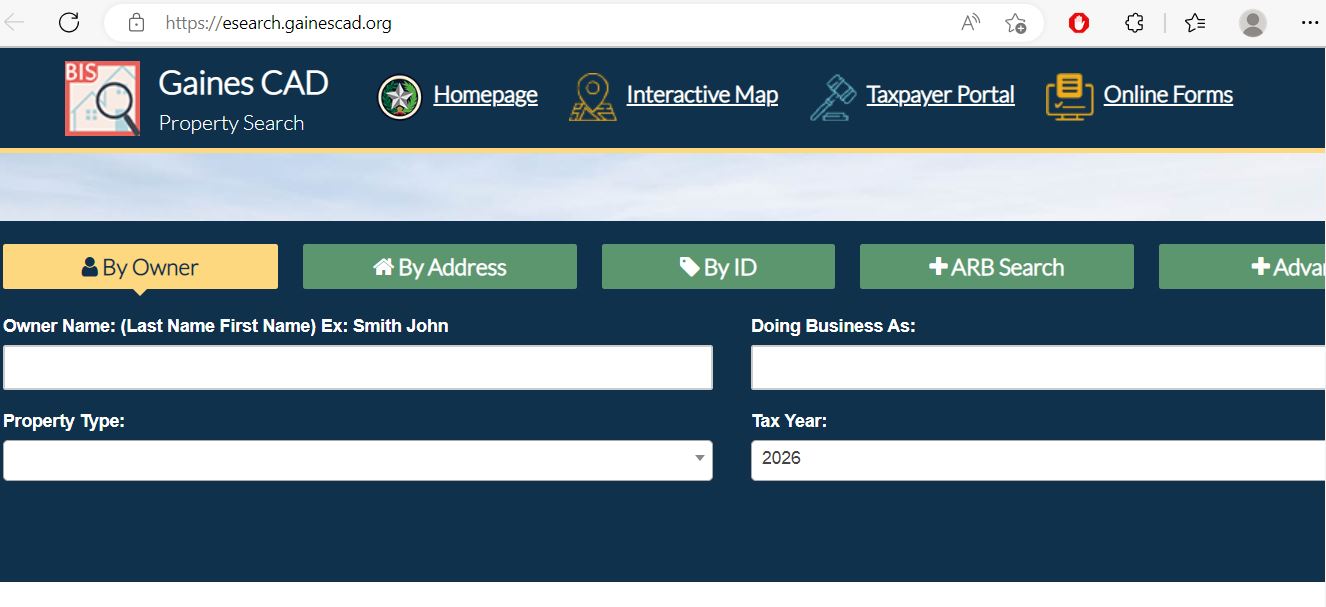
Gaines CAD property search screenshot guide
The image below helps readers understand the type of official appraisal-district record and property lookup screen they should use before making decisions about value, exemptions or protest. Use the image as a visual guide, then open the official search link to verify live data.
What to check on your Gaines County appraisal record
A Gaines CAD record is not just a value number. It can help you find wrong mailing details, missing exemptions, incorrect property type, land-value issues, improvement-value concerns, mineral/industrial notices, business personal property items and appeal evidence.
| Record item | What it means | Why it matters |
|---|---|---|
| Property ID / account | Unique appraisal record identifier | Use it when calling, filing online protest, checking taxes or submitting forms. |
| Owner name | Owner currently shown in CAD records | New buyers, heirs and business owners should confirm ownership is updated correctly. |
| Mailing address | Address used for notices and correspondence | Wrong mailing address can cause missed value notices, protest deadlines and tax communication. |
| Market value | CAD’s opinion of market value for the tax year | Most protests focus on value being too high or unequal compared with similar properties. |
| Land value | Value assigned to land, acreage or site portion | Important for farm/ranch land, vacant land, location issues and productivity/special appraisal review. |
| Improvement value | Value assigned to houses, buildings or structures | Check square footage, age, condition, damage, building type and structure quality. |
| Exemptions | Homestead, over-65, disability, disabled veteran, agricultural/timber or other qualifying status | Missing exemption can affect taxable value and should be corrected quickly. |
| Taxing units | County, city, school, hospital, emergency service or other districts tied to the account | Taxing units and rates affect the tax bill, even though CAD’s job is appraisal and records. |
Official Gaines CAD tools and when to use them
Gaines CAD provides separate official routes for property search, forms, online protest, maps, truth-in-taxation, electronic communication, public data and helpful videos. Using the correct tool saves time and avoids broken third-party links.
| Official resource | Best use | Practical tip |
|---|---|---|
| Property Search | Owner, address, value, property ID and account details | Save the property ID after finding the correct record. |
| Online Forms | Exemption forms, applications and official CAD paperwork | Use the latest form from Gaines CAD or Texas Comptroller, not old PDF copies from random sites. |
| Online Protest | Filing protest electronically where available | Keep confirmation proof and upload evidence in clear file names. |
| Interactive Map | Parcel location, boundary review, land context and nearby-property check | Very useful for acreage, land, rural property and comparable-property review. |
| Truth in Taxation | Tax rates, public tax-rate information and taxing unit context | Use this to understand rates, but use CAD for values and tax office for bills/payment. |
| Helpful Videos | Learning how to present an ARB case | Watch before your hearing so your evidence is organised and concise. |
Gaines County homestead exemption and other exemption checks
Before spending time on a value protest, first check exemptions. A missing homestead, over-65, disability, disabled veteran, agricultural or timber-related exemption can create a bigger tax impact than a small market-value change.
How to file a Gaines CAD protest with stronger evidence
Property owners can protest several appraisal-district actions, including market value, unequal appraisal, exemptions, ownership, taxing units, agricultural/timber qualification and other record issues. A good protest is not just “my taxes are high.” It explains exactly what is wrong and supports the correction with evidence.
Evidence that actually helps in a Gaines County appraisal protest
The strongest evidence is specific to your property. A short, organized packet usually works better than a long emotional explanation without documents.
- Recent comparable sales from a similar local market
- Dated photos of damage or poor condition
- Repair estimates from contractors
- Closing statement if the property recently sold
- Independent appraisal or broker market analysis
- Wrong square footage or improvement size
- Incorrect year built, condition or quality
- Wrong land size, use or classification
- Incorrect owner or mailing address
- Mineral, business personal property or special appraisal issue
- Only saying “taxes are too high”
- Random screenshots without address or date
- Comparing unlike properties
- Using old market data without context
- Submitting unlabeled files
Mineral, industrial, agricultural and business personal property notes
Gaines County property owners often search beyond standard residential homes. The Gaines CAD website includes public information and data downloads for real property, personal property and mineral property. That matters for owners with oil/gas interests, business equipment, agricultural land, rural acreage or industrial-related accounts.
| Property type | What to check | Practical tip |
|---|---|---|
| Residential home | Market value, improvement value, homestead, square footage and condition | Check exemptions first, then compare similar homes if value looks high. |
| Farm, ranch or acreage | Land classification, acreage, productivity/special appraisal and map details | Use interactive maps and official forms if land use or special appraisal status is the issue. |
| Mineral property | Owner information, mineral notices, valuation data and account details | Keep copies of notices and contact CAD early if the owner or mailing address is wrong. |
| Business personal property | Rendition, equipment, inventory, depreciation and account classification | Use official business personal property resources and keep asset records organized. |
| Industrial or utility-related account | Notices, public information, account type and appraisal documentation | Do not treat industrial or utility accounts like a simple home protest; use documentation specific to that property type. |
Common Gaines CAD mistakes to avoid
Most delays happen because users search the wrong record, call the wrong office, miss the deadline, ignore exemptions or file a protest without evidence.
| Mistake | Why it causes problems | Better action |
|---|---|---|
| Calling CAD only to pay taxes | CAD handles appraisal matters; tax payment may be handled through payment/tax office routes. | Use Gaines CAD for value/exemption/protest and the tax office/payment portal for tax bill payment. |
| Ignoring the mailing address | Notices may go to the wrong address, causing missed deadlines. | Confirm mailing address every year and after purchase, inheritance or business address change. |
| Filing protest without documents | ARB needs evidence, not only opinion. | Prepare photos, estimates, comparable sales, maps and record-correction proof. |
| Using the wrong property type comparison | Residential, agricultural, mineral and business property are not valued the same way. | Use evidence that matches your property type and market. |
| Using old forms | Outdated forms can delay processing or miss required fields. | Download current forms from Gaines CAD or the Texas Comptroller. |
Gaines CAD vs Gaines County Tax Assessor-Collector
This distinction is important. Gaines CAD values property and manages appraisal records. Tax office resources help with tax bills, payment, receipts and tax collection functions. Some Gaines CAD pages connect to online payment options, but users should still understand which office handles which issue.
| User need | Correct place | What to do |
|---|---|---|
| Search property value, owner or exemptions | Gaines CAD | Use official property search and forms/eServices. |
| File protest or review appraised value | Gaines CAD / ARB process | Use online protest or official protest procedure before the deadline. |
| Review maps or parcel location | Gaines CAD interactive map | Use the GIS map to verify location, parcel context and nearby properties. |
| Pay property tax or check receipt | Gaines CAD payment link / Gaines County Tax Assessor-Collector as applicable | Use official payment/tax office resources and confirm convenience fees before paying. |
| County tax office contact | Gaines County Tax Assessor-Collector | Use the county tax office for tax-office questions at 101 S. Main St., Room 205, Seminole. |
Gaines County buyer, landowner and investor tips
Gaines CAD records can help before buying property, inheriting land, leasing mineral rights, opening a business or checking tax exposure. But CAD records should not replace title review, survey, mineral ownership research, inspection, legal advice or tax advice.
- Check current value and prior-year value
- Confirm homestead status after closing
- Review square footage and improvement details
- Verify mailing address after deed update
- Estimate tax separately from listing price
- Check acreage and legal description
- Review agricultural/special appraisal status
- Use interactive map for parcel context
- Keep land-use documents organized
- Do not ignore change-of-use notices
- Check business personal property obligations
- Review mineral or industrial notices if applicable
- Use data downloads for research
- Separate CAD value from final tax bill
- Keep property ID in your records
Gaines County Appraisal District contact details
Before calling, write down the property ID, owner name, property address and your exact question. This helps the staff route you faster and reduces repeat calls.
| Contact item | Official detail | Best use |
|---|---|---|
| Office name | Gaines County Appraisal District | Use for appraisal, exemptions, ownership records, maps and protests. |
| Phone | 432-758-3263 | Use for property record, exemption, protest, form and account questions. |
| Fax | 432-758-3674 | Use only when official instructions allow fax submission. |
| gainescad@gainescad.org | Use for non-urgent written questions and documentation follow-up. | |
| Mailing address | PO Box 490, Seminole, TX 79360 | Use for mailed forms or correspondence when allowed by official instructions. |
| Physical address | 302 S. E. Ave. B, Seminole, TX 79360 | Use for office visit, document drop-off or appointment planning. |
| Hours | Monday–Friday, 8:30 AM–5:00 PM | Call before visiting near deadlines, holidays or hearing season. |
Gaines CAD office map
Use this map for route planning to the Gaines CAD office in Seminole. If you are going for a protest, exemption, evidence submission or property-record correction, confirm required documents and current office instructions before leaving.
Official helpful video resources for ARB hearing preparation
Gaines CAD links to official helpful videos for property owners and small businesses preparing to present a case at an Appraisal Review Board hearing. These are stronger than random YouTube videos because they are tied to official Texas property-tax protest education.
Open Gaines CAD helpful videos and watch the homeowner ARB case presentation resource before your hearing.
The helpful videos page also links to small-business ARB case guidance. Use it if your issue involves business personal property, inventory or business-related appraisal concerns.
Official Gaines CAD and property-tax resources
Use these official links for final confirmation before filing a protest, applying for an exemption, checking tax-rate information, searching a property or visiting the office.
Gaines County Appraisal District official website Official Gaines CAD property search Official Gaines CAD online forms Official Gaines CAD forms page Official Gaines CAD online protest Official protest and appeal procedures Official interactive map Official helpful videos page Official data downloads Official Gaines CAD contact page Gaines County Tax Assessor-Collector Texas Comptroller property tax informationGaines County Appraisal District FAQs
What is the official Gaines County Appraisal District website?
The official website is gainescad.org. Use it for Gaines CAD property search, online forms, online protest, interactive maps, public information, helpful videos and official contact details.
How do I search Gaines CAD property records?
Open the official property search at esearch.gainescad.org. You can search by owner, address, property ID or advanced search options. Confirm the property ID, address and owner before relying on the result.
What is the Gaines County Appraisal District phone number?
The main Gaines County Appraisal District phone number is 432-758-3263. Have your property ID, owner name, address and question ready before calling.
Where is Gaines County Appraisal District located?
Gaines CAD is located at 302 S. E. Ave. B, Seminole, Texas 79360. The mailing address is PO Box 490, Seminole, TX 79360.
What are Gaines CAD office hours?
The official contact information lists Monday through Friday, 8:30 AM to 5:00 PM. Call before visiting near holidays, protest season or deadline-sensitive filings.
How do I file a Gaines CAD protest online?
Use the official Gaines CAD online protest portal at eprotest.gainescad.org when available for your account. Read your notice, confirm the deadline, choose the correct protest reason and keep proof of submission.
What is the usual protest deadline for Gaines County property owners?
The official protest procedure page explains the usual deadline is not later than May 15 or within 30 days after the notice of appraised value was mailed, whichever is later. Always confirm your exact notice deadline.
What evidence helps in a Gaines CAD protest?
Helpful evidence includes comparable sales, dated damage photos, repair estimates, closing statements, independent appraisal reports, maps, incorrect square-footage proof, land-use proof and documentation specific to your property type.
Does Gaines CAD handle property tax payments?
Gaines CAD provides payment links and appraisal information, but tax bill and tax office matters may involve the Gaines County Tax Assessor-Collector. Use CAD for appraisal, exemptions and protest; use tax office/payment resources for tax bill and payment questions.
How do I check exemptions for a Gaines County property?
Search your official property record, review exemption status, then use Gaines CAD forms or online forms to apply or correct exemptions. Keep proof of filing and check the account later for status updates.
Last editorial check: June 2026. Official details can change without notice; verify your exact account on GainesCAD.org or the official county tax office resources before filing, protesting, paying or visiting.

Founded by Mahesh Kumar, AppraisalDistrict.org is built on the belief that public information should be accessible and accurate. We have replaced AI-generated ‘fluff’ and automated scraping with 100% manual human verification. With over 15 years of experience in real estate and digital journalism, we help you find the right data without the frustration of broken links.
Search Smarter, Estimate Taxes, Check Exemptions and Prepare for a Protest
Use this free tool before you visit a county appraisal district, property search portal, tax office, or exemption page. It helps you understand property value, taxable value, possible savings, protest value, and the next official step.
What do you need help with today?
Choose your main reason for visiting. The tool will show the best next step and quick estimate.
Use this tool to check your appraisal notice, exemption savings, protest value, and official next step.
Use the tax calculator before trusting only the sale price or mortgage estimate.
Property Search Helper
Use this when a county property search portal is confusing. It shows which search method is usually best.
Property Tax Estimate Calculator
Estimate annual property tax using appraised value, assessment ratio, exemptions, and combined tax rate.
Homestead and Exemption Savings
Estimate how much a homestead, senior, disability, veteran, or local exemption may reduce tax.
Appraisal Notice Review
Compare last year value with this year value and see whether the increase deserves closer review.
Property Tax Protest Savings
Estimate possible savings if your appraised value is reduced after protest, correction, evidence review, or appraisal review board hearing.
Property Tax Protest and Exemption Checklist
Use this checklist before you file a protest, apply for exemption, or call the appraisal district.
Before calling, write your property ID, owner name, property address, and question on paper. It saves time.
Do not call the CAD to pay tax bills unless the local article says they collect taxes. In many counties, the tax office collects payment.
Official Resource Finder
Enter county and state to create safe searches for official CAD pages, property search, tax payment, exemptions, maps, forms, and protest help.
CAD vs Tax Office
- Appraisal District: value, exemptions, ownership records, maps, protest.
- Tax Office: tax bill, payment, receipt, delinquent balance, penalty.
Best place to use this
Add this tool after the first major content section or before the FAQ area. It gives visitors a reason to interact before leaving the page.
Important estimate note
This tool gives educational estimates only. Final values, exemptions, tax rates, bills, payments, and deadlines must be confirmed with official county sources.