
Match the Right Hidalgo County Parcel Before You Pay, Protest or File
Begin with Hidalgo County Appraisal District when you need the owner display, property address, PropID, legal description, appraisal value, exemption, land detail or improvement information. Move to the Hidalgo County Tax Office only when you need the bill, balance, payment status or receipt.
This rebuilt guide explains the official search screen, every useful identifier, no-result fixes, homestead verification, protest preparation, tax-payment checks, deed research and local situations involving McAllen, Edinburg, Mission, Pharr, Weslaco and surrounding Rio Grande Valley communities.
Use hidalgoad.org/property-search for appraisal records.
Search by owner, address, account, CAD reference or fiduciary number.
May 15 or 30 days after the notice is mailed, whichever is later.
4405 S. Professional Drive, Edinburg, Texas 78539.
Contacts, portals and procedures checked July 28, 2026.
What are you trying to do with the Hidalgo County property?
This helper runs in your browser. It does not request or transmit an owner name, address, PropID, account number or tax information.
Search Hidalgo CAD and verify the year, property type, address and identifiers before relying on the result.
Follow the CAD search stepsUse the CAD map for research and comparison, then use deeds, plats or surveys when legal accuracy matters.
Use map search safelyCarry the CAD reference or account information into the Tax Office portal and verify the correct tax year.
Search the tax accountUse the County Clerk when an appraisal owner display is not enough to prove a transfer or encumbrance.
Search official recordsSave the property record, identify the exact error and organise evidence before filing or attending a hearing.
Build the protest fileConfirm the recorded deed, search the new account and verify that the correct exemption appears for the correct year.
Follow the new-owner checklistSearch Hidalgo CAD by property identifier, owner or address
Prepare these details first
Use the visible Hidalgo CAD search controls correctly
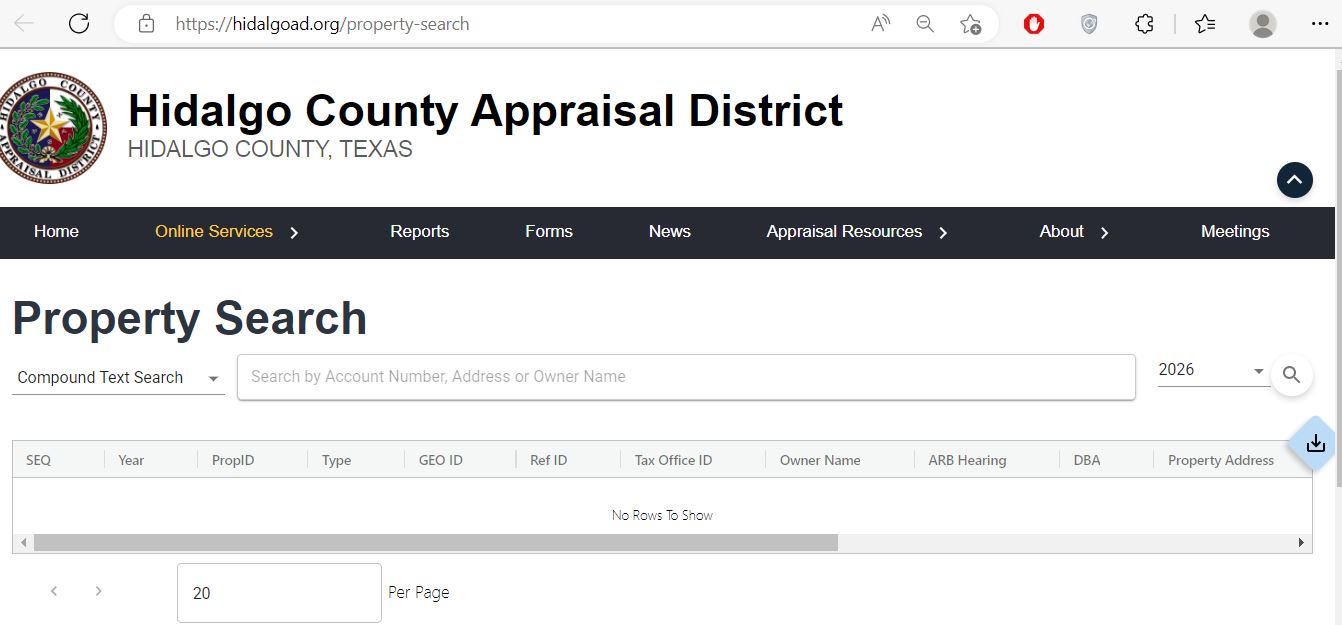
Use the dropdown when the portal provides additional search modes or a more precise property field.
Start with the strongest identifier. Use fewer words when a full owner name or address produces no result.
Do not compare a 2026 appraisal record with a 2025 tax bill without recognising the year difference.
The result table can include PropID, GEO ID, Ref ID, Tax Office ID, owner, DBA, ARB and address fields.
Understand the Hidalgo CAD fields before using the record
| Field | What it helps identify | What it does not prove | Best next action |
|---|---|---|---|
| Year | The appraisal year connected to the displayed value and property data. | That a current tax bill has already been calculated for that year. | Match the year to the notice, tax bill or protest. |
| PropID | A property identifier used within the appraisal system. | That another county portal uses the same field name or number. | Save it with the property address and owner. |
| GEO ID | A geographic or parcel-related reference associated with the appraisal record. | A surveyed boundary, legal acreage or deed instrument. | Use it with the CAD map and legal description. |
| Ref ID | A reference used to connect or distinguish the appraisal record. | That it is the Tax Office account or County Clerk instrument number. | Use the exact identifier requested by each portal. |
| Tax Office ID | The identifier that may help match the property with a tax collection account. | The current tax balance or payment status. | Verify it through the Hidalgo County Tax Office search. |
| Owner name | The owner currently displayed for appraisal administration. | Complete legal title, lien status or every ownership interest. | Use the County Clerk for the recorded deed. |
| Property address | The physical or assigned situs location connected to the account. | The complete legal description or boundary. | Compare the legal description and map. |
| Legal description | The lot, block, subdivision, tract, unit or abbreviated land description. | That the CAD version contains every deed restriction or exception. | Match it with the deed and recorded plat. |
| Market value | The appraisal district’s estimate of market value as of January 1. | The sale price, mortgage appraisal or final tax bill. | Review characteristics and comparable evidence. |
| Appraised value | The value after an applicable appraisal limitation or special treatment. | That the market value cannot be reviewed or protested. | Compare it with market and taxable values. |
| Exemptions | Residence homestead, age, disability, veteran or another approved exemption. | That every taxing unit applies the same exemption amount. | Review the taxable value for each taxing unit. |
| ARB hearing | A protest or Appraisal Review Board-related status shown in the result system. | That a deadline, hearing date or settlement remains unchanged. | Open the public portal and read the current notice. |
Fix a Hidalgo County owner or address search that returns nothing
| Problem | Likely reason | Best fix |
|---|---|---|
| Full owner name returns nothing | The account may use surname-first order, initials, a spouse, trust, estate or business name. | Search only the surname or main business word. |
| Too many owner matches | The surname is common or the owner holds several parcels. | Add the city, street, subdivision or a second property detail. |
| Full address returns nothing | The record may omit a directional, suffix, unit or city, or use a different abbreviation. | Enter only the street number and main street name. |
| New owner is not shown | The recorded deed or CAD ownership update may still be processing. | Confirm the Clerk recording, then provide the instrument details to CAD. |
| Rural tract has no street address | The land may be indexed mainly by owner, legal description, GEO ID or parcel location. | Search by owner or identifier and use the map. |
| Subdivision lot is unclear | Several lots can share similar street or mailing information. | Compare lot, block, subdivision, PropID and legal description. |
| Business property is missing | Business personal property and real estate can use separate accounts or names. | Search the exact business entity, DBA and physical location. |
| CAD and tax search do not match | The portals use different identifiers, years or update schedules. | Match owner, address, legal description and year before calling. |
Follow the Hidalgo County value from January appraisal to tax bill
The appraisal district’s estimate of value as of January 1 for the selected appraisal year.
The value after an applicable cap, limitation or special appraisal treatment.
The value remaining after the exemptions allowed by a particular taxing unit.
The Tax Office applies the certified values and adopted rates for the units it collects.
Use Hidalgo CAD map search when the address is not enough
Map search is especially useful for rural acreage, agricultural land, subdivision lots, commercial tracts, parcels near city boundaries and properties without a reliable street address.
Confirm the exemption on the property—not only the application receipt
Hidalgo CAD handles residence homestead, over-65, disability, disabled-veteran, surviving-spouse, agricultural, business and other property-tax applications. Use the correct form and read its evidence requirements before submitting.
Do not assume the seller’s homestead, cap, age exemption or tax ceiling continues after the sale.
Verify the exemption and ask the Tax Office about any qualifying installment or payment option.
Special appraisal depends on qualifying use and evidence. Ownership or acreage by itself does not guarantee approval.
Build the Hidalgo County protest around a specific property error
Because it is now July 2026, the ordinary deadline has passed for many accounts. A notice mailed later can create a later deadline, and limited late-protest or correction procedures may apply in specific circumstances. Contact Hidalgo CAD promptly rather than assuming no remedy exists.
Practical evidence checklist
Stronger argument: “The record includes 420 square feet that does not exist, the roof requires documented replacement and three similar properties are appraised below this account after adjusting for size.”
Use the Hidalgo County Tax Office search after confirming the parcel
The official tax portal allows searches by owner name, property address, account number, CAD reference number or fiduciary number. It also permits an optional second search criterion to narrow a broad result.
The county’s FAQ directs taxpayers to the registration link on the property-tax balance page before September 15 for electronic statements.
Compare the tax account with the mortgage servicer’s disbursement record before making a possible duplicate payment.
The county states that tax statements are mailed in October or soon thereafter. Contact the collecting office when one does not arrive.
Use the Hidalgo County Clerk when the CAD owner field is not enough
The Hidalgo County Clerk records documents that establish or affect interests in real property. These include warranty deeds, liens, judgments, trustee deeds, foreclosure documents, subdivision plats and financing statements.
Edinburg, Texas 78539
Mailing: P.O. Box 58, Edinburg, TX 78540
Phone: 956-318-2100
Toll free: 888-318-2811
Fax: 956-318-2105
Published hours: Monday–Friday, 8:00 AM–5:00 PM.
- Warranty deeds and trustee deeds
- Property liens and judgments
- Recorded releases
- Subdivision plats
- Foreclosure-related recordings
- Plain or certified official-record copies
Adjust the search to the type and location of the property
Use the street number and main street name, then verify the city, school district, property type and improvement details.
A recently created lot may have a new PropID or legal description. Search the buyer, seller, subdivision and prior parent tract.
Check the exact city, school district and special districts rather than assuming every nearby parcel has the same taxing units.
Similar street names and repeated family names can produce several matches. Add a PropID, subdivision or second criterion.
Verify both the municipal and school-district entries before estimating a tax bill from a neighbouring property.
Search by owner, GEO ID, legal description and map location. Review productivity or special-appraisal fields separately from market value.
Search the legal business name, DBA and physical location. Equipment or inventory accounts may be separate from the real-estate parcel.
Search the deceased owner, estate and family names, then confirm probate and recorded deed documents before requesting an ownership update.
Do not assume the seller’s exemptions, capped value or tax ceiling will continue. Review the property as it may apply to the buyer.
Contact the Hidalgo County office that controls the record
Use for appraisal records, values, exemptions, property details, map search, public portal, protests and appraisal-account corrections.
4405 S. Professional DriveEdinburg, Texas 78539-6556
Mailing: P.O. Box 208, Edinburg, TX 78540-0208
Phone: 956-381-8466
Fax: 956-289-2120
Email: cs@hidalgoad.org
The Texas Comptroller directory currently lists Rolando Garza as Chief Appraiser and Lydia Elizondo as Taxpayer Liaison.
Use for tax statements, balances, online payment, receipts, delinquent accounts and tax-collection questions.
2804 S. Business Highway 281Edinburg, Texas 78539
Mailing: P.O. Box 178, Edinburg, TX 78540-0178
Phone: 956-318-2157
Fax: 956-318-2733
Tax Assessor-Collector: Pablo “Paul” Villarreal, Jr.
Published hours: Monday–Friday, 8:00 AM–4:30 PM.
Use for deeds, liens, judgments, releases, plats, recorded ownership documents and official copies.
100 N. ClosnerEdinburg, Texas 78539
Mailing: P.O. Box 58, Edinburg, TX 78540
Phone: 956-318-2100
Toll free: 888-318-2811
Published hours: Monday–Friday, 8:00 AM–5:00 PM.
Hidalgo County publishes tax-office locations in McAllen, Mission, Pharr, Weslaco, San Juan, Elsa and Alamo in addition to the main Edinburg office.
The Alamo substation is currently listed for Mondays and Tuesdays only. Confirm the location, hours and available service before travelling.
Check current branch detailsOpen the exact Hidalgo County property resource
Official appraisal district homepage, notices, meetings, reports and owner services.
Open Hidalgo CADSearch the appraisal record by account, owner, address or available search criteria.
Search property recordsUse account-specific services for available protest, evidence, exemption and owner tasks.
Open public portalFind homestead, age, disability, veteran, agricultural, rendition and protest forms.
Open Hidalgo CAD formsReview current filing, informal review, evidence and ARB guidance.
Review protest processResearch parcel location, surrounding appraisal accounts and geographic context.
Open map searchFind tax balance, payment history, receipts and available online payment methods.
Open tax searchSearch deeds, liens, judgments, releases, plats and recorded property documents.
Search official recordsRelated AppraisalDistrict.org guides
How this Hidalgo County guide was rebuilt

The image already used on the original article has been preserved in this editorial-review section. The property-search instructions, official links, office routing, troubleshooting, local scenarios and action steps were independently rebuilt around Hidalgo County’s current public resources.
Last reviewed July 28, 2026. Search layouts, office personnel, values, deadlines, tax balances, forms, fees, branch schedules and online services can change after publication.
Hidalgo County Texas property search FAQs
What is the official Hidalgo County property search?
Use the Hidalgo County Appraisal District property search for appraisal records, owner display, property details, values, exemptions and parcel information. Use the Hidalgo County Tax Office search separately for tax balances, payments and receipts.
Can I search Hidalgo County property by owner name?
Yes. Use a shortened owner-name search when a full name fails. Try the surname first, then compare every possible result with the property address, PropID, legal description and property type.
Why does a Hidalgo CAD address search return no result?
The record may abbreviate the road, omit a directional, use a subdivision description or contain no conventional situs address. Search with the street number and main street name, then try the owner, property identifier or map search.
What do PropID, Ref ID and tax account number mean?
They are identifiers used by different property and tax systems. They are not always interchangeable. Save every identifier displayed with the property and use the field requested by the official portal you are searching.
How do I check a Hidalgo County homestead exemption?
Open the appraisal record and review the exemption and taxable-value information for the correct year. When an expected exemption is missing, use Hidalgo CAD forms or the public portal and contact the appraisal district with the account number and filing confirmation.
What is the Hidalgo County appraisal protest deadline?
Most Texas appraisal protests are due May 15 or 30 days after the appraisal district mails the Notice of Appraised Value, whichever is later. The deadline printed on the Hidalgo CAD notice controls. Contact the district promptly if a notice was mailed later or the ordinary deadline has passed.
Where do I pay Hidalgo County property taxes?
Use the Hidalgo County Tax Office property-tax portal. Search by owner name, property address, account number, CAD reference number or fiduciary number, verify the property and year, review any payment fee and save the receipt.
How do I correct ownership on a Hidalgo County property record?
First confirm that the ownership document was recorded with the Hidalgo County Clerk. The county states that an ownership correction requires a recorded legal document and that an unrecorded document is not acceptable. Then provide the recording details to the appraisal district or tax office.
Where can I search Hidalgo County deeds and liens?
Use the Hidalgo County Clerk Official Records Search for deeds, liens, judgments, releases, plats and other recorded property documents. The Clerk provides online searching, viewing, printing and downloading.
Does the Hidalgo CAD parcel map prove a legal boundary?
No. A CAD map is useful for locating and comparing appraisal parcels, but it should not replace a recorded deed, subdivision plat or licensed survey when ownership or legal boundary accuracy matters.