
Search Irion CAD Records and Route Real, Mineral or Personal Property to the Right Office
Irion County property research is not limited to houses in Mertzon. The official database also contains ranch land, open-space accounts, mineral interests, oil-and-gas leases, utility or industrial property and taxable business assets.
Begin with Irion County Appraisal District for appraisal records, values, exemptions and protests. Use the Irion County Tax Assessor-Collector for tax bills and payment confirmation, and use the County Clerk for recorded deeds, liens and other official land documents.
REAL, MINERAL and PERSONAL property can be filtered separately.
209 N. Parkview, Mertzon, Texas 76941.
Irion County Tax Assessor-Collector, also at 209 N. Parkview.
Mineral, utility and industrial accounts are handled by a contracted appraisal firm.
Official links and local procedures reviewed July 2026.
Choose the Irion County property task you need to complete
Search by owner, property ID, Geo ID, address, abstract, subdivision or legal description.
Follow the property-search stepsFilter for MINERAL and use lease number, lease name, owner ID, legal description or property ID.
Use the mineral workflowFilter for PERSONAL and search the business, owner, property ID or doing-business-as name.
Review rendition requirementsPrepare identification, ownership and qualification evidence before sending the application.
Review exemption and ag stepsSave the account, request a PIN when needed and file before waiting for perfect evidence.
Build a protest packetUse the Tax Assessor-Collector for payment and the County Clerk for recorded ownership documents.
Choose the correct officeSearch Irion CAD real, mineral and personal property records
Use the original Irion CAD screenshot to understand the result tools
The image from the existing article has been retained. It shows the official search-result screen and the controls users can use to change the view or preserve the result.
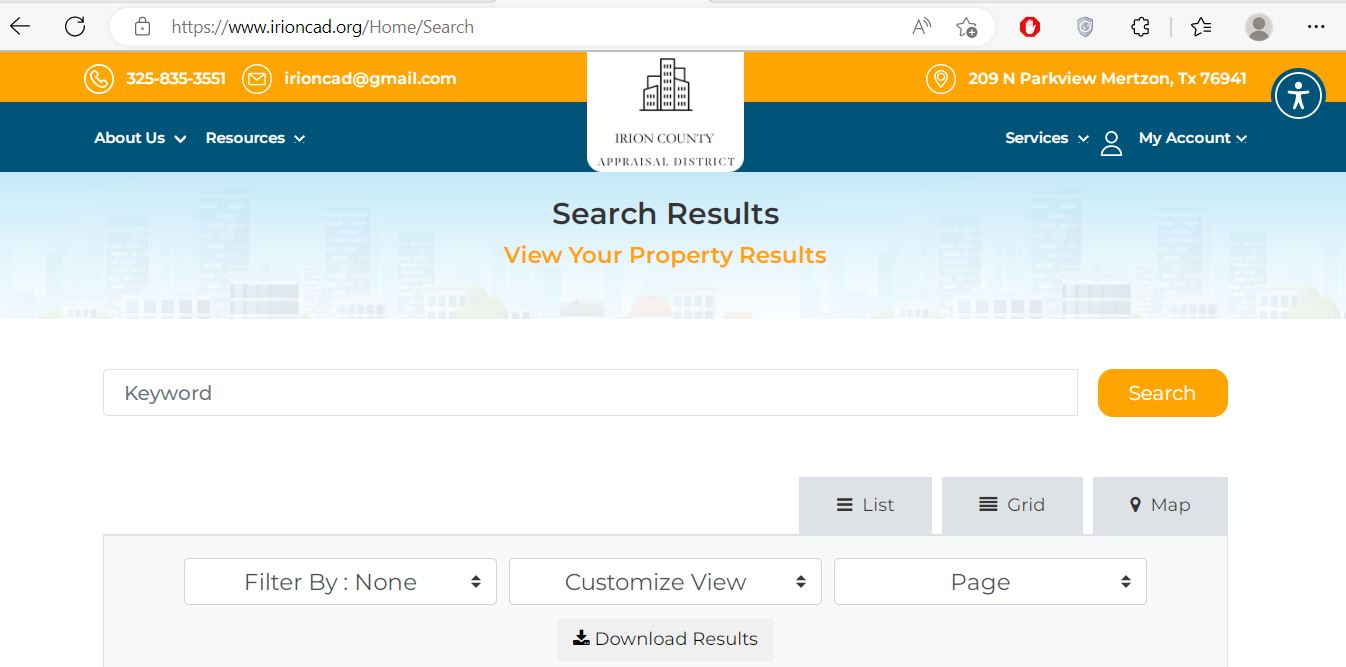
Use a broad owner, property ID or address search before adding more details.
Useful for comparing several accounts belonging to one owner or lease.
Use these to compare account fields and approximate parcel location.
Save a copy before filing an exemption, protest or correction request.
Recognise the Irion CAD filters and verification points
Choose the account before entering details
Search an Irion County mineral interest without confusing it with the surface tract
| Problem | Why it happens | What to try |
|---|---|---|
| Royalty account is missing | The record may be under a trust, estate, prior owner, operator or different spelling. | Owner ID, Property ID, Geo ID, lease name and legal description. |
| Surface owner appears but minerals do not | Surface and mineral ownership are separate legal interests. | Switch the property-type filter from REAL to MINERAL. |
| One lease shows several records | Separate owners or fractional interests can have separate accounts. | Compare owner, interest, property ID, legal description and year. |
| Value changed sharply | Production, reserves, pricing, ownership or appraisal inputs may have changed. | Request the appraisal basis and prepare production or ownership documentation. |
| Recently transferred interest is outdated | Recorded ownership documents may not yet be processed into the appraisal account. | Confirm the recorded instrument and contact the district with documentation. |
Use the map view for rural land without treating it as a survey
The official search provides a Map view within the result interface. It can help distinguish tracts with similar owner names, addresses or legal descriptions.
Understand the Irion CAD account before acting on it
| Account field | What it helps identify | What it does not prove | Best next action |
|---|---|---|---|
| Property type | REAL, MINERAL or PERSONAL account classification. | That every related interest or asset is in the same account. | Search other property types when something appears missing. |
| Property ID | The individual Irion CAD appraisal account. | That an outside tax or deed system uses the same number. | Save it for calls, filings and payment verification. |
| Geo ID | Geographic or parcel-related indexing information. | A surveyed legal boundary. | Compare it with the map, deed and survey. |
| Owner shown | The owner maintained for appraisal administration. | Complete legal title or every mineral interest. | Use County Clerk records when ownership matters. |
| Legal description | The abstract, survey, section, block, tract, lot or other legal reference. | That the abbreviated CAD text is sufficient for conveyance. | Obtain the recorded deed or full legal description. |
| Lease number or name | The oil-and-gas or mineral lease connected to an account. | Current production, payment or complete ownership. | Compare with operator, royalty and recorded-document information. |
| Market value | The district’s opinion of market value as of January 1. | A guaranteed sale price or final tax bill. | Compare condition, sales, production or equal-appraisal evidence. |
| Appraised value | Value after an applicable statutory limitation. | The value after every exemption. | Continue to taxable value by taxing entity. |
| Productivity or 1-d-1 value | The special appraisal applied to qualifying agricultural land. | That the qualification will continue after a sale or use change. | Confirm qualification, history and intended future use. |
| Taxable value | Value after applicable exemptions for a taxing entity. | The live balance, payment status or penalty amount. | Contact the Tax Assessor-Collector or review the official statement. |
Separate market, appraised and taxable value
The appraisal district’s estimate of market value as of January 1 for the selected tax year.
The value after an applicable statutory limit, such as a qualifying homestead cap or circuit-breaker limitation.
The value remaining after exemptions. It may differ for the county, school, city and water district.
Who appraises each type of property?
Irion CAD states that real-estate and personal-property accounts are appraised locally by the district.
The district states that these specialised accounts are appraised by Thomas Y. Pickett & Company.
Fix an Irion CAD search that returns no result
| Problem | Likely reason | Practical fix |
|---|---|---|
| Owner name finds nothing | The record may use a trust, estate, spouse, business, operator or different name order. | Search the last name or one organisation word, then try owner ID. |
| Address search fails | Rural land or mineral records may not have a standard situs address. | Use Property ID, Geo ID, abstract, legal description or owner. |
| Mineral interest is missing | The search is still filtered for REAL property. | Select MINERAL and search lease, owner, legal or property identifiers. |
| Business account is missing | The account may be under a DBA, owner or PERSONAL property type. | Select PERSONAL and try the business name, owner ID or Property ID. |
| Too many accounts appear | The owner has several tracts, leases or mineral interests. | Add property type, Geo ID, abstract, lease name or legal description. |
| Recently transferred record is outdated | The deed or mineral conveyance may still be processing. | Confirm recording and send the district the requested ownership documents. |
| Tax due filter shows nothing | The wrong year is selected, the payment posted or the account is not in that filter. | Check the tax year and contact the Tax Assessor-Collector for the live balance. |
| Parcel split is not visible | The child accounts may not yet be available publicly. | Search the parent account and contact CAD with the deed or survey. |
Use a different workflow for each local property type
Search the street address or Property ID, then confirm the homestead exemption and City of Mertzon taxing line.
Search the owner, abstract, legal description, Geo ID and map rather than relying on a road address.
Review market value, productivity value, acreage, category code and 1-d-1 qualification separately.
Select MINERAL and search the lease name, lease number, owner interest and legal description.
Confirm the specialised property type, appraiser, taxable situs and relevant taxing entities.
Select PERSONAL and review the business name, location, rendered assets and appraisal year.
Search the deceased owner, estate, heirs, trust and related deed or probate records.
Determine whether the home and land are separate accounts and whether the ownership documentation is current.
Search real property, related mineral interests, tax balances, deed history, exemptions and agricultural status.
Use Irion CAD, the Tax Office or County Clerk for the correct task
| Your question | Correct office | What to prepare |
|---|---|---|
| What is the appraised value? | Irion County Appraisal District | Property type, Property ID, Geo ID, tax year and disputed value. |
| Why is an exemption missing? | Irion County Appraisal District | Application, identification, qualification date and filing proof. |
| How was a mineral account valued? | Start with Irion CAD | Property ID, lease, owner interest, production or appraisal documents. |
| How much property tax is due? | Irion County Tax Assessor-Collector | Tax account, property ID, year, owner and statement. |
| Did my payment post? | Irion County Tax Assessor-Collector | Receipt, payment date, amount, cheque or confirmation information. |
| Who legally owns the land? | Irion County Clerk or title professional | Grantor, grantee, legal description, date and instrument number. |
| Where can I find a lien or deed? | Irion County Clerk | Names, recording period, legal description and document type. |
| Is the parcel boundary correct? | Surveyor, County Clerk records and title professional | Deed, survey, plat and metes-and-bounds description. |
| Who sets the tax rate? | Each taxing unit | The property’s taxing-entity list and current tax-rate worksheet. |
Correct the record that actually contains the error
File an Irion County exemption with the complete supporting documents
For the owner’s principal residence. Confirm ownership, occupancy and identification requirements.
Can provide additional exemption benefits, a school-tax ceiling and qualifying payment options.
Requires qualification under the applicable disability standard and supporting documentation.
The exemption amount depends on the VA disability category and the applicable form.
Eligibility may depend on age, remarriage, residence and the deceased spouse’s prior qualification.
Use the official electronic-communications request when you prefer eligible tax communications electronically.
Review ranch and open-space land separately from a normal exemption
Agricultural appraisal is a special valuation based on qualifying productivity use. It is not granted merely because a property is large, rural or called a ranch.
Document livestock type, stocking, carrying capacity, leases and management activity.
Prepare planting, harvesting, irrigation, expense, lease and sale records.
Confirm prior open-space qualification and maintain the required wildlife plan and annual evidence.
File an Irion CAD protest before waiting for perfect evidence
Evidence matched to the account type
| Property type | Useful evidence | Common weak argument |
|---|---|---|
| Home or improvement | Comparable sales, dated photographs, measurements, repair estimates and inspection findings. | The tax bill is too high without identifying an appraisal error. |
| Ranch or rural land | Sales, access limitations, topography, survey, acreage, water, fencing and land-use evidence. | All acreage should have the same per-acre value. |
| Mineral interest | Production records, ownership documents, lease information, decline evidence and appraisal inputs. | The surface tract value proves the mineral value. |
| Business personal property | Asset list, acquisition dates, original cost, condition, disposal records and inventory information. | A total estimate without supporting asset records. |
| Exemption or ag use | Application, filing proof, ID, ownership, qualification history and agricultural-use documentation. | The property qualified in a different county or under a prior owner. |
Prepare for the Irion County ARB hearing before the appointment
The ARB hears unresolved disputes between property owners and the appraisal district.
The owner should receive hearing information explaining the date, time, subject and participation method.
The ARB order applies to the protested tax year and should be saved for any further appeal.
File an Irion County business-personal-property rendition correctly
Businesses generally must report taxable tangible personal property used to produce income, including furniture, fixtures, equipment, machinery and inventory owned or managed on January 1.
Confirm the Irion County tax account before sending payment
| Check | Why it matters | What to save |
|---|---|---|
| Correct property type | A mineral, real-estate or personal-property account can have a separate balance. | Property type and Property ID. |
| Correct tax year | A payment can be applied to the wrong year when several balances exist. | Statement year and payoff date. |
| Current amount due | Penalty, interest or a correction can change the balance. | Dated payoff or official statement. |
| Collector and mailing address | The CAD and Tax Office use different P.O. boxes despite sharing a physical location. | Collector name and address printed on the statement. |
| Payment confirmation | It proves when, how and where payment was submitted. | Receipt, cheque image or confirmation number. |
Use the Irion County Clerk for deeds, liens and official property records
Complete these checks before relying on an Irion County property record
Confirm the Property ID, Geo ID, legal description, map location and acreage.
Determine whether mineral or royalty interests are separate from the surface ownership.
Verify current and delinquent amounts directly with the Tax Assessor-Collector.
Search recorded deeds, mineral instruments, liens and releases through the County Clerk.
The seller’s exemptions, cap, ceiling or agricultural appraisal may not continue.
Review county, school, city and water-conservation taxing lines connected to the account.
Confirm qualifying history and ask whether the planned use could create additional tax liability.
A purchase can involve personal-property accounts that are not part of the real-estate account.
Keep the deed, title policy, survey, probate documents, tax statements and exemption filing proof.
Important Irion County appraisal and property-tax dates
Irion County appraisal, tax and property-record offices
Mertzon, Texas 76941-9998
Mailing: P.O. Box 980, Mertzon, Texas 76941-0980
Phone: (325) 835-3551
Fax: (325) 835-2018
Email: irioncad@gmail.com
Hours: Monday-Thursday 8:00 AM-4:30 PM; Friday 8:00 AM-4:00 PM.
Chief Appraiser: The Texas Comptroller directory lists Byron Bitner. Confirm the current name before addressing formal correspondence.
Mertzon, Texas 76941
Mailing: P.O. Box 859, Mertzon, Texas 76941-0859
Phone: (325) 835-7771
Fax: (325) 835-2195
Email: tacajg@outlook.com
Hours: Monday-Thursday 8:00 AM-4:30 PM; Friday 8:00 AM-4:00 PM. The office states that it remains open during lunch.
Tax Assessor-Collector: Joyce Gray
209 N. Parkview
Mertzon, Texas 76941
Mailing: P.O. Box 270, Mertzon, Texas 76941
Phone: (325) 835-2421
Fax: (325) 835-7941
Hours: Monday-Thursday 8:00 AM-4:30 PM; Friday 8:00 AM-4:00 PM.
County Clerk: Shirley Graham
The CAD, Tax Assessor-Collector and County Clerk are associated with the 209 N. Parkview courthouse location, but they use different mailing addresses and perform different tasks.
Write the office name, account identifier and tax year clearly on every mailed request.
Use these official resources for the final live action
Official contacts, district responsibilities, hours and taxing-entity information.
Open Irion CADSearch real, mineral and personal property by owner, ID, legal, lease and advanced fields.
Search property recordsDownload homestead, veteran, rendition, agricultural and electronic-delivery forms.
Open Irion CAD formsUse the district’s electronic protest route when the account and notice are eligible.
Open online protestCreate or sign in to an account and request the unique online property PIN.
Request an online PINAccess the district’s hearing-information search when records are available.
View protest hearingsReview appraisal rolls and other downloadable district records.
Open data and reportsConfirm bills, payments, tax worksheets, office hours and current collection instructions.
Open the official Tax OfficeFind property-record search information, request forms, notices and the county fee schedule.
Open the official County ClerkHow this Irion County article was improved

Existing images preserved and the guide rebuilt around complete property tasks
This version retains the search screenshot and editor image used by the existing article while adding complete workflows for real, mineral and personal property, lease searches, account verification, exemptions, agricultural appraisal, online protest, PIN requests, payment confirmation and deed research.
The office routing and contact details were checked against Irion County Appraisal District, the Irion County Tax Assessor-Collector, the Irion County Clerk and the Texas Comptroller’s county directory.
AppraisalDistrict.org is an independent informational website and is not operated by Irion County Appraisal District or Irion County.
10 common Irion County Appraisal District questions
1. What is the official Irion County Appraisal District website?
The official website is irioncad.org. Use it for property search, forms, exemptions, online protest access, hearing information, public records and district contacts.
2. How do I search Irion County property records?
Open the official Irion CAD Property Search and choose Basic Search, By Owner, By Property, All Criteria or Advanced Search. Property ID or Geo ID usually provides the cleanest match.
3. Can I search Irion County mineral properties and leases?
Yes. Select MINERAL and search by owner ID, Property ID, Geo ID, legal description, lease number, lease name or agent. Mineral records may be separate from the surface land.
4. How do I know whether a 2026 Irion CAD value is final?
The portal allows selection of the 2026 tax year, but values can change during the appraisal and protest season. Compare the live account with the Notice of Appraised Value and later verify the certified record.
5. Who handles Irion County property-tax bills and payments?
The Texas Comptroller directory lists Irion County as the collecting unit and identifies the Tax Assessor-Collector as serving Irion County, Irion County ISD, the City of Mertzon and the Irion County Water Conservation District.
6. Can I pay Irion County property taxes online?
A clearly labelled public online property-tax payment link was not visible on the official county tax page during this review. Call (325) 835-7771 or follow the current tax statement before submitting payment.
7. What is the Irion County property-tax protest deadline?
Most protests are due May 15 or 30 days after Irion CAD mails the Notice of Appraised Value, whichever date is later. The date printed on the individual notice controls.
8. How do I apply for an Irion County homestead exemption?
Download the residence-homestead application from the official forms page, attach the required Texas driver’s licence or other identification and mail or deliver the complete application to Irion CAD. Keep proof of filing.
9. Where can I search Irion County deeds and liens?
Use the Irion County Clerk’s official page and its property-record search information. Prepare names, the recording period, legal description and instrument number when available.
10. Why does a recently purchased Irion County property still show the seller?
The deed may still be processing into the appraisal system. Confirm recording with the County Clerk, save the instrument information and contact Irion CAD with the ownership documentation it requests.