
Route a Brazos County Property From Appraisal Search to Appeals, Taxes or Deed Records
Brazos Central Appraisal District is the official starting point for property characteristics, preliminary appraisal values, exemptions, agricultural valuation, business personal property, GIS research and appraisal protests.
The Brazos County Tax Assessor-Collector is the correct office for tax statements, balances, payments and receipts. The County Clerk controls recorded deeds, liens, plats and other official land records.
Brazos Central Appraisal District.
Dana Horton.
4051 Pendleton Drive, Bryan.
Brazos County Tax Assessor-Collector.
Official resources checked July 31, 2026.
What do you need from the Brazos County property account?
Use property ID, owner, address, subdivision, abstract, condo or advanced criteria.
Follow the search workflowSave the date viewed and review land, improvements, exemptions and value limitations.
Understand the value fieldsAttach identification, retain confirmation and recheck the correct property account.
Review exemption stepsThe online appeal already counts as both an informal review and a formal protest.
Choose the correct appeal routeSearch every year, review the final processor charge and save the receipt.
Follow the payment workflowSearch owner-name variations, document types, recording dates and legal descriptions.
Open the deed workflowSearch Brazos CAD without selecting the wrong Bryan or College Station property
Use the Brazos CAD image to recognise the official search workflow
The existing property-search image is retained below. It is a visual guide for choosing a search method and confirming the property ID—not a live appraisal, exemption or tax record.
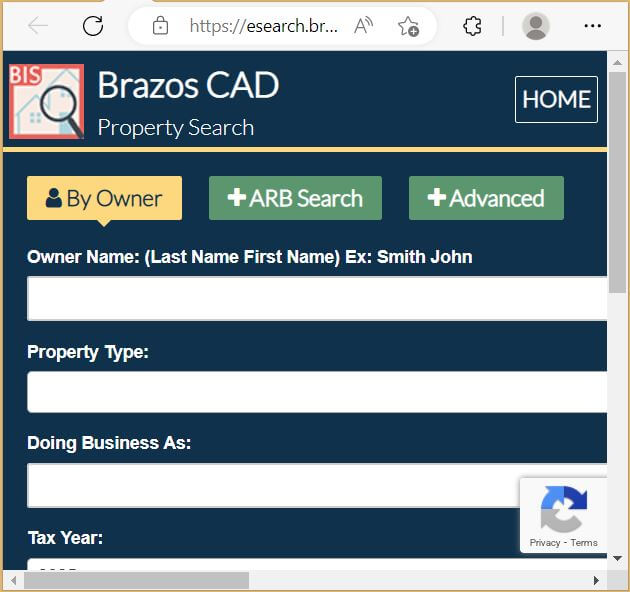
Choose the strongest Brazos CAD search method
| Search field | Use it when | Practical tip |
|---|---|---|
| Property ID | You have an appraisal notice or known CAD record. | This is normally the most reliable appraisal-account identifier. |
| Owner name | You know an individual, estate, trust, LLC or business. | Start with the surname or one distinctive entity word. |
| Street number and name | You know the physical property address. | Remove the direction, suffix or unit when a full address fails. |
| Owner ID | You want to locate several accounts connected to one owner. | Do not confuse Owner ID with the Property ID or appeal PIN. |
| Geographic ID | A prior record or GIS result displays the geographic identifier. | Match it to the property ID and legal description. |
| Subdivision or condominium | You are researching a planned community, unit or student-housing property. | Confirm lot, block, phase, unit and property ID. |
| Abstract | The property is rural or described by an original survey. | Compare the abstract, tract and acreage with the deed. |
| Mobile-home park | You are locating a manufactured-home account. | Search the home and land separately when ownership differs. |
| ARB Search | You need protest status, informal dates, formal dates or hearing information. | Use the formal hearing notice as the controlling schedule. |
Understand what each Brazos CAD field proves
| Field | What it identifies | What it does not prove | Next action |
|---|---|---|---|
| Property ID | The account maintained by Brazos CAD. | That every county system uses the same number. | Use it for CAD calls, forms and property matching. |
| Owner shown | The owner carried for appraisal administration. | Complete title, probate status or lien history. | Open County Clerk records when ownership matters. |
| Situs address | The physical location shown by CAD. | The mailing address or complete legal description. | Compare GIS, deed, plat and addressing records. |
| Legal description | A lot, block, subdivision, abstract or tract reference. | A complete deed-ready boundary description. | Review the recorded deed or plat. |
| Acreage | The acreage used for appraisal purposes. | Professionally surveyed acreage. | Verify acreage with a current survey. |
| Market value | CAD’s opinion of market value as of January 1. | A sale price or final tax bill. | Compare similar sales, condition and property facts. |
| Appraised value | Value after an applicable appraisal limitation. | Taxable value after every exemption. | Review taxable value by taxing unit. |
| Exemptions | Benefits applied to the property account. | That each taxing unit grants the same amount. | Compare the local exemption table and taxable values. |
| Taxing units | County, city, school, ESD, MUD or management-district jurisdictions. | The final adopted tax rate. | Use the local truth-in-taxation database. |
Separate preliminary market value, appraised value and taxable value
Brazos CAD’s opinion of the property’s market value as of January 1.
The value after an applicable appraisal limitation, including a residence-homestead cap.
The value remaining after exemptions for an individual taxing unit.
Use the Brazos CAD map for parcel context—not a legal boundary decision
Local checks for homes, rentals, new construction and rural land
Check the City of Bryan, Bryan ISD, county and applicable emergency-service or special districts.
Verify the City of College Station, College Station ISD and all local homestead benefits.
Confirm unit configuration, living area, condition, parking, property class and comparable rental-oriented properties.
Match the unit, building, percentage interest, parking allocation and condominium legal description.
Compare completion status on January 1 with permits, builder records, closing documents and actual square footage.
Check whether CAD records accurately describe added area, quality, effective age, garage, pool or accessory improvements.
Use property ID, abstract and legal description, then verify acreage, road access and agricultural status.
Confirm whether Brazos County MUD District No. 1 or No. 2 appears among the taxing units.
Verify the county location, City of Navasota or Navasota ISD jurisdiction rather than relying only on the mailing address.
Apply through Brazos CAD and keep proof of every submission
Confirm ownership interest, principal-residence use, identification and the correct property ID.
Review the additional school exemption, local exemptions, school-tax ceiling and payment options.
Prepare qualification evidence and review the school-tax ceiling and local benefits.
Use the appropriate state form and attach the required VA documentation.
Prepare ownership affidavits, death certificate, utility evidence and available court documents.
Use current forms for charitable, religious, low-income housing and other qualifying property.
What to prepare before filing
Check the property’s exact taxing units before estimating exemption savings
| Taxing unit | General homestead | Over-65 benefit | Disabled-person benefit |
|---|---|---|---|
| Brazos County | No general local homestead amount shown. | $75,000 optional exemption shown. | No optional amount shown. |
| Bryan ISD | $140,000 required school exemption shown. | $60,000 required school exemption shown. | $60,000 required school exemption shown. |
| College Station ISD | $140,000 required school exemption shown. | $60,000 required plus $5,000 optional shown. | $60,000 required school exemption shown. |
| City of Bryan | No general homestead amount shown. | $15,000 optional exemption shown. | No optional amount shown. |
| City of College Station | $5,000 required and 5% optional benefits shown. | $30,000 optional exemption shown. | No optional amount shown. |
| Navasota ISD | $140,000 required school exemption shown. | $60,000 required school exemption shown. | $60,000 required school exemption shown. |
Respond carefully to legitimate exemption-audit correspondence
Document agricultural use instead of relying only on rural acreage
Search and render business assets separately from the building
Try both business-name versions and every related personal-property account.
Check furniture, fixtures, machinery, equipment, inventory and business vehicles.
Prepare invoices, purchase dates, freight, setup costs, condition and disposal documentation.
Most renditions are due April 15, with a written extension generally available to May 15.
Brazos CAD publishes its current schedule through the official forms page.
Renditions, extension requests and BPP questions may be sent to bpp@brazoscad.org.
Separate special-property valuation from the surface real estate
Land and buildings may appear in a separate real-property account.
Search the owner and special-property account rather than only the surface address.
Confirm the correct owner, property identifier, taxing units and appraisal contractor.
Prepare assignments, deeds, division orders or other transfer evidence.
Use production, operating, age, condition, income or expense records appropriate to the property.
Check every account and tax year before assuming one payment covers all interests.
Choose the Brazos CAD appeal route before opening the portal
Build a property-specific Brazos County appraisal case
Evidence for common Brazos County situations
Use similar location, size, age, quality, condition and January 1 status.
Document occupancy configuration, condition, functional issues and comparable investment properties.
Use completion percentage, builder costs, plans, permits and dated construction photographs.
Review acreage, access, flood influence, utilities, land class and agricultural qualification.
Use asset schedules, original cost, age, condition, disposals and depreciation evidence.
Provide measurements, plans, surveys, photographs and documentation of the correct characteristics.
Prepare for an independent Brazos County ARB hearing
Check hearing format, evidence deadlines, rescheduling rules and telephone or video requirements.
Give the market value, exemption decision or record correction you want.
Number photographs, estimates, comparable sales and property-detail corrections.
Mark inaccurate characteristics, sales, dates, adjustments or property classifications.
Use it for the date, time, hearing method and submission instructions.
The written order records the decision and starts any available appeal period.
Fix common Brazos CAD search problems
| Problem | Likely reason | Practical fix |
|---|---|---|
| Owner name returns nothing | The record may use initials, a spouse, trust, estate, LLC or former owner. | Search only the first or last name. |
| Too many owner results | The name is common or connected to several properties. | Add the street name, property type, owner ID or property ID. |
| Full address does not work | The record may omit a direction, suffix, unit or alternate formatting. | Search only the street name or the number and main name. |
| Condo or student unit is missing | The legal unit designation may differ from the mailing address. | Use the condominium field, owner name or property ID. |
| Recently purchased home shows seller | The recorded deed may still be processing into CAD records. | Confirm recording through County Clerk land records and contact CAD. |
| 2026 value changed | The portal labels the displayed values as preliminary. | Compare dated copies and confirm the current appraisal status. |
| Appeals portal rejects Property ID | First-time users need the Owner ID and Efile PIN. | Use the credentials printed on the Notice of Appraised Value. |
| Tax balance differs from CAD value | The appraisal and tax systems serve different functions. | Use CAD for value and Brazos Tax Office for the amount due. |
| Online payment is not visible | The transaction may still be processing or applied to another account. | Use the receipt, account, year, amount and confirmation when contacting the Tax Office. |
Send each Brazos County property question to the correct office
| Your question | Correct starting point | What to prepare |
|---|---|---|
| What is the appraised value? | Brazos Central Appraisal District | Property ID, year and disputed value field. |
| Why is an exemption missing? | Brazos Central Appraisal District | Application, ID, qualification date and filing proof. |
| How do I protest or appeal? | Brazos CAD and Brazos County ARB process | Notice, deadline, requested result and evidence. |
| How much property tax is due? | Brazos County Tax Assessor-Collector | Tax account, property ID, year and owner. |
| Did my payment post? | Brazos County Tax Assessor-Collector | Receipt, confirmation, date, amount and tax year. |
| Who legally owns the property? | Brazos County Clerk or title professional | Grantor, grantee, recording period and legal description. |
| Where can I obtain a deed or lien? | Brazos County Clerk | Names, date range, document type and instrument number. |
| Who sets the property-tax rate? | Each county, city, school or special taxing unit | The taxing-unit list from the CAD account. |
| Who resolves a boundary dispute? | Surveyor, title professional or attorney | Deed, plat, survey and adjoining-property records. |
Pay Brazos County property taxes through the County Tax Office
| Payment route | Published instruction | Important timing point |
|---|---|---|
| Online | Credit card, debit card, e-check, PayPal and PayPal Credit are available through the Tax Office website. | Online payments are credited through 11:00 PM on the payment date. |
| In person | Visit 4151 County Park Court in Bryan. | Office hours are Monday-Friday, 8:00 AM-4:30 PM. |
| Send payment to the Brazos County Tax Office at 4151 County Park Court, Bryan, Texas 77802. | Mail early and keep postmark or tracking proof. | |
| Drop box | Use the payment drop box in lane 1 of the drive-through lanes. | Payments deposited after business hours are posted on the next business day. |
| Drive-through | Property-tax service is available through the Tax Office drive-through operation. | Confirm current lane availability before travelling. |
Use Brazos County Clerk records when legal ownership matters
| Service | Published fee | Practical note |
|---|---|---|
| Real-property recording | $25 for the first page and $4 for each additional page. | Additional indexed-name charges can apply after five names. |
| Additional grantor or grantee name | $0.25 for each name after the first five names. | Ask the Clerk to calculate the exact filing total. |
| Plat recording | $72. | Confirm document size and filing requirements first. |
| Plain copy | $1 per page. | Provide the document number when available. |
| Certified copy | $1 per page plus $5 certification. | Confirm that certification is required by the recipient. |
Complete these checks before relying on a Brazos County property record
Match property ID, address, legal description, subdivision, abstract and acreage.
Determine whether the displayed value is preliminary, ARB-adjusted or certified.
Review current and delinquent balances and request a live payoff before closing.
Use County Clerk records and a title company for complete title examination.
The seller’s homestead exemption, appraisal cap or tax ceiling may not transfer.
Identify city, school, county, ESD, MUD and management-district jurisdictions.
Confirm use history, application status and possible change-of-use liability.
Do not substitute CAD acreage or GIS lines for a professional boundary survey.
Keep the deed, title policy, survey, tax receipt, closing statement and exemption confirmation.
Important Brazos County property dates
Brazos County appraisal, tax and recorded-property offices
Bryan, Texas 77802-2465
Phone: (979) 774-4100
Fax: (979) 774-4196
General email: info@brazoscad.org
Exemptions: exemptions@brazoscad.org
ARB documents: arb@brazoscad.org
Chief Appraiser: Dana Horton
Hours: Monday-Friday, 8:30 AM-5:00 PM.
Bryan, Texas 77802
Phone: (979) 775-9930
Fax: (979) 775-9938
Property fax: (979) 775-9937
Tax Assessor-Collector: Melissa Leonard, PCAC
Hours: Monday-Friday, 8:00 AM-4:30 PM.
Use for property-tax statements, balances, payments and receipts.
300 E. 26th Street, Suite 1430
Bryan, Texas 77803
Phone: (979) 361-4128
Fax: (979) 361-4125
County Clerk: Karen McQueen
Hours: Monday-Friday, 8:00 AM-4:30 PM.
Use for deeds, liens, plats, releases, copies and official land records.
Prepare the property ID, owner, situs address, legal description, tax year and exact question.
For an appeal, also prepare the notice, deadline and requested value.
For a tax payment, prepare the tax account, year, receipt and confirmation number.
Official Brazos County property resources
Use for alerts, district information and official task links.
Open Brazos CADSearch owner, address, ID, ARB and advanced criteria.
Open property searchReview approximate parcel location and surrounding appraisal accounts.
Open interactive mapSubmit supported exemption and property forms through the unified portal.
Open Online Forms PortalFind agricultural, wildlife, rendition, disaster and exemption resources.
Open CAD formsFile an eligible appeal and review evidence or settlement offers.
Open Appeals PortalFind 2026 protest forms, procedures, hearing dates and remote-hearing guidance.
Open ARB resourcesReview historical certified totals and available appraisal statistics.
Open certified valuesReview estimated taxes and local taxing-unit rate activity.
Open tax-rate databaseFind statements, receipts, balances and electronic-payment access.
Open Brazos Tax OfficeSearch deeds, liens, releases, easements and other official instruments.
Open land-record searchSubmit a mailing-address correction through Brazos CAD’s official route.
Open address-change requestHow this Brazos County guide was rebuilt

Independent review of appraisal, appeal, tax and land-record systems
This version preserves the existing Brazos CAD property-search image while expanding the page into practical search, GIS, exemption, audit, agricultural, business-property, online-appeal, ARB, tax-payment and deed-record workflows.
The review used Brazos Central Appraisal District, Brazos County Tax Assessor-Collector, Brazos County Clerk and Texas property-tax resources.
AppraisalDistrict.org is an independent informational website and is not operated by Brazos CAD, Brazos County or any taxing unit.
10 common Brazos County appraisal and property-tax questions
1. What is the official Brazos County Appraisal District website?
The official Brazos Central Appraisal District website is brazoscad.org. Use it for property search, the interactive map, exemptions, online forms, appeals, ARB documents, appraisal data and district contacts.
2. How do I search Brazos County property records?
Open the official Brazos CAD search at esearch.brazoscad.org. Search by property ID when available, or use owner name, street address, owner ID, geographic ID, subdivision, abstract, condominium, mobile-home park or advanced criteria.
3. Are Brazos CAD’s displayed 2026 values final?
No. The official property-search disclaimer states that displayed 2026 values are preliminary and may change during the Appraisal Review Board season. Save a dated copy and verify the current status before relying on the value.
4. Where do I pay Brazos County property taxes?
Pay property taxes through the Brazos County Tax Assessor-Collector at brazostax.org. Brazos CAD states that it cannot accept property-tax payments and will return payments sent to the appraisal district.
5. How does the Brazos CAD Online Appeals process work?
Most eligible owners can use the Brazos CAD Appeals Portal with the Owner ID and Efile PIN printed on the Notice of Appraised Value. Do not use the Property ID as the login credential. An online appeal counts as both an informal review and a formal protest.
6. What was the normal Brazos CAD protest deadline for 2026?
Most 2026 protests were due May 15 or 30 days after the Notice of Appraised Value was mailed, whichever date was later. The deadline printed on the individual notice controls.
7. How do I apply for a Brazos County homestead exemption?
Use the Brazos CAD Online Forms Portal or an official residence-homestead application. Attach the required driver licence or other identification, submit it to Brazos CAD and keep the confirmation, email receipt or stamped copy.
8. Can the Brazos CAD interactive map be used as a legal survey?
No. The map is useful for appraisal research and approximate parcel context, but it does not replace a recorded deed, plat, title examination, flood determination or professional boundary survey.
9. What local homestead exemptions are available in Brazos County?
Benefits depend on the property’s taxing units. The local exemption sheet currently linked by Brazos CAD is labeled 2025 and includes school exemptions, a 75000 dollar county over-65 exemption and additional City of Bryan, City of College Station and College Station ISD benefits. Verify 2026 amounts before estimating taxes.
10. Where can I search Brazos County deeds and liens?
Use the Brazos County Clerk Official Record Search at brazos.tx.publicsearch.us. Search owner-name variations, document types, recording dates and document numbers, then compare the recorded legal description with the Brazos CAD account.