Gauge a Concho County Property From Appraisal Search to Tax Payment and Recorded Deed
Start with Concho Central Appraisal District when you need a property ID, geographic ID, owner entry, legal description, acreage, improvement record, market value, exemption, agricultural appraisal, mineral account, protest status or property-tax balance.
Concho County’s routing is different from many Texas counties. The county Tax Assessor-Collector does not collect property taxes. Use Concho CAD’s official payment, statement and receipt routes for real-property taxes, and use the County Clerk for recorded deeds, liens and plats.
Use the property ID or geographic ID when one is available.
The official search currently labels 2026 values preliminary.
121 S. Roberts Ave., Paint Rock, Texas 76866.
Property-tax payment and receipt services route through Concho CAD.
Local portals and procedures reviewed July 2026.
What do you need from the Concho County property record?
Use property ID, owner, address, geographic ID, abstract, subdivision or Advanced Search.
Follow the search workflowCompare market value, appraised value, assessed value, agricultural use value and property characteristics.
Understand the value fieldsReview the account’s estimated tax-due section, request a current payoff and then use the official payment provider.
Use the safe payment stepsIdentify whether the issue involves value, equal appraisal, acreage, improvements, exemption or ownership.
Build a focused protestSearch recorded instruments instead of treating the appraisal owner field as a title report.
Search official recordsRural acreage, wildlife land, mineral interests and business property require different searches and documents.
Review special-property guidanceSearch Concho County property records without relying on the first similar name
Use the Concho CAD screenshot as a search-menu guide
The current article already contains the official Concho CAD property-search image below. It is preserved and placed inside the exact workflow where it helps users choose the correct search route.
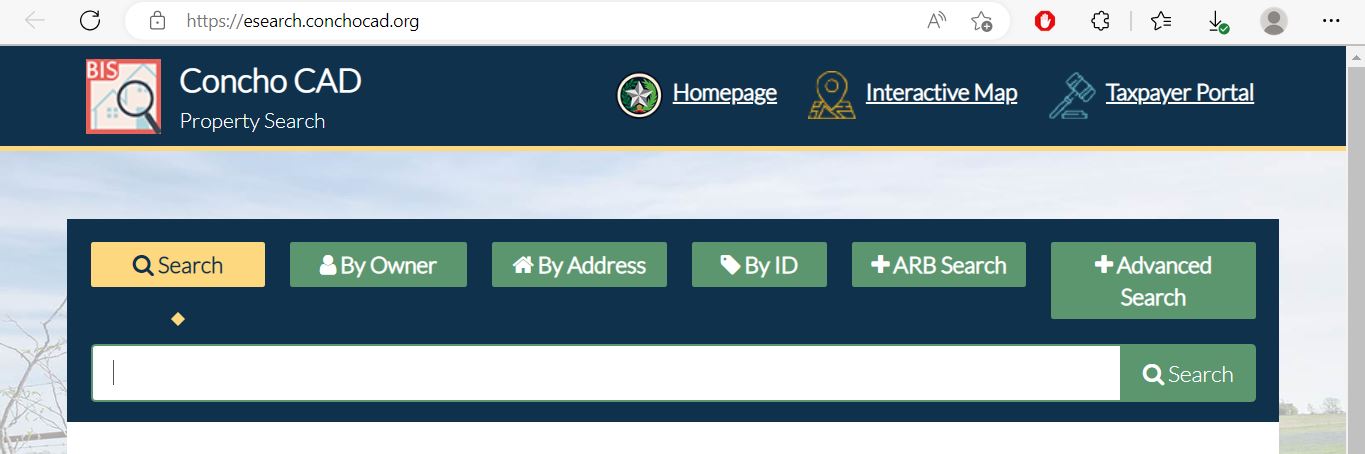
Choose the Concho CAD search field that matches the property
| Search field | Use it when | What to verify |
|---|---|---|
| Property ID | You copied the identifier from a notice, statement, receipt or prior account. | Tax year, property type and legal description. |
| Owner name | You know a person, estate, trust, partnership, company or DBA. | Initials, spouse, entity name, prior owner and ownership percentage. |
| Street number and name | The property has an assigned situs address. | City, unit, legal description and geographic ID. |
| Geographic ID | You are matching an appraisal account to a parcel or map reference. | Recorded documents and survey information before legal use. |
| Abstract | You are researching rural land identified by an original survey or abstract. | Tract, block, section and acreage. |
| Subdivision | You know the addition, rural subdivision, unit, lot or block. | The property ID and exact legal description. |
| Property type | You need to separate real estate, business personal property, mineral, mobile-home or another account category. | Whether connected accounts are listed separately. |
| Owner ID | You need to locate multiple accounts connected to the same owner record. | Every parcel and tax year separately. |
| Neighborhood | You are researching equal appraisal or the district’s comparison group. | That the properties are physically and economically comparable. |
| ARB hearing fields | You are checking a hearing date, board member or protest status. | The formal hearing notice as the controlling schedule. |
Understand what each Concho CAD field does and does not prove
| Field | What it identifies | What it does not establish | Next action |
|---|---|---|---|
| Property ID | The appraisal and collection account used by Concho CAD. | That the County Clerk uses the same number. | Use it for CAD questions and payment verification. |
| Owner shown | The owner carried for appraisal and tax administration. | Clear title, probate status or absence of liens. | Search recorded County Clerk documents. |
| Situs address | The physical location carried in the appraisal account. | The mailing address or complete legal location. | Compare the map and legal description. |
| Legal description | The abbreviated lot, block, subdivision, abstract or tract reference. | A complete description suitable for a deed or boundary dispute. | Obtain the recorded deed, plat and survey. |
| Acreage | The acreage carried for appraisal purposes. | Legally guaranteed or professionally surveyed acreage. | Compare the deed and survey. |
| Market value | CAD’s opinion of market value as of January 1. | A guaranteed selling price or final property-tax bill. | Compare sales, use, access, condition and equal-appraisal evidence. |
| Appraised value | Value after an applicable statutory appraisal limitation. | Taxable value after every exemption. | Continue to assessed and taxable values. |
| Assessed or taxable value | The value used after limitations and exemptions. | The current amount due after payments, penalties or attorney fees. | Review the estimated tax-due and payment-history sections. |
| HS or CB cap loss | Value excluded by a homestead or circuit-breaker appraisal limitation. | That the underlying market value is accurate. | Review market value even when assessed value is limited. |
| Deed history | Deed-related information copied into the appraisal account. | A complete title search or certified ownership record. | Verify the instrument through the County Clerk. |
Use the Concho CAD interactive map without treating it as a survey
Separate market value, appraised value and assessed value
Concho CAD’s opinion of what the property would sell for under normal market conditions as of January 1.
The value after an applicable homestead cap, circuit-breaker limitation or agricultural productivity appraisal.
The value remaining after applicable limitations and exemptions for the taxing jurisdiction.
The official search currently states that 2026 values are preliminary and may change before certification.
Review homesite land, non-homesite land, agricultural market value and each listed building separately.
Compare prior years to identify when land, structures, appraisal limitations or agricultural use changed.
Understand the value cap before assuming the displayed difference is an exemption
A qualifying residence homestead’s appraised value generally cannot increase by more than 10% per year, plus the market value of qualifying new improvements.
For 2026, qualifying non-homestead real property valued at $5,320,000 or less may receive a temporary 20% appraisal limitation.
Agricultural land and several other specially appraised property categories do not qualify for the non-homestead circuit breaker.
Read the Notice of Appraised Value before deciding what to challenge
Confirm property ID, owner, mailing address, situs address, type and legal description.
Review each value component and identify exactly what changed from the previous year.
Check acreage, building type, living area, year built, condition, use and listed structures.
Check homestead, age, disability, veteran and other expected exemptions.
Keep the notice, property ID, owner information and any PIN or registration details.
Use the exact date printed on the notice rather than assuming every property has a May 15 deadline.
Fix common Concho CAD search failures before calling
| Problem | Likely reason | Practical fix |
|---|---|---|
| Owner name returns no result | The account may use initials, spouse, estate, trust, business or prior owner. | Use only the first or last name, then try property ID or owner ID. |
| Too many owner matches | The name is common or the search is too broad. | Add property type, street name, subdivision, geographic ID or neighborhood. |
| Full address fails | The account may use a different suffix, direction, rural-road format or no situs address. | Search only the street name, as recommended by the official portal. |
| Rural tract has no address | The property may be indexed by abstract, legal description, subdivision or geographic ID. | Use Advanced Search and the interactive map. |
| Recently purchased property shows the seller | The recorded deed may still be processing into the appraisal system. | Confirm the document with the County Clerk and provide the instrument details to CAD. |
| Manufactured home is missing | The home may have a separate personal-property or mobile-home account. | Change property type and search the owner or mobile-home park. |
| Mineral account is missing | The mineral interest may be separate from the surface-land account. | Search the owner, property type, geographic ID or related lease information. |
| Tax due looks incorrect | The online estimate may not include older delinquency, partial payments, contracts or recent posting. | Contact Concho CAD for a current amount due before paying. |
| 2026 value changed after saving it | The official portal currently labels 2026 values preliminary. | Save the status and date, then recheck after certification. |
Local search tips for Paint Rock, Eden, Eola, ranch land and the Concho River area
Confirm City of Paint Rock, Paint Rock ISD, county, hospital, road and applicable water-district taxable values.
Check City of Eden, Eden CISD, county, hospital and special-district jurisdictions.
Search by property ID, abstract, legal description and map because the street address may be incomplete.
Verify acreage, access, flood or river context, improvements and legal boundaries through independent records.
Confirm the school district, rural legal description, road access and all connected taxing units.
Concho CAD lists Brady ISD among entities it serves. Verify the account’s actual school jurisdiction.
Compare market acreage, agricultural acreage, improvements, fences, barns, wells and productivity value.
Keep the management plan, annual report, maps, photographs and activity records connected to the exact tract.
Search separately from the surface property and confirm owner interest, operator, lease and tax year.
Verify the business name, DBA, situs, rendered assets, depreciation category and filing year.
Search the deceased owner, estate, heirs and prior names, then confirm probate and recorded ownership documents.
Verify legal access, water, survey, title, delinquent taxes and actual parcel location before paying a seller.
Send each Concho County property question to the office that controls it
| Your question | Correct starting point | What to prepare |
|---|---|---|
| What is the market or appraised value? | Concho Central Appraisal District | Property ID, tax year and disputed value field. |
| Why is an exemption missing? | Concho Central Appraisal District | Application, identification, qualification date and filing proof. |
| Does land qualify for agricultural appraisal? | Concho Central Appraisal District | Acreage, use history, leases, livestock or production evidence and maps. |
| What property tax is currently due? | Concho CAD collection services | Property ID, tax year, owner and current statement. |
| Did an online payment post? | Concho CAD collection services | Certified Payments confirmation, amount, date and tax year. |
| Who handles vehicle registration? | Concho County Tax Assessor-Collector | Identification, insurance and vehicle-title or registration records. |
| Who legally owns the property? | Concho County Clerk or title professional | Grantor, grantee, date range and legal description. |
| Where can I obtain a deed, lien or plat? | Concho County Clerk | Names, document type, recording date and copy requirement. |
| Who adopts the tax rate? | Each county, city, school or special taxing unit | The taxing-jurisdiction list from the property account. |
| Who determines zoning or development approval? | The applicable city or county authority | Jurisdiction, property ID, project plan and proposed use. |
Correct the system that owns the inaccurate information
Verify Concho County exemptions before estimating the tax bill
Confirm that the home is the owner’s principal residence and that the account reflects the exemption.
Review the additional exemption, school-tax ceiling and possible instalment or deferral options.
Check qualification evidence, exemption status and any applicable school-tax ceiling.
Use the correct veteran or surviving-spouse application and include required VA documentation.
Prepare ownership, occupancy, family-history and heirship evidence when a residence was inherited.
Use the property-specific form and include organisational, ownership and use documentation.
What to prepare before filing
Prepare differently for agricultural, wildlife, mineral and business property
Gather acreage, qualifying-use history, grazing or crop activity, leases, livestock records, production records, photographs and maps.
Compare market value with agricultural-use value and verify that the correct acreage and category are included.
Keep the management plan, annual report, maps, photographs and evidence of qualifying wildlife-management activities.
The wildlife option generally depends on prior qualification for open-space appraisal.
Search the mineral account separately by owner, property ID, geographic ID, lease or operator information.
Surface ownership does not automatically establish ownership of every mineral interest.
Prepare a rendition showing taxable assets, location, acquisition year, cost and supporting depreciation information.
Keep a copy of the rendition, extension request and filing confirmation.
Determine whether the home appears as real property, personal property or a separate account from the land.
Prepare ownership, statement-of-ownership and situs evidence for corrections.
Confirm the legal owner, operator, lease, property type, asset description and appraisal year.
Do not assume the account is combined with the surface ranch or residential parcel.
File a Concho CAD protest around one clear issue
Evidence packet checklist
Know the role of the Concho County Appraisal Review Board
Pay Concho County property taxes through the correct CAD collection route
Concho CAD’s property record includes taxing jurisdictions, tax values, tax rates, estimated tax-due information and payment history. The county Tax Assessor-Collector does not collect these property taxes.
Retrieve the correct Concho County document before calling about a balance
| Document | Use it for | Important check |
|---|---|---|
| Notice of Appraised Value | Proposed value, property details, exemption changes and protest deadline. | The notice year and mailing date. |
| Property-tax statement | Taxing units, taxable values, rates, amount due and delinquency date. | Whether the statement is current or superseded. |
| Payment receipt | Proof that payment was applied to a property and year. | Property ID, date, amount and taxing jurisdictions. |
| Provider confirmation | Evidence that an online payment was submitted. | It is not a substitute for verifying final posting. |
| Current payoff | Delinquent, partial, contract or older tax balances. | Request it close to the planned payment date. |
Use the Concho County Clerk for deeds, liens, releases and plats
| Recording item | Published fee | Practical note |
|---|---|---|
| First page | $25 | Confirm the current total before submitting a document. |
| Each additional page or part | $4 | Count every page and any back-side printing. |
| Additional indexed names | $0.25 for each name over five | Count grantors, grantees and other indexed parties. |
Complete these checks before buying or inheriting Concho County property
Match property ID, geographic ID, legal description, abstract, subdivision, acreage and map.
Check current and prior amounts due, payment history, penalties, interest and attorney fees.
Do not rely only on the estimated tax-due table when delinquent or partial payments may exist.
Review recorded instruments and use a title company or attorney for a complete title examination.
A parcel appearing beside a road or river on a map does not automatically establish legal access.
CAD acreage and online outlines are not substitutes for a current professional survey.
The seller’s homestead exemption, appraisal cap or tax ceiling may not transfer to the buyer.
Confirm qualifying acreage, productivity value and possible consequences of changing land use.
Surface ownership does not prove ownership of all minerals, royalties or lease interests.
Review county, city, school, hospital, road and water-district jurisdictions.
Verify buildings, living area, age, condition, land type, barns, sheds and other improvements.
Keep the deed, title policy, survey, closing statement, tax payoff and exemption filing proof.
Use Concho CAD reports when one property account is not enough
Useful for reviewing business-personal-property asset categories and depreciation assumptions.
Relevant to qualifying low-income housing appraisal research.
Review district workload, property categories, values, exemptions and operating information.
Use the plan to understand the district’s property-inspection and reappraisal cycle.
Review valuation methods, schedules, models and local appraisal practices.
Use published lists for broader exemption and taxing-unit research.
Use prior rates for context, not as a substitute for the current tax statement.
Review published district utility-usage information and transparency records.
Use truth-in-taxation resources during August and September to review proposed and adopted rates.
Important Concho County appraisal and tax dates
Concho County appraisal, property-tax, vehicle and deed-record offices
Paint Rock, Texas 76866
Mailing: P.O. Box 68, Paint Rock, Texas 76866
Phone: 325-732-4389
Fax: 325-732-4234
Email: cad@conchocad.org
Hours: Monday-Friday, 8:00 AM-4:30 PM.
Lunch closure: 12:00 PM-12:30 PM.
Chief Appraiser: D’Andra Warlick
Use this office for appraisal, exemptions, protests, property-tax balances, statements, receipts and payment-posting questions.
152 N. Roberts Avenue
Paint Rock, Texas 76866
Mailing: P.O. Box 67, Paint Rock, Texas 76866
Phone: 325-732-4312
Tax Assessor-Collector: Brent Frazier
Hours: Monday-Friday, 8:30 AM-12:00 PM and 1:00 PM-4:30 PM.
Important: this office does not collect property taxes. Use it for vehicle-registration and related county tax-office services.
Eden, Texas 76837
Phone: 325-869-4941
Hours: Monday, Wednesday and Friday, 8:30 AM-12:00 PM and 1:00 PM-4:30 PM.
Confirm the office day and required vehicle documents before travelling.
Paint Rock, Texas 76866
Mailing: P.O. Box 98, Paint Rock, Texas 76866
Phone: 325-732-4322
Email: amber.hall@conchocounty.gov
County and District Clerk: Amber Hall
Use this office for deeds, liens, plats, certified copies, probate and recorded-document questions.
Official Concho County property resources
Use for official appraisal information, payment, statements, receipts, news and contact details.
Open Concho CADSearch property ID, owner, address, legal description, abstract, subdivision and advanced criteria.
Open property searchLocate parcels and compare surrounding appraisal-map context.
Open interactive mapAccess Concho CAD’s electronic protest service.
Open protest portalFind homestead, agricultural, wildlife, protest, rendition and other appraisal forms.
Open official formsUse only after verifying the account and current amount due through Concho CAD.
Open Certified PaymentsStart on the official homepage and select Notice, Statements, and Receipts.
Open document serviceReview the ARB’s role, organisation and local information.
Open ARB informationAccess annual reports, reappraisal plans, mass-appraisal reports and 2026 schedules.
Open appraisal reportsRequest qualifying communications from the tax official electronically.
Open electronic-communication requestSearch deeds, liens, plats and other digitally available official records.
Open online records searchVerify CAD and Tax Assessor-Collector contacts and active taxing units.
Open Comptroller directoryHow this Concho County guide was researched and improved

Independent review of appraisal, collection and recorded-property systems
This rebuild preserves the property-search and editor images already used in the existing article while replacing its short, generic guidance with complete workflows for appraisal search, rural land, exemptions, protest preparation, tax payment, statements, receipts and recorded deeds.
Official resources reviewed include Concho Central Appraisal District, the Concho CAD property-search and payment services, Concho County Clerk, Concho County Tax Assessor-Collector and Texas Comptroller property-tax guidance.
AppraisalDistrict.org is an independent informational website and is not operated by Concho Central Appraisal District or Concho County.
10 common Concho County appraisal and property-search questions
1. What is the official Concho County Appraisal District website?
The official website is conchocad.org. Use it for property search, maps, appraisal forms, exemptions, protests, tax statements, receipts and payments.
2. How do I search Concho County property records?
Use the official Concho CAD property search. Search by owner, address or property ID, or use Advanced Search for owner ID, geographic ID, abstract, subdivision and other filters.
3. Why does a Concho CAD search show no result?
The account may use a different name order, abbreviated address, prior owner, abstract, subdivision or separate property type. Search only the first or last name, use only the street name and remove unnecessary filters.
4. Does the Concho County Tax Assessor-Collector collect property taxes?
No. The state county directory states that the Concho County Tax Assessor-Collector does not collect property taxes. Use Concho CAD for property-tax balances, statements, receipts and payment routing.
5. How do I pay Concho County property taxes online?
Search the account through Concho CAD, review the estimated tax-due section, request a current payoff when necessary and then use the official Certified Payments route with Bureau Code 5404405.
6. How do I verify a Concho County homestead exemption?
Open the complete property account and review exemptions and taxable values. Because not every exemption may be displayed publicly, contact Concho CAD if the account does not clearly confirm the expected exemption.
7. What is the Concho County property-tax protest deadline for 2026?
Most protests are due by May 15 or by the 30th day after Concho CAD mails the Notice of Appraised Value, whichever is later. Follow the exact deadline printed on the notice.
8. Can Concho CAD acreage or map boundaries be used for legal documents?
No. The official search states that legal descriptions and acreage should be verified before legal use. Obtain recorded documents and a professional survey when boundaries or acreage matter.
9. Where can I search Concho County deeds and liens?
Use the Concho County Clerk online records search. Search current and prior owner names, document types, dates and legal descriptions.
10. Where is Concho Central Appraisal District located?
Concho CAD is located at 121 S. Roberts Avenue, Paint Rock, Texas 76866. Its mailing address is P.O. Box 68, Paint Rock, Texas 76866, and its phone number is 325-732-4389.