Follow an Oldham County Parcel From Panhandle Road to Verified Tax Account
Start with Oldham County Appraisal District when you need a property ID, geographic ID, appraisal owner, situs address, abstract, subdivision, acreage, property type, value, exemption or taxing-unit information.
Oldham County has an important local collection difference: the Texas Comptroller states that the elected County Tax Assessor-Collector does not collect property taxes. Contact Oldham CAD and follow the collector printed on the tax statement before sending a payment.
Property ID or geographic ID provides the strongest match.
909 Vega Boulevard, Vega, Texas 79092.
Start with Oldham CAD and the collector printed on the bill.
Local portals and guidance reviewed July 30, 2026.
What do you need from the Oldham County property record?
Use owner, address, property ID, geographic ID, abstract, subdivision or property type.
Follow the search workflowCompare market value, productivity value, land class, qualifying use and account boundaries.
Review rural-property checksThe elected County Tax Assessor-Collector does not collect property taxes.
Use the local collection workflowThe old eProtest page now directs taxpayers to the central Oldham CAD portal.
Prepare and file a protestPrepare identification, ownership details and qualification evidence before filing.
Review exemption stepsThe owner shown by CAD does not replace a recorded deed or title search.
Check deeds and liensSearch Oldham County property records without selecting the wrong tract
Use the Oldham CAD search screen shown below
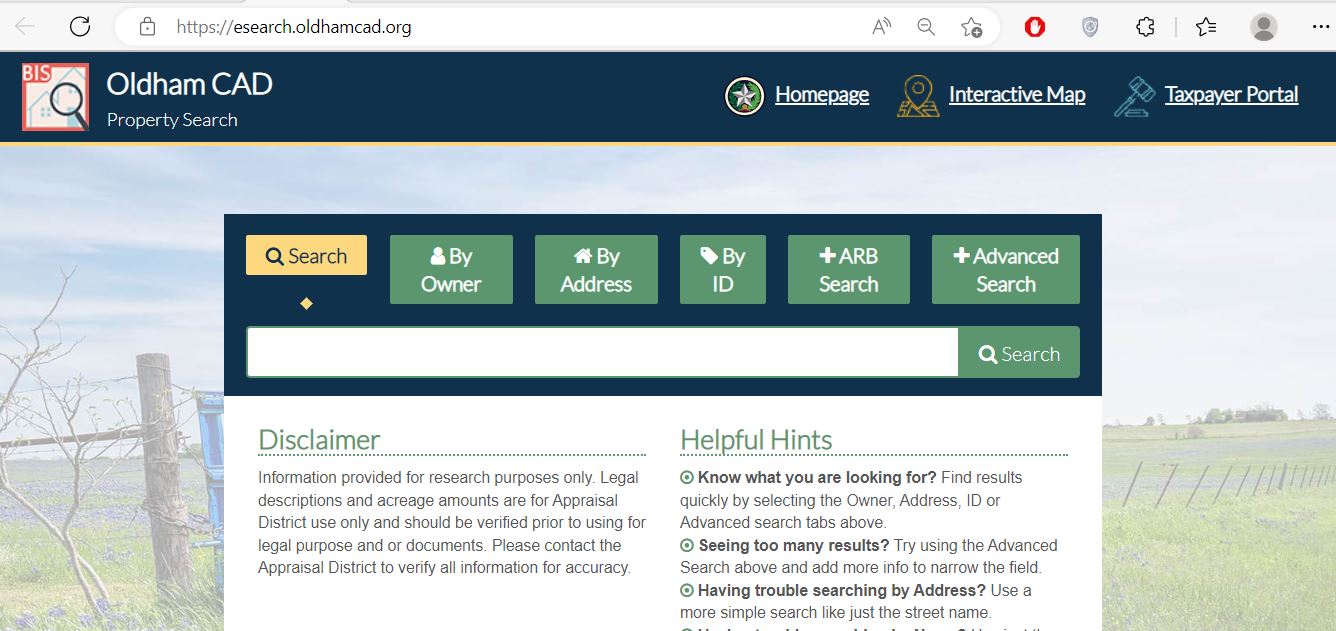
Choose the search field that matches the Oldham County property
| Search field | Best use | Practical tip |
|---|---|---|
| Property ID | Reopening one exact appraisal account. | Copy it from an appraisal notice, prior property card or tax statement. |
| Geographic ID | Matching a parcel to geographic or legal map information. | Enter the identifier exactly as shown. |
| Owner ID | Finding accounts connected to a known appraisal owner. | Do not confuse owner ID with property ID. |
| Abstract | Finding rural land described by survey or abstract. | Use the abstract information from the deed or earlier appraisal record. |
| Subdivision | Finding a tract or lot in a named subdivision. | Compare lot, block, address and legal description. |
| Neighbourhood | Reviewing appraisal accounts in the same valuation area. | Useful for unequal-appraisal research. |
| Property type | Separating real, personal, mineral, auto and mobile-home accounts. | Change this filter when an owner search appears incomplete. |
| Doing Business As | Finding a commercial account that uses a trade name. | Try one distinctive business-name word. |
| Mobile-home park | Locating manufactured-home accounts associated with a park. | Confirm whether the home and land are separate accounts. |
| ARB hearing fields | Checking public protest hearing date or board-member information. | Confirm the protest year before relying on the result. |
Verify an Oldham County rural parcel before relying on an address
Understand the important fields inside an Oldham CAD record
| Property field | What it tells you | What it does not prove | Next action |
|---|---|---|---|
| Property ID | The appraisal account identifier. | That every collector or Clerk system uses the same number. | Save it and match it with the tax statement. |
| Geographic ID | A geographic or legal reference associated with the parcel. | A surveyed property boundary. | Compare it with the map, deed and survey. |
| Owner shown | The owner maintained for appraisal and tax administration. | Clear legal title or complete ownership history. | Check County Clerk documents when ownership matters. |
| Situs address | The physical location used in the appraisal account. | The complete legal description or mailing address. | Compare it with the map and deed. |
| Legal description | The abstract, survey, tract, lot, block or subdivision reference. | That abbreviated CAD wording is complete for a deed. | Obtain the recorded instrument. |
| Market value | CAD’s opinion of market value as of January 1. | A guaranteed selling price or tax amount. | Compare sales, condition and equal-appraisal evidence. |
| Productivity value | A special appraisal value for qualifying agricultural or timber land. | Continued qualification after a use or ownership change. | Review land use, acreage and application status. |
| Exemptions | Tax benefits applied to the account or taxing unit. | That every taxing unit grants the same exemption. | Check each unit’s taxable value. |
| Improvements | Buildings or other taxable improvements carried by CAD. | That size, class, condition or completion is correct. | Document any incorrect characteristic. |
| Taxing units | The local entities connected to the account. | Who currently collects every tax bill. | Use the collector printed on the tax statement. |
Move from market value to the taxable value for each entity
Oldham CAD’s opinion of market value as of January 1 for the tax year.
The value after an applicable appraisal limitation or qualifying special land appraisal.
The value remaining after exemptions for a particular county, city, school or water district.
Fix an Oldham CAD search that returns no property
| Problem | Likely reason | Practical fix |
|---|---|---|
| Owner name returns nothing | The account may use a shortened name, trust, estate, company or ranch name. | Search only the first or last name, then try one distinctive entity word. |
| Address is not recognised | The account may use an abbreviated road or no standard rural situs address. | Search only the road name, then use owner, ID, abstract or the map. |
| Farm or ranch is split across results | Adjacent land can have separate property IDs, owners or legal descriptions. | Save every account and compare abstract, acreage and geographic ID. |
| Recently purchased property shows the seller | The deed may still be processing into the appraisal roll. | Confirm recording with the County Clerk and give CAD the instrument information. |
| Business property does not appear | The account may be classified as Personal rather than Real property. | Change the property-type filter and search the business or DBA name. |
| Mineral account is missing | The mineral interest may be separate from the surface account. | Select Mineral property and search the owner or property identifier. |
| Wrong value is displayed | The search may be showing another tax year. | Select the year printed on the appraisal notice or statement. |
| Cannot find tax-payment instructions | The elected County Tax Assessor-Collector does not collect property taxes. | Call Oldham CAD and follow the collector printed on the current bill. |
Extra checks for farms, ranches and open-space land
Review acreage, land class, productivity value, irrigation information and each separate account.
Prepare livestock, lease, use-history and intensity evidence for an agricultural appraisal question.
Confirm prior open-space qualification, the wildlife plan and annual activity documentation.
Address search may work, but confirm the subdivision, legal description and taxing units.
Compare the situs address with the lot, block, subdivision and City of Adrian taxing-unit line.
Confirm the county, school-district and mailing information because nearby properties can cross county lines.
Do not assume adjoining land shares one property ID or one ownership record.
Compare estate, probate and deed documents before changing the owner shown by CAD.
Ask about special-appraisal consequences before converting qualifying land to another use.
Search and prepare non-residential Oldham County property records
Search the business or DBA name with the Personal property type and review the rendition forms.
Determine whether equipment is taxable business property and keep acquisition, cost, condition and ownership records.
Select Mineral property and verify the owner and property identifier separately from the surface parcel.
Search the Mobile Home property type and confirm whether the home and land are separate accounts.
The official forms page includes motor-vehicle, heavy-equipment, manufactured-home, vessel and outboard-motor inventory forms.
Review the Freeport application and supporting inventory movement requirements before filing.
Send each Oldham County property question to the right office
| Your need | Correct starting point | Prepare before contacting |
|---|---|---|
| Appraised value or property characteristics | Oldham County Appraisal District | Property ID, tax year, notice and evidence. |
| Homestead, veteran or other exemption | Oldham County Appraisal District | Application, identification and qualification date. |
| Agricultural or wildlife appraisal | Oldham County Appraisal District | Acreage, use history, leases, maps and production evidence. |
| Property-tax bill or payment | Collector shown on the tax statement; begin with Oldham CAD | Property ID, tax year, statement and current balance question. |
| Vehicle registration or voter-registration services | Elected Oldham County Tax Assessor-Collector | Required identification and transaction documents. |
| Recorded deed, lien, plat or probate record | Oldham County Clerk | Grantor, grantee, date, legal description or instrument number. |
| Tax-rate or budget question | The individual taxing unit | Taxing-unit name and Truth-in-Taxation information. |
| Legal boundary or title conclusion | Licensed surveyor, title company or qualified attorney | Deeds, plats, easements, surveys and CAD map. |
Correct the Oldham County record that controls the error
Use the correct Oldham CAD application and keep proof
Complete the official application and attach a driver licence copy or other information required by the form.
Review the additional exemption, possible school-tax ceiling and available deferral or instalment rules.
Use the official veteran or surviving-spouse application and attach the required VA documentation.
Prepare land-use history, acreage, leases, management records and evidence meeting local guidelines.
Prepare the wildlife plan, annual report and proof of prior qualifying open-space appraisal.
The forms library includes charitable, religious, cemetery, solar, pollution-control, Freeport and other applications.
Application preparation checklist
Prepare an Oldham County protest around one clear issue
Evidence packet checklist
Use one Oldham CAD account for property details and electronic services
The taxpayer portal provides access to property details, appraisal-district communications, documents, applications and online appeals.
Confirm who collects the Oldham County property-tax bill
Confirm the property ID, owner, tax year, taxable values and every taxing unit.
Locate the name, address and contact information of the collector printed on the bill.
Call (806) 267-2442 for current collection and payment direction.
Separate the appraisal value from the local tax-rate decision
Use Oldham County Clerk records when title or liens matter
105 South Main Street
Vega, Texas 79092
Mailing: P.O. Box 360, Vega, Texas 79092
Phone: (806) 639-2119
Court records: ocdclerk@oldham-county.org
Clerk requests: darla.lookingbill@oldham-county.org
County Clerk: Darla Lookingbill
Monday-Friday, 8:30 AM-12:00 PM and 1:00 PM-5:00 PM.
Call the Clerk before travelling for a record search, certified copy or recording deadline.
Use Oldham CAD reports for research beyond one property account
The public-information section includes appraisal-district reports and planning documents that explain broader valuation and administration practices.
Use it for district activity, appraisal information and annual administration context.
Review the district’s mass-appraisal approach and property-category information.
Review planned appraisal and inspection activity for the current cycle.
Use the published program to understand appraisal-district compliance and review processes.
The official archive includes annual utility-use reports for transparency.
Review taxing-unit worksheets for Oldham County, cities, schools and the water district.
Request a specific public record
Important Oldham County appraisal and tax dates
Oldham County property offices and where to visit
Vega, Texas 79092
Mailing: P.O. Box 310, Vega, Texas 79092-0310
Phone: (806) 267-2442
Fax: (806) 267-2471
Email: oldhamcad@xit.net
Chief Appraiser: Leann Voyles
The official homepage does not publish regular office hours. Call before travelling.
Vega, Texas 79092
Mailing: P.O. Box 211, Vega, Texas 79092-0211
Phone: (806) 639-2109
Fax: (806) 639-2202
Email: adriana.cano@oldham-county.org
Tax Assessor-Collector: Adriana Cano
Collection warning: the Texas Comptroller states that this office does not collect property taxes.
105 South Main Street
Vega, Texas 79092
Mailing: P.O. Box 360, Vega, Texas 79092
Phone: (806) 639-2119
Email: darla.lookingbill@oldham-county.org
County Clerk: Darla Lookingbill
Monday-Friday:
8:30 AM-12:00 PM
1:00 PM-5:00 PM
These are general courthouse hours. Confirm the individual office schedule before visiting.
Official Oldham County property resources
Start with official appraisal, contact and tax resources.
Open Oldham CADSearch owner, address, ID, ARB and advanced property fields.
Open property searchReview rural parcels, nearby accounts and approximate tract context.
Open parcel mapAccess property details, communications, applications and online appeals.
Open taxpayer portalFind homestead, veteran, agricultural, rendition, protest and tax-bill forms.
Open forms libraryReview annual rates and the local property-tax process.
Open tax informationFollow proposed rates, adopted rates and database updates.
Open rate informationRequest recorded deeds, liens, plats, probate records and certified copies.
Open County ClerkHow this Oldham County guide was rebuilt

Existing images retained and the collection error corrected
This regenerated article preserves the Oldham CAD property-search screenshot and editor image from the existing page while replacing the earlier brief content with detailed search guidance, screenshot instructions, rural-property checks, exemption preparation, portal-based protest steps, tax-collector verification, deed research and public-report guidance.
The most important correction is the property-tax collection route. The Texas Comptroller directory states that the elected Oldham County Tax Assessor-Collector does not collect property taxes, so owners should begin with Oldham CAD and the collector printed on the current tax statement.
AppraisalDistrict.org is an independent informational website and is not operated by Oldham County Appraisal District or Oldham County.
10 common Oldham County Appraisal District questions
1. How do I search Oldham County property records?
Open the official Oldham CAD property search. Search by owner, address or ID, or use Advanced Search for geographic ID, abstract, subdivision, neighbourhood, mobile-home park, property type or agent information.
2. How should I enter an owner name in Oldham CAD?
Begin with only the first or last name when the complete name produces no result. For a ranch, trust, estate or company, search one distinctive word and compare every likely property account.
3. Why does an Oldham CAD address search return no result?
Rural property may use an abbreviated road, abstract, legal description or geographic ID rather than a standard address. Search only the street name, then try owner, property ID, geographic ID or the interactive map.
4. Does the Oldham County Tax Assessor-Collector collect property taxes?
The Texas Comptroller directory states that the elected Oldham County Tax Assessor-Collector does not collect property taxes. Contact Oldham CAD and follow the collector information printed on the current tax statement.
5. Where do I pay Oldham County property taxes?
Begin with Oldham County Appraisal District at (806) 267-2442. Confirm the property ID, tax year, current amount due, collector, accepted payment method and receipt process before sending payment.
6. How do I apply for an Oldham County homestead exemption?
Download the application from the Oldham CAD forms page, complete the ownership and occupancy information, attach the driver licence copy or other required documentation, submit it to CAD and retain proof.
7. How do I protest an Oldham County appraisal value?
Save the appraisal account and notice, identify the exact issue, use the Oldham CAD Taxpayer Portal or an accepted written method, file by the deadline on the notice and keep confirmation.
8. Can I search Oldham County agricultural or mineral property?
Yes. The official portal supports Real, Personal, Mineral, Auto and Mobile Home property types. Rural land can also be searched by abstract, owner, property ID, geographic ID, subdivision or map location.
9. Does the owner shown by Oldham CAD prove legal ownership?
No. The appraisal owner supports property-tax administration. Use recorded Oldham County Clerk documents and professional title research when ownership or lien status matters.
10. Can Oldham CAD acreage or map lines be used as legal boundaries?
No. Oldham CAD states that acreage and legal descriptions should be verified before legal use. Obtain the recorded deed, plat and professional survey.