Find the Correct Ochiltree County Account Before You File, Protest or Pay
Ochiltree CAD’s database covers more than homes and land. It includes real estate, mineral interests, oil-and-gas leases, industrial property and business personal property, each with different search clues and record details.
The county Tax Assessor-Collector does not collect property taxes. Start with Ochiltree CAD for appraisal records, exemptions, protests, tax-due information and the official payment route. Use the County Clerk for deeds, liens, releases and certified land records.
Real Estate, Mineral and Personal Property accounts.
825 S. Main Street, Suite 100, Perryton.
Certified Payments Bureau Code 3923049.
Official notice listed a July 8 starting date.
Links and local procedures reviewed July 30, 2026.
Which Ochiltree County property task are you completing?
Search by property ID, owner, street, legal description, abstract, subdivision or map location.
Follow the search workflowUse the Mineral property type with the lease name, lease number, owner or property ID.
Review mineral-account stepsVerify the property, year, amount, bureau code, checkout fee and confirmation before paying.
Review payment instructionsProtect the deadline, save evidence and verify the formal hearing date through the official system.
Build the protest fileThe CAD owner field does not prove clear title or show every deed, lien, release or easement.
Search recorded documentsCheck appraisal identity, tax status, deed history, exemptions, mineral interests and special valuation.
Use the due-diligence checklistSearch Ochiltree CAD without mixing real, mineral and personal property
Use the Ochiltree CAD screenshot to choose the correct search path
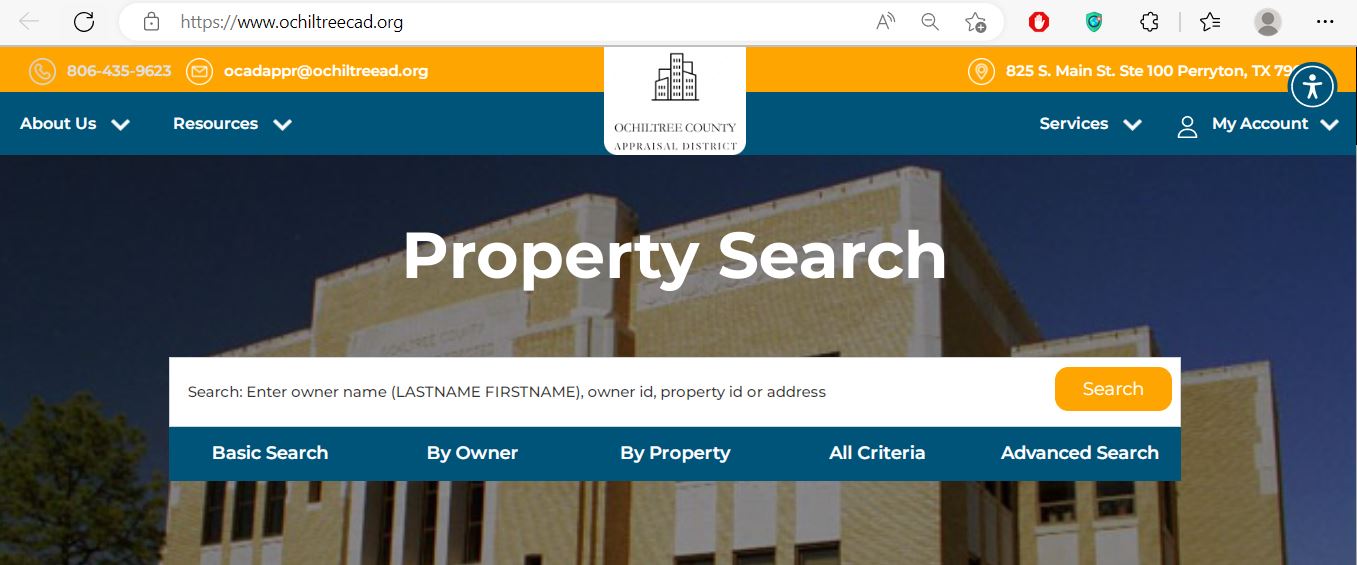
Understand what each Ochiltree CAD field tells you
| Field | What it identifies | What it does not prove | Best next action |
|---|---|---|---|
| Property ID | The account identifier used by Ochiltree CAD. | That every outside system uses the same number. | Save it before filing, paying or calling. |
| Geographic ID | A parcel or geographic reference associated with the property. | A surveyed legal boundary. | Compare it with the BIS map, deed and survey. |
| Owner shown | The owner carried for appraisal and collection purposes. | Clear title, every heir, lien status or mineral ownership. | Search County Clerk records when legal ownership matters. |
| Property type | Whether the account is Real Estate, Mineral or Personal Property. | That every related interest is included in that account. | Repeat the search under other property types when needed. |
| Legal description | The abstract, section, block, subdivision, lot or tract reference shown by OCAD. | That the abbreviated description is sufficient for a deed. | Review the recorded instrument and survey. |
| Lease name or number | The oil, gas or mineral lease reference associated with an account. | Complete mineral title, royalty decimal or division-order accuracy. | Contact the mineral-ownership specialist when necessary. |
| Market value | OCAD’s opinion of market value as of January 1. | A guaranteed sale price or final tax bill. | Compare property data, sales, production or equal-appraisal evidence. |
| Appraised value | Value after an applicable limitation or special appraisal. | The taxable value used by every taxing unit. | Continue to exemptions and taxing-unit values. |
| Tax due | A balance shown through the CAD search or collection record. | A final payoff after recent payments, penalties or adjustments. | Confirm the live amount before submitting payment. |
| Protest status | A status such as new, open, field, closed, pending or hold. | That the hearing date or filing requirement has not changed. | Use the hearing search and official notice. |
Use the BIS interactive map for rural tracts and nearby parcels
Fix an Ochiltree CAD search that shows no result
| Problem | Likely reason | Practical fix |
|---|---|---|
| Owner name returns nothing | The account may use initials, an estate, trust, partnership, company or different order. | Use LASTNAME FIRSTNAME, last name only, owner ID or property ID. |
| Too many results appear | The search term is broad or includes multiple property types. | Add tax year, property type, city, geographic ID or legal description. |
| Address search fails | Rural, industrial or county-road property may not use a standard postal address. | Search by owner, property ID, geographic ID, abstract, subdivision or map. |
| Mineral interest is not found | Minerals can be separate from the surface estate and indexed by lease or owner. | Select Mineral and search the lease name, lease number or owner. |
| Business property is missing | Assets may be carried under a DBA, parent company or Personal Property account. | Select Personal Property and search business-name variations. |
| Recent buyer still sees seller | The recorded deed may not yet have completed processing into OCAD. | Confirm recording with the Clerk and save the document number. |
| Tax balance appears wrong | A payment, adjustment, penalty or posting may not yet be reflected. | Contact OCAD collections with the receipt, account and tax year. |
| Service page shows maintenance | The OCAD platform may temporarily lock forms or another service page. | Return through the homepage, retry later or call 806-435-9623. |
Search mineral interests separately from the surface estate
Select Mineral and search the lease name or lease number exactly as shown on a statement, division order or prior tax record.
Try the mineral owner, trust, estate, company or royalty entity—not only the surface-property owner.
One owner may have separate interests by lease, well, property ID, operator or ownership decimal.
Check the tax year, production or reserve assumptions, ownership interest and supporting appraisal information.
Prepare recorded documents, probate information, assignments and current division-order details.
Do not use the surface land account as proof that the same person owns the minerals beneath it.
Official mineral and industrial contacts
Local contact: Lorena Ceniceros
Call the main OCAD number at (806) 435-9623 and ask for Mineral and Ownership.
Mineral and industrial appraisal: (806) 358-7837
Mineral ownership or division orders: Ginger Hilbert, (817) 370-3348
Industrial ownership: Josh Roeder, (817) 370-3353
Search and prepare an Ochiltree County business-property rendition
A business-personal-property account can be separate from the land or building. Search under Personal Property using the business name, DBA, owner ID, property ID or business location.
Inventory, furniture, machinery, equipment, computers, tools, vehicles and leased assets used to produce income.
Confirm where each asset was located or normally used on January 1 of the appraisal year.
Keep acquisition dates, original costs, depreciation schedules, lease records and disposal information.
Do not confuse market value, appraised value and taxable value
OCAD’s opinion of the property’s normal market value as of January 1.
The value after an applicable appraisal limitation or special valuation calculation.
The value remaining after exemptions for each taxing unit attached to the account.
Taxing units that may appear on an Ochiltree account
Ochiltree County, City of Perryton and other applicable municipal jurisdictions.
Perryton ISD, Booker ISD or Spearman ISD may appear depending on the parcel location.
Ochiltree County Hospital District, North Plains Groundwater Conservation District and Frank Phillips College District may apply.
Send each property question to the office that controls the record
| Your question | Correct contact | What to prepare |
|---|---|---|
| What is the appraised value? | Ochiltree County Appraisal District | Property ID, tax year and disputed value field. |
| Why is an exemption missing? | OCAD Collections and Exemptions | Application, identification, qualification date and filing proof. |
| How much property tax is due? | OCAD collections | Property ID, tax year, owner and requested payoff date. |
| Did my property-tax payment post? | OCAD collections | Receipt, confirmation, amount, date and account. |
| Who legally owns the land? | Ochiltree County Clerk or title professional | Grantor, grantee, date range, legal description and document number. |
| Who owns a mineral interest? | Recorded documents, mineral specialist and title professional | Lease, assignment, probate, division-order and owner information. |
| Where can I obtain a deed or lien? | Ochiltree County Clerk | Names, date range, document number or volume and page. |
| Who handles vehicle registration? | Ochiltree County Tax Assessor-Collector | Vehicle title, registration, ID and insurance documentation. |
Pay Ochiltree County property taxes through OCAD’s official route
Check and file Ochiltree County property-tax exemptions
Confirm ownership, principal-residence use and the identification-address requirement.
Review the additional exemption, school-tax ceiling and possible instalment or deferral options.
Prepare the required disability evidence and verify whether a school-tax ceiling applies.
Use the correct veteran application and attach the required VA documentation.
Prepare ownership affidavits, death certificate, utility bill and available court information when required.
Charitable, religious, Freeport and other exemptions use separate qualification rules and forms.
Verify agricultural appraisal before changing the land use
Qualifying land can show a full market value and a lower productivity-based appraised value.
Prepare evidence showing qualifying agricultural use during the required historical period.
Match property ID, geographic ID, abstract, legal description, map and acreage.
Acreage alone does not establish qualification. The use must satisfy local intensity and management standards.
Maintain a plan, practice records, maps, photographs and annual supporting documentation.
Converting qualifying land to a non-agricultural use can create additional tax liability.
File and organise an Ochiltree County appraisal protest
Limited correction routes may remain after May 15
Verify the formal hearing date through the official search
| Hearing stage | What to present | Common mistake |
|---|---|---|
| Opening | Property ID, property type, protest ground and exact requested correction. | Starting with a long story before stating the requested result. |
| Property facts | Correct size, condition, use, lease, acreage, ownership or asset details. | Using unsupported statements. |
| Value evidence | Comparable sales, equal appraisals, repair evidence, production data or business records. | Providing documents without explaining their relevance. |
| Closing | Repeat the exact value, exemption, ownership or property-data change requested. | Ending without asking for a specific decision. |
Correct the Ochiltree County system that owns the inaccurate information
Use the Ochiltree County Clerk for deeds, liens and certified copies
| Record detail | Published guidance | What to do |
|---|---|---|
| Online record coverage | All county records are scanned, with full indexing back to July 1974. | Search party names for July 1974 forward. |
| Records before July 1974 | A volume and page reference is generally needed. | Use prior documents, an abstract, title records or in-person research. |
| Search method | Use Both Names and enter one party’s last name. | Try grantor, grantee, spouse, estate, trust and company variations. |
| Regular online copy | $1 per page | Verify the document before checkout. |
| Certified copy | $1 per page plus $5 certification | Contact the Clerk with the document number or volume and page. |
| 2026 recording fees | The Clerk publishes a new fee schedule effective January 1, 2026. | Open the current fee schedule before submitting a document. |
Complete these checks before relying on the current property record
Match property ID, geographic ID, legal description, acreage and map location.
Review Real Estate, Mineral and Personal Property when the transaction involves more than land.
Confirm current and delinquent years, payments, penalties and the correct OCAD account.
Review deeds, liens, releases, assignments and probate documents.
Do not assume minerals transfer with the surface without reviewing the deed and title records.
The seller’s homestead, age, disability or veteran benefits may not transfer.
Confirm qualifying use and possible additional tax before changing the land.
Compare buildings, acreage, condition, completion and business assets with the actual property.
Save the deed, title policy, survey, tax receipt, closing statement and exemption filing confirmation.
Use OCAD data files for broader property research
The normal property search is best for one account. The Records, Data and Reports section is more useful for certified rolls, appraisal plans, annual reports, mass-appraisal reports, exemption lists and tax-rate worksheets.
OCAD publishes geographic-order PDF, alphabetical PDF and Excel versions.
Prior certified mineral-roll files help with broader lease and ownership research.
Review appraisal methods, property categories and district-wide valuation practices.
Use the 2025–2026 plan to understand scheduled appraisal activity and property review.
Review district operations and historical appraisal information.
Use the property-specific tax-notice portal for the current proposed and adopted rate process.
Request electronic property-tax communications correctly
OCAD provides Form 50-843 for property owners who want eligible communications delivered electronically. A request remains active until it is revoked in writing.
Important Ochiltree County appraisal and tax dates
Ochiltree County appraisal, collection, tax and deed offices
Perryton, Texas 79070-3556
Phone: (806) 435-9623
Email: ocadappr@ochiltreead.org
Chief Appraiser: Julia Mendez, RPA, RTA
Collections Administrator: Loretta Mick, RTA
Collections and Exemptions: Dulce Silva
Use for: appraisal records, property search, values, exemptions, protests, property-tax collection and payment questions.
Hours: Call before travelling because current public hours were not consistently displayed across official pages.
Perryton, Texas 79070
Phone: (806) 435-8025
Fax: (806) 435-2899
Email: ahernandez@ochiltree.net
Tax Assessor-Collector: Angel Hernandez
Important: This office does not collect property taxes. Its official page focuses on vehicle title and registration and related county duties.
Perryton, Texas 79070
Phone: (806) 435-8039
Fax: (806) 435-2081
Email: countyclerk@ochiltree.net
County Clerk: Sandra I. Limas
Hours: Monday-Thursday 8:00 AM-5:00 PM; Friday 8:00 AM-12:30 PM; open during lunch.
Use for: deeds, liens, releases, assignments, plats and certified Official Public Records.
Prepare the property ID, geographic ID, property type, owner, address or legal description, lease information, tax year and exact field or transaction you need help with.
Official Ochiltree County property resources
Search real estate, mineral and personal-property accounts.
Open property searchFind exemption, rendition, agricultural, wildlife and communication forms.
Open formsFile or manage an eligible appraisal protest through the official service.
Open online protestRequest the unique PIN used for eligible online account functions.
Request a PINSearch future, past and open Ochiltree ARB matters.
Search protest hearingsReview rural parcel location and nearby appraisal accounts.
Open BIS mapUse Certified Payments with the bureau code preloaded by OCAD.
Open payment portalReview 2026 appraisal rolls, annual reports, plans and district data.
Open data and recordsReview property-specific taxing units, proposed rates and public hearings.
Open tax noticesFind vehicle title, registration and county tax-office information.
Open Tax Assessor pageFind deed-search instructions, copy fees, recording fees and office contacts.
Open County ClerkVerify chief appraiser, Tax Assessor, addresses and active taxing units.
Open Ochiltree directoryHow this Ochiltree County guide was rebuilt

Existing images preserved and county-specific workflows added
This version retains the property-search screenshot and editor image used in the existing article. It replaces the shorter guidance with separate workflows for real estate, mineral interests, industrial ownership, business property, agricultural land, tax collection, protests, ARB hearings, deed research and certified appraisal data.
The review used Ochiltree County Appraisal District, the Texas Comptroller county directory, Ochiltree County Tax Assessor-Collector and Ochiltree County Clerk resources.
AppraisalDistrict.org is an independent informational website and is not operated by Ochiltree CAD, Ochiltree County or any Texas government agency.
10 common Ochiltree County Appraisal District questions
1. What is the official Ochiltree County Appraisal District website?
The official website is ochiltreecad.org. It provides property search, forms, online protest, account PIN access, hearing search, appraisal data, mapping and the official payment route.
2. Can I search Ochiltree County property by owner name?
Yes. Search LASTNAME FIRSTNAME or begin with the last name only. For a trust, estate, partnership or company, try the complete entity name and then one distinctive word.
3. How do I find an Ochiltree County mineral property account?
Select Mineral as the property type and search by owner, property ID, geographic ID, lease name or lease number. Verify the lease, tax year and property identifier before relying on the result.
4. Does the Ochiltree County Tax Assessor-Collector collect property taxes?
No. The Texas Comptroller directory states that the county Tax Assessor-Collector does not collect property taxes. Start with OCAD’s official payment route or call (806) 435-9623.
5. What was the normal Ochiltree County protest deadline for 2026?
The normal deadline was May 15, 2026, or 30 days after OCAD delivered the Notice of Appraised Value, whichever date was later. The individual notice controls.
6. When did Ochiltree County ARB hearings begin in 2026?
OCAD’s public notice stated that the ARB would begin hearing taxpayer protests on July 8, 2026. Verify the individual date through the written notice or official hearing search.
7. How do I apply for an Ochiltree County homestead exemption?
Download the residence-homestead form from OCAD Forms, complete it, attach the required identification and submit it to 825 S. Main Street, Suite 100, Perryton, Texas 79070.
8. Where can I pay Ochiltree County property taxes online?
Use the official Certified Payments route linked by OCAD. The official URL uses Bureau Code 3923049. Confirm the account, year, amount and fee before paying.
9. Where can I search Ochiltree County deeds and liens?
Use the Ochiltree County Clerk instructions. Online records are fully indexed back to July 1974; earlier documents generally require a volume and page reference.
10. Can Ochiltree CAD maps and acreage be used as a legal survey?
No. OCAD states that legal descriptions and acreage are for appraisal use and should be verified before legal use. Rely on deeds, plats, title records and a professional survey.