
Trace a Hale County Property From Cotton-Field Parcel to Appraisal Value, Tax Payment and Recorded Deed
Start with Hale County Appraisal District—Hale CAD—when you need a Property ID, Geographic ID, appraisal owner, situs address, legal description, acreage, improvement details, market value, agricultural value, exemption, protest record or local property-tax balance.
Hale County is different from many Texas counties because the county Tax Assessor-Collector does not collect property taxes. Hale CAD has the local Collection Department and provides the official green “Pay Taxes” workflow. Use the County Clerk for recorded deeds, liens, releases, easements and plats.
302 West 8th Street, Plainview, Texas 79072.
Use the exact Property ID or Geographic ID from an official notice.
The live search currently labels displayed 2026 values as preliminary.
Certified Payments Bureau Code 5036947.
Local links and procedures reviewed July 31, 2026.
What do you need to complete for the Hale County property?
Use the Property ID, Geographic ID, owner, address, DBA, subdivision or abstract.
Follow the search workflowMarket value, appraised value, assessed value and agricultural-use value answer different questions.
Decode the valuesOpen the property account, select the green Pay Taxes button and verify the live balance.
Use the payment stepsFile the protest, upload focused evidence and preserve the electronic confirmation.
Prepare a protestPrepare acreage, crop, grazing, lease, irrigation, production and land-use history.
Review agricultural appraisalUse the Hale County Clerk rather than treating the CAD owner field as a title report.
Review deed-record stepsUse Hale CAD Collections—not the county vehicle office—to pay property taxes
| Your task | Correct office or portal | Prepare before contacting |
|---|---|---|
| Search value, owner or property characteristics | Hale County Appraisal District | Property ID, Geographic ID, owner, address and tax year. |
| Apply for homestead or another exemption | Hale County Appraisal District | Application, identification, ownership and qualification records. |
| Apply for agricultural or timber appraisal | Hale CAD appraisal staff | Land-use history, acreage, leases, crop, grazing and production evidence. |
| Protest value or an exemption decision | Hale CAD eProtest and Hale County ARB | Appraisal notice, property account, deadline and evidence. |
| Find tax balance, pay or request a receipt | Hale CAD Collection Department | Property ID, owner, tax year, payment amount and confirmation. |
| Register or title a vehicle | Hale County Tax Assessor-Collector | Vehicle title, registration, identification and insurance records. |
| Search a deed, lien, release or plat | Hale County Clerk | Grantor, grantee, date range, instrument number or legal description. |
| Research a district-court tax lawsuit | Hale County District Clerk | Case number, owner, account, taxing units and tax years. |
Search Hale CAD by owner, address, ID, ARB record or advanced filters
Use the Hale CAD screenshot to select the right search method
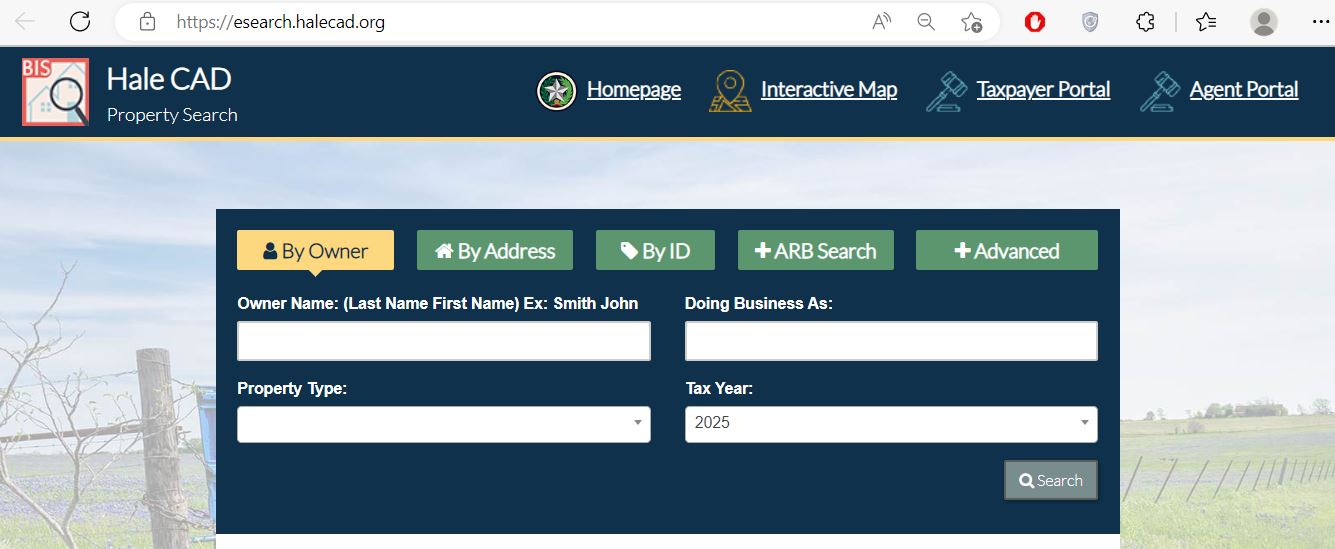
Use Hale CAD filters for farms, mobile homes, businesses and common owner names
| Field | When it helps | What to verify |
|---|---|---|
| Property ID | Reopening the exact account from a notice, payment record or prior screenshot. | Property, owner and displayed tax year. |
| Geographic ID | Matching an appraisal account with the interactive parcel map. | Legal description, acreage and map location. |
| Abstract | Rural acreage that lacks a normal street address. | Survey, abstract, tract and deeded acreage. |
| Subdivision | Plainview, Abernathy, Hale Center or Petersburg lots with repeated street names. | Lot, block, phase and recorded plat. |
| Mobile-home park | Finding a manufactured-home account located in a park. | Home owner, land owner, label, serial and title information. |
| Doing Business As | Locating a business-personal-property account under its public operating name. | Legal entity, situs and January 1 ownership. |
| Neighborhood | Comparing property accounts within a valuation area. | Size, age, class, condition, use and location differences. |
| Property type | Separating real, personal, mineral, utility, industrial and mobile-home records. | That the selected category matches the intended property interest. |
| ARB fields | Researching protest status, agent, informal date, hearing date or board member. | The current-year protest and correct property account. |
Use the Hale CAD map for rural tracts, irrigated fields and unclear addresses
Understand what the Hale CAD property record does and does not prove
| Account field | What it helps identify | What it does not prove | Best next action |
|---|---|---|---|
| Property ID | The primary Hale CAD appraisal and collection account. | That every recorded document uses the same number. | Save it for appraisal, protest and payment communication. |
| Geographic ID | A geographic reference connected with mapping. | A surveyed property boundary. | Compare the map, deed and survey. |
| Owner shown | The owner carried for appraisal and tax administration. | Complete title, heirship, mineral ownership or absence of liens. | Search recorded County Clerk documents. |
| Situs address | The physical location maintained in the account. | The owner’s mailing address or the full legal description. | Compare the map and deed. |
| Legal description | Lot, block, subdivision, abstract, survey or tract references. | That the abbreviated wording is sufficient for conveyance. | Review the recorded deed, plat and field notes. |
| Acreage | The area maintained for appraisal administration. | Surveyed acreage or the amount receiving agricultural appraisal. | Compare the survey and land breakdown. |
| Exemptions | Approved homestead, age, disability, veteran or other benefits shown online. | That every exemption is publicly displayed or that an application is not pending. | Confirm status directly with Hale CAD. |
| Taxing jurisdictions | County, city, school, water and other local units. | A payment was made or that the displayed estimate is the final bill. | Open the collection account and verify the live balance. |
Separate market value, appraised value and assessed value
Hale CAD’s opinion of the property’s market value as of January 1 for the appraisal year.
The value after an applicable homestead cap, circuit-breaker limit or agricultural-use adjustment.
The amount used after applicable exemptions and taxing-unit calculations are considered.
| Field | Meaning | What to check |
|---|---|---|
| Improvement homesite value | Value assigned to qualifying residence-homestead improvements. | Home area, class, age, condition and completion. |
| Improvement non-homesite value | Value assigned to non-homestead buildings or improvements. | Barns, shops, rentals, commercial structures and use. |
| Land market value | Market value of the land before productivity treatment. | Acreage, land class, location, access and comparable sales. |
| Agricultural value loss | The difference removed when qualifying land receives productivity appraisal. | Qualifying acreage and current agricultural classification. |
| HS cap loss | The amount excluded by the residence-homestead appraisal cap. | Homestead approval, prior appraised value and new improvements. |
| Circuit breaker | A temporary limit for qualifying non-homestead real property. | Property type, prior value and 2026 eligibility threshold. |
| Ag-use value | Productivity value assigned to qualifying agricultural acreage. | That the correct acreage and use category receive the benefit. |
| Estimated tax | A calculation using the displayed values and rates. | Live collection balance before paying. |
Local search tips for Plainview, Abernathy, Hale Center, Petersburg and rural acreage
Verify Plainview ISD, City of Plainview, Hale County, farm-to-market and water-district entries separately.
Check real-estate and business-personal-property accounts, DBA, improvement class, inventory and payment status.
Because Abernathy and its school district extend across county boundaries, confirm that the parcel is physically in Hale County.
Verify city, school, land, improvement and exemption records rather than relying only on the mailing address.
Check City of Petersburg, Petersburg ISD, county and water-district jurisdiction on the exact account.
Use the owner, Property ID, abstract or rural road and verify Cotton Center ISD and agricultural-use acreage.
Separate land market value, productivity value, irrigation improvements, wells, pivots and other taxable equipment.
Search the mobile-home account and land account separately and verify title, serial, ownership and park information.
Hale CAD states that these accounts are appraised by Thomas Y. Pickett & Co.; verify the account type before protesting.
Do not estimate future taxes from the seller’s taxable value alone
File with Hale CAD, preserve proof and verify the taxable values later
For a qualifying owner’s principal residence. Filing is free and a paid filing company is unnecessary.
Can provide additional exemption, school-tax-ceiling and qualifying installment or deferral rights.
Can provide an additional exemption and school-tax ceiling when statutory requirements are met.
Use the appropriate veteran or surviving-spouse application with current VA documentation.
An inherited residence can require death, heirship, utility, occupancy and available court documentation.
Religious, charitable, cemetery, solar, Freeport and other property use separate qualification rules.
Residence-homestead filing workflow
Document Hale County land use, production and qualifying history
Most 1-d-1 applications require qualifying agricultural use during five of the preceding seven years.
Agriculture should be the primary use rather than a token, planned or recreational activity.
The operation should resemble a prudent farm or ranch of the same type in the Hale County area.
Document irrigation method, water source, planted acreage, production, harvest and operating expenses.
Preserve seed, tillage, planting, weather, harvest, crop-insurance and sale records.
Prepare stocking, pasture, water, fence, feeding, cutting, bale and sale information.
Hale County farm and ranch evidence checklist
Protect the deadline, upload focused evidence and save confirmation
Evidence that may help a Hale County protest
Prepare a short, organised case for the Hale County ARB
State whether the dispute concerns value, unequal appraisal, property facts, exemption or special appraisal.
Ask for a specific value, acreage, exemption, classification or account correction.
Label each comparable, photograph, estimate, survey page, lease or production record.
Follow the hearing notice for date, attendance method, affidavit and evidence-delivery requirements.
Explain why a comparison differs in size, age, condition, location, access, acreage or use.
Save the ARB decision and review any arbitration, SOAH or court deadline immediately.
Five-part hearing presentation
Search the account, select Pay Taxes and verify the confirmation
| Method | Practical workflow | What to preserve |
|---|---|---|
| Online from property account | Search the account, select the green Pay Taxes button and review the cart. | Property ID, tax year, processor fee and confirmation. |
| Certified Payments | Use Bureau Code 5036947 and confirm the government entity and payment category. | Bureau code, account, amount and payment receipt. |
| In person | Visit Hale CAD at 302 West 8th Street during published hours. | Stamped receipt and tax-year breakdown. |
| Confirm the current payee and mailing instructions with the Collection Department. | Check copy, bill stub, tracking and postmark evidence. | |
| Multiple properties | Use the property-search cart and verify each selected account before checkout. | Account-by-account payment allocation. |
Request the live payoff instead of calculating an old balance yourself
Property taxes are normally timely when paid by January 31, subject to delayed-bill and calendar rules.
Unpaid taxes generally begin accruing statutory penalty and interest on February 1.
Ask Hale CAD Collections whether a partial payment can be accepted and how it will be applied.
Qualifying age-65, disabled, disabled-veteran and certain disaster-affected homesteads can use statutory installments.
Additional collection charges can attach after the statutory notice and date.
Request the current total before mailing or paying a delinquent account.
Search the BPP account and document the new 2026 exemption
The normal 2026 business-personal-property rendition deadline has passed.
A timely written request normally extends the deadline to May 15, with limited additional relief for good cause.
Qualifying income-producing tangible personal property at or below the threshold is exempt in a taxing unit beginning in 2026.
Follow Hale CAD’s instructions for documenting the exemption and reporting the account.
Hale CAD publishes a current business-personal-property depreciation schedule.
A late or missing rendition can create a penalty generally equal to 10% of the property taxes.
Business rendition preparation checklist
Use the correct declaration and monthly tax-statement workflow
Use the annual declaration and confidential monthly tax statement applicable to motor-vehicle inventory.
Use the heavy-equipment declaration and monthly prepayment form when the business qualifies.
Retail manufactured housing uses its own inventory declaration and monthly statement.
Dealers use a separate declaration and confidential monthly tax statement.
Special-inventory prepayments should be routed according to Hale CAD Collection Department instructions.
Preserve sales, statements, prepayment confirmations and annual declaration records.
Correct the system that controls the inaccurate information
Use the Hale County Clerk for deeds, liens, easements and official copies
Deeds, deeds of trust, releases, liens, easements, plats and other official public records.
District-court cases, including some tax suits, title disputes and other civil litigation.
Use a Texas title company or lawyer when clear ownership or lien priority must be determined.
Fix common Hale CAD search, protest, exemption and payment problems
| Problem | Likely reason | Best fix |
|---|---|---|
| Address search finds nothing | The address format is too detailed or the account uses rural wording. | Search only the street name, owner, Property ID, abstract or Geographic ID. |
| Owner search finds no property | The account may use a spouse, trust, estate, company or DBA. | Search only the surname or one business-name word. |
| Too many owner results | The owner has several properties or the name is common. | Add property type, street number, subdivision, abstract or tax year. |
| Only land or only the mobile home appears | The land and manufactured home use separate accounts. | Search the owner, address and mobile-home park under multiple property types. |
| Recently purchased property shows the seller | The recorded deed has not yet been reflected in the appraisal system. | Confirm recording and provide Hale CAD with the instrument information. |
| Homestead is not shown | The application is pending, incomplete, filed for another year or not publicly displayed. | Contact Hale CAD with the Property ID and proof of filing. |
| eProtest confirmation is missing | The final submission was not completed or the message was filtered. | Reopen eProtest and contact Hale CAD before the controlling deadline. |
| Tax Office says it cannot take property taxes | The county Tax Assessor-Collector is not the property-tax collector. | Contact Hale CAD’s Collection Department or use the green Pay Taxes button. |
| Online payment has not posted | Processing is pending, rejected or applied to another account or year. | Contact Hale CAD Collections with the processor confirmation. |
| Ag-use value disappeared | Ownership changed, a new application was required or qualifying evidence was insufficient. | Review the application, denial, use history and protest deadline immediately. |
Important Hale County appraisal and property-tax dates
Hale County appraisal, collection, vehicle and deed-record offices
Plainview, Texas 79072
Mailing: P.O. Box 29, Plainview, Texas 79073-0029
(806) 293-4226
Fax: (806) 293-1834
halecad1981@halecad.org
Hours: Monday-Friday, 8:00 AM-5:00 PM.
Chief Appraiser: Andrew Moritz
Plainview, Texas 79072
Main: (806) 293-4226
Collection Department Head: Alecia Johnson
Use for property-tax statements, balances, payments, receipts, delinquency and payment posting.
521 Broadway Street
Plainview, Texas 79072
(806) 291-5276
Fax: (806) 296-0876
Tax Assessor-Collector: Israel Flores
Use for vehicle title, registration and related county services—not property-tax collection.
Plainview, Texas 79072
County office: (806) 291-5205
County Clerk: Christine Reyna
Ask for real-property or official-public-records assistance and confirm the current direct records number.
Plainview, Texas 79072
Use for district-court civil cases, tax suits and court-file research.
Have the Property ID, Geographic ID, owner, property location, legal description and tax year.
For payment questions, also prepare the amount, date, method and confirmation.
For an exemption or protest, have the application, notice and evidence available.
Official Hale County appraisal, payment, protest and record resources
Official district notices, departments, forms, staff, reports and contact information.
Open Hale CADSearch owner, address, ID, abstract, subdivision, DBA, neighborhood and ARB fields.
Search Hale CAD recordsReview parcel location, surrounding accounts and rural property context.
Open Hale CAD GISAccess property information, electronic communication and supported applications.
Open taxpayer portalFile an eligible online protest and preserve submission confirmation.
Open online protestAuthorized agents can access the district’s electronic appeal system.
Open agent portalHomestead, veteran, agriculture, timber, rendition and special-inventory forms.
Open Hale CAD formsTax rates, reappraisal plans, annual reports and BPP depreciation schedules.
Open tax informationReview local proposed-rate and adopted-rate information as it is posted.
Open Hale tax transparencyHow this Hale County guide was researched and rebuilt

Existing images preserved with corrected collection routing
This replacement preserves the Hale CAD property-search screenshot and editor image already used on the page. The previous article incorrectly routed property-tax payments to the county Tax Assessor-Collector and used outdated school-exemption figures.
The rebuilt guide corrects the collector information, adds the Hale CAD Collection Department, green Pay Taxes workflow, Bureau Code 5036947, 2026 exemption amounts, taxpayer and eProtest portals, preliminary-value warning, rural and irrigated-land preparation, business-property exemption, special inventory, deed-history interpretation and current office details.
Official sources reviewed include Hale County Appraisal District, its property search, taxpayer portal, eProtest, map, forms, staff, tax-information and useful-links pages; the Texas Comptroller Hale County directory and property-tax resources; the Texas Department of Motor Vehicles; the Texas Secretary of State; and Hale County government resources.
AppraisalDistrict.org is an independent informational website and is not operated by Hale County Appraisal District, Hale County or any taxing jurisdiction.
10 common Hale County Appraisal District questions
1. How do I search Hale County Appraisal District property records?
Use the official Hale CAD property search. Search by Property ID or Geographic ID when available, or use owner, address, subdivision, abstract, DBA, mobile-home park, neighborhood or advanced fields.
2. Who collects Hale County property taxes?
Hale County Appraisal District has the Collection Department and provides the local property-tax payment system. The Texas Comptroller directory states that the county Tax Assessor-Collector does not collect property taxes.
3. How do I pay Hale County property taxes online?
Search the property in Hale CAD, open the correct account and select the green Pay Taxes button. Hale CAD also publishes Certified Payments Bureau Code 5036947. Verify the year, balance and fee before paying.
4. What is the Hale CAD protest deadline for 2026?
The ordinary deadline was May 15, 2026, or 30 days after notice delivery, whichever was later. A later notice or another appealable action can carry a different deadline, so follow the date on the individual notice.
5. Can I protest a Hale County appraisal online?
Yes. Use the official Hale CAD eProtest system. Complete the final submission, upload clearly labelled evidence and save confirmation outside the portal.
6. How do I apply for a Hale County homestead exemption?
Open Hale CAD’s official forms page, complete the current residence-homestead application, attach the identification and supporting documents required by the form and file it with Hale CAD. Keep delivery proof.
7. How does agricultural appraisal work in Hale County?
Qualification depends on current principal use, qualifying history and local degree of intensity. Prepare acreage, irrigation, crop, grazing, lease, production, expense and sale records and file the correct application with Hale CAD.
8. What is the 2026 business personal property exemption?
Qualifying income-producing tangible personal property with a total taxable value of $125,000 or less in a taxing unit is exempt beginning in 2026. Follow Hale CAD’s rendition and documentation instructions.
9. Where can I find Hale County deeds and liens?
Contact the Hale County Clerk for recorded deeds, deeds of trust, liens, releases, easements and plats. The deed-history section in a Hale CAD property account is a research aid but is not a certified record or title report.
10. Where is Hale County Appraisal District located?
Hale CAD is located at 302 West 8th Street, Plainview, Texas 79072. Call (806) 293-4226. Published hours are Monday-Friday from 8:00 AM to 5:00 PM.