Guadalupe County, Texas · Appraisal search, maps, exemptions, protests, property-tax payment and deeds
Follow a Guadalupe County Property From the CAD Search to the Correct Tax or Recorded Document
Guadalupe Appraisal District is the correct starting point for appraisal ownership, property characteristics, market and appraised values, exemptions, agricultural land, business personal property, interactive mapping and appraisal protests.
Guadalupe County Tax Assessor-Collector handles property-tax bills, balances, receipts and payments. The County Clerk maintains deeds, mortgages, liens, plats and other recorded instruments. Using the correct office first avoids duplicate payments, missed protest deadlines and ownership mistakes.
Property IDOwner or Owner IDGeographic IDStreet or legal descriptionTax year and property type
RIVER CORRIDOR PARCEL ROUTERVERIFYING
GUADALUPE AD SEARCH2026
REALPERSONALMINERAL
OFFICIAL RECORD ROUTE
PROPERTY + VALUE + OFFICE MATCHED
SEARCH → VERIFY → FILE OR PAY
Current Schertz appraisal-office closure:
Guadalupe AD’s Suite 103 office at 1052 FM 78 is closed from June 18 through August 28, 2026 for construction and is tentatively scheduled to reopen August 31. A drop box remains outside. The Guadalupe County Tax Office in Suite 107 is a separate office—confirm its current status before visiting.
Main appraisal office
3000 N. Austin Street, Seguin, Texas 78155.
2026 value status
The live search labels 2026 values preliminary before certification.
2026 protest date
May 15, 2026 was the district’s published general deadline.
Online exemptions
Homestead, disabled-veteran and surviving-spouse tools are available.
Official review
Local links and procedures reviewed July 31, 2026.
Start with the task
Choose the Guadalupe County property action you need
PROPERTY LOOKUPSearch the appraisal account
Use owner, address, Property ID, Owner ID, Geographic ID, subdivision, abstract or Advanced Search.
Use the first sections to identify the property. Continue to values, exemptions, protests, tax payment, deeds or office contacts as needed.
Official appraisal database
Search Guadalupe AD without choosing a similar but incorrect property
Best search sequence:
use Property ID or Geographic ID when available, simplify name and address searches, select the correct tax year and property type and save the complete account before filing or paying.
Open the official Guadalupe AD property search
Start at the district’s BIS-powered portal instead of a copied property-record website.
Open Guadalupe AD Property Search
Choose Owner for an individual, trust or company
The portal shows owner-name format as last name first, such as Smith John. Use only the first or last name when the complete name fails.
Choose Address for a known location
Enter the street number and name. If the complete address fails, the portal recommends trying only the street name.
Choose ID for an exact account
Use the Property ID, Owner ID or Geographic ID from the appraisal notice, prior record, tax statement or closing file.
Use Advanced Search for difficult properties
Available fields include abstract, mobile-home park, subdivision, condo, neighborhood, agent, DBA, property type and tax year.
Select the correct tax year
The portal provides current and prior years. Match the year associated with the notice, protest, exemption or tax question.
Select the correct property type
Search categories include Real, Personal, Mineral, Auto and Mobile Home.
Open every plausible result
One owner may have a residence, rural tract, business account, mineral interest, inventory account or multiple subdivision lots.
Verify the complete property account
Match Property ID, Geographic ID, owner, situs, legal description, subdivision, acreage, property type, values, exemptions and taxing entities.
Save a dated copy
Print the account or save a PDF or screenshot before filing an exemption, protest, correction or tax-payment inquiry.
The official search states that 2026 values are preliminary and subject to change before certification.
It also warns that legal descriptions and acreage are provided for appraisal-district purposes and should be independently verified before legal use.
Existing screenshot preserved
Use the original Guadalupe AD image to select the strongest search tab
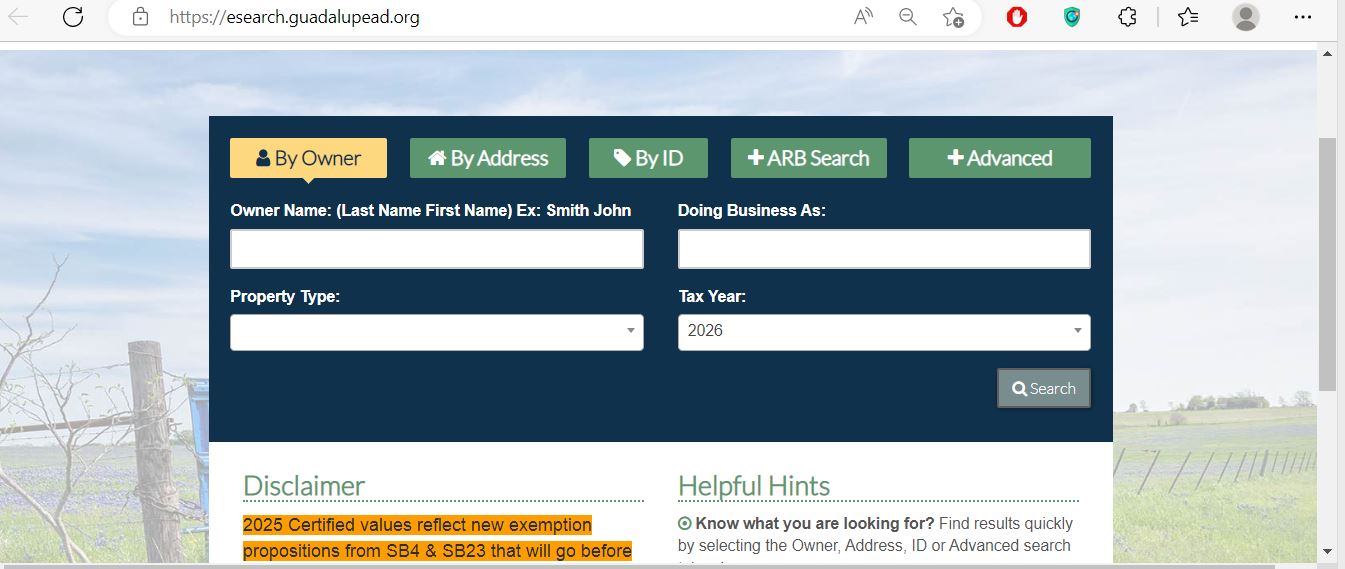
This screenshot appeared in the existing article and has been retained. It shows the official 2026 search interface with Owner, Address, ID, ARB Search and Advanced options.
Existing Guadalupe Appraisal District screenshot reused from the previous article. Use it as a navigation guide only and verify all live account data on the official search portal.
By Owner
Use last name first. Reduce the search to one name when the full entry returns nothing.
By Address
Use street number and name, then simplify to the street name when necessary.
By ID
Use Property ID, Owner ID or Geographic ID for the most precise lookup.
ARB Search
Use hearing and board fields for appraisal-review research when records are available.
Advanced
Use abstract, subdivision, condo, neighborhood, DBA, agent and property-type filters.
Tax year
Confirm that the selected year matches the appraisal or tax question before saving the result.
Original field guide
Recognise the Guadalupe AD fields that must match before acting
esearch.guadalupead.org · official appraisal and ARB search
Begin with one strong identifier
OwnerAddressIDARB SearchAdvanced
Property ID · Owner ID · Geographic ID
Street · subdivision · condo · neighborhood · abstract
Tax year · property type · DBA · agent · hearing date
Open complete property record
Property ID: save it for forms, protests and tax questions
Geographic ID: compare it with the interactive map
Owner: appraisal ownership, not complete title proof
Legal description: match the correct lot, block, abstract or tract
Values: distinguish market, appraised and taxable amounts
Taxing units: use them to review rates and payment records
GIS and parcel location
Use the Guadalupe AD interactive map for fast-growth and rural properties
GIS is especially useful for new subdivisions around Cibolo and Schertz, rural acreage near New Berlin or Marion, boundary-area parcels and properties with similar street addresses.
Return to the property account
Confirm that the map and appraisal record contain matching identifiers and legal information.
Verify legal boundaries separately
Use the recorded deed, plat, title documents and professional survey before making a legal or construction decision.
The GIS map is not a survey, title report or jurisdiction guarantee.
Do not use it alone to place a fence, confirm legal access, determine exact acreage or resolve a city, school or county boundary dispute.
Property-record decoder
Understand what each Guadalupe AD field does and does not prove
Use the appraisal account as a route to the controlling official record
Field
What it identifies
What it does not prove
Best next action
Property ID
The individual Guadalupe AD appraisal account.
That every related tract, mineral interest or asset appears in one account.
Save it and search related account types separately.
Owner ID
The owner record used by the appraisal system and taxpayer portal.
Legal ownership, lien status or probate resolution.
Use it for portal registration and compare County Clerk records.
Geographic ID
Geographic indexing associated with the parcel.
A surveyed property boundary.
Compare GIS, deed, plat and survey.
Owner shown
The owner carried for appraisal administration.
Complete title, liens, heirship or mineral ownership.
Search County Clerk Official Records.
Situs address
The physical location used by the appraisal account.
Mailing address, legal description or exact jurisdiction.
Compare the map and recorded instrument.
Legal description
The subdivision, lot, block, abstract, survey, tract or acreage reference.
That abbreviated CAD wording is sufficient for conveyance.
Open the complete recorded deed or plat.
Market value
The district’s January 1 opinion of market value.
A guaranteed sale price or final property-tax bill.
Compare sales, condition and equal-appraisal evidence.
Appraised value
Value after an applicable statutory appraisal limitation.
Taxable value after every exemption.
Continue to the taxable value for each taxing unit.
Productivity value
Special valuation of qualifying agricultural or timber land.
Future qualification after sale or use change.
Review the application and land-use history.
Taxable value
Value after applicable exemptions for a taxing unit.
The current balance, receipt or payment posting.
Open the County Tax Office account.
2026 property values
Read market, appraised and taxable value in the correct order
FIRSTMarket value
The district’s estimate of what the property would sell for under normal market conditions as of January 1.
THENAppraised value
The value after an applicable homestead or non-homestead appraisal limitation.
FINALLYTaxable value
The value remaining after exemptions. It can differ among county, school, city and special districts.
Guadalupe AD’s live search still identifies 2026 values as preliminary.
Save the current record for evidence, but verify the certified or supplemental appraisal roll before treating the value as final.
Review these fields before challenging only the total value
Land details
Check lot size, acreage, frontage, location, topography, utilities and land classification.
Improvement details
Review living area, garages, porches, pools, barns, shops, additions and completion percentage.
January 1 condition
Document unrepaired damage, deferred maintenance and incomplete construction.
New subdivision account
Check whether land, improvements or a new parcel split are incomplete or duplicated.
Special appraisal
Compare ordinary land market value with any agricultural or timber productivity value.
Exemption status
Make sure the taxable-value change is not caused by a missing or reduced exemption.
The residence-homestead cap limits appraised value, not market value.
The district must still display its market-value opinion. New improvements are generally added separately.
2026 non-homestead circuit breaker:
qualifying real property other than a residence homestead may receive the temporary 20% appraised-value limitation when its market value is $5,320,000 or less and all statutory conditions are met. Agricultural, timber and several other special-appraisal categories are excluded. The provision expires after 2026 unless extended.
Switch search methods before assuming the property is missing
Problem
Likely reason
Practical fix
Owner name finds nothing
The record may use a spouse, trust, estate, business, initials or prior owner.
Use only the first name, last name or one business keyword.
Address search fails
The appraisal address may differ from the postal wording.
Use only the street name, as recommended by the official portal.
New subdivision home is missing
The address or parcel split may still be updating.
Search owner, Property ID, subdivision, lot and Geographic ID.
Rural acreage has no normal address
The property may be indexed by abstract, survey, tract or Geo ID.
Use Advanced Search and GIS.
Property appears in another city
Postal city names and municipal boundaries are not always identical.
Verify the legal description, GIS parcel and taxing units.
Business account is missing
The account may use a DBA, owner name or Personal property category.
Search Doing Business As, Owner ID and Personal property.
Mobile home is missing
The home may be separate from land or indexed by a mobile-home park.
Select Mobile Home and use the park, owner or Property ID.
Recent buyer is not listed
The recorded deed may still be processing into the appraisal system.
Confirm County Clerk recording and retain the instrument number.
Tax payment is not visible
Processing or online display may take time.
Check Payment History and contact the Tax Office before resubmitting.
Prepared Guadalupe AD call script
I am researching tax year [year], Property ID [number], Geographic ID [number] and property type [type]. The account currently shows [owner, value, exemption or property detail]. I need help with [one exact issue]. Please tell me which form, portal action or department controls the next step.
Guadalupe County situations
Use a different search strategy for each local property type
Seguin residence
Search the address or Property ID, then verify City of Seguin, school and homestead lines.
Schertz property
Confirm the parcel is in Guadalupe County and distinguish the CAD office in Suite 103 from the Tax Office in Suite 107.
Cibolo subdivision
Use Property ID, subdivision, lot, block and Geo ID when a new street address does not work.
Marion property
Verify City of Marion, Marion ISD and the correct tax-account lines.
New Braunfels-area parcel
Confirm the county boundary because a New Braunfels mailing address can be in Guadalupe or Comal County.
Selma or Santa Clara property
Use GIS and taxing units to verify municipal and school boundaries.
New Berlin or rural acreage
Search by owner, abstract, survey, legal description, Property ID or Geo ID.
Agricultural land
Compare market value, productivity value, qualifying acreage and current use records.
Business or inventory property
Search the Personal account separately from land and buildings.
Office routing
Use Guadalupe AD, the Tax Office or County Clerk for the correct task
Contact the office that controls the record or action
Your question
Correct starting office
What to prepare
What is the market or appraised value?
Guadalupe Appraisal District
Property ID, tax year and disputed field.
Why is an exemption missing?
Guadalupe Appraisal District
Application, identification and filing confirmation.
How do I protest?
Guadalupe AD and the Appraisal Review Board
Notice, E-File PIN, deadline and evidence.
How much property tax is due?
Guadalupe County Tax Assessor-Collector
Tax account, year and statement.
Did my payment post?
Guadalupe County Tax Office
Receipt, confirmation, account, amount and date.
Who legally owns the property?
Guadalupe County Clerk or title professional
Grantor, grantee, date and legal description.
Where is a deed, lien or plat?
County Clerk Official Records
Names, document type, date range and instrument number.
Is the boundary or acreage correct?
Surveyor, title professional and recorded records
Deed, plat, title commitment and survey.
Which city or school taxes the property?
CAD account, GIS and taxing-unit records
Property ID, situs and legal description.
Who adopts the tax rate?
Each local taxing unit
Taxing-unit list and Truth-in-Taxation record.
Account corrections
Use the correct Guadalupe AD request for the field that is wrong
Appraisal owner is incorrect
Confirm the recorded deed, probate order or ownership instrument and provide the requested information.
Mailing address is incorrect
Use the district’s Mailing Address Change Request rather than changing only the tax-payment profile.
Acreage or legal detail is incorrect
Use the Account Details Change Request and attach the deed, plat or survey evidence.
Building data is incorrect
Prepare measurements, plans, photographs, permits or inspection records.
Tax ceiling information is needed
Use the Tax Ceiling Certificate Request available through the forms page.
Public website suppression is needed
Review the district’s information-suppression or confidentiality request and eligibility rules.
A correction and protest are different remedies.
Use an account-change request for inaccurate data. File a timely protest when challenging value, unequal appraisal, exemption denial or another protestable action.
Homestead and special exemptions
Use Guadalupe AD’s online tools or printable forms without paying a filing service
Online tools are available for selected exemptions.
Guadalupe AD currently provides online applications for residence homestead and for disabled-veteran or surviving-spouse exemptions. Other forms remain printable.
Select the correct tool
Choose the Homestead Exemption Tool or the Disabled Veteran or Surviving Spouse Exemptions Tool.
Create an account with your email address
The district requires an online-tool account when the applicant has not used that tool before.
Match the appraisal account
Use the Property ID, owner, situs address and legal description from the official search.
Attach the required identification
Residence-homestead applications generally require Texas identification showing the residence address, subject to statutory affidavits and exceptions.
Attach category-specific evidence
Age, disability, VA, surviving-spouse, heir-property or manufactured-home claims can require additional documents.
Use printable forms when no online tool exists
Guadalupe AD states that its other forms currently do not have an online application tool.
Open Printable Forms
Save proof of submission
Keep the complete application, attachments, confirmation, certified-mail receipt or office-stamped copy.
Recheck the property account
Confirm the exemption appears for the correct year and taxing entities after approval.
General homestead
Current Texas law provides a $140,000 mandatory school-district residence-homestead exemption.
Age 65 or older
Current law provides an additional $60,000 school exemption and can provide tax-ceiling protections.
Disabled person
Requires qualification under the applicable disability standard and supporting evidence.
Disabled veteran
The benefit depends on the VA disability category and statutory exemption claimed.
Surviving spouse
Eligibility can depend on age, remarriage, residence and the deceased owner’s qualification.
Heir property
Special affidavits and ownership evidence can help qualifying heirs establish a homestead interest.
Late homestead filing may still be available.
Contact Guadalupe AD with the exact tax year and ownership date before assuming a missed application deadline permanently eliminated the benefit.
Select the correct filing
Use Agricultural Appraisal 1-D-1, Timber Land Appraisal, Wildlife Management Plan or the form matching the actual land use.
Identify every tract
Match Property ID, Geographic ID, acreage, abstract, survey and legal description.
Separate non-qualifying areas
A residence, yard, business site, storage area or development phase may receive different appraisal treatment.
Document the use history
Prepare leases, crop records, livestock evidence, timber-management records, maps, receipts and photographs.
Meet local intensity requirements
The operation must satisfy the degree-of-intensity standard normally accepted for the property’s agricultural category.
Submit the timely application
April 30 is the normal statewide timely deadline for many open-space applications; confirm the current form and any extension or late-filing rule.
Keep annual evidence
Continue preserving leases, production records, wildlife reports and timber-management documents after approval.
Ask about rollback or change-in-use taxes
Guadalupe AD provides a rollback-estimate request for owners considering development or another change of use.
Grazing operation
Document livestock type, stocking, leases, carrying capacity and management activity.
Crop or hay production
Prepare planting, harvesting, input, lease and sales records.
Timber use
Maintain planting, thinning, management, harvest and sale evidence.
Wildlife management
Confirm prior qualification and maintain the required plan and annual report.
New owner
Confirm whether the district requires a new application after the ownership transfer.
File a Guadalupe County business-property rendition with an organised asset list
Businesses generally report taxable tangible personal property used to produce income, including machinery, equipment, furniture, fixtures and inventory owned or managed on January 1.
Find the Personal property account
Search the business, owner, DBA, Owner ID or Property ID.
Prepare the asset list
Include descriptions, quantities, acquisition years, original costs, locations and disposal information.
Use the district’s information guide
Guadalupe AD provides instructions for completing a business-personal-property rendition and a depreciation schedule.
Open BPP Resources
File by April 15
The normal deadline for most required business-personal-property renditions is April 15.
Request a timely extension when necessary
The forms page includes a Business Personal Property Extension request.
Keep proof of delivery
Save the completed rendition, attachments and mailing, electronic or stamped confirmation.
A late required rendition can create a 10% penalty based on the taxes imposed on the property.
File the rendition or extension request on time even when some asset details require explanation.
Current small-value exemption:
qualifying income-producing tangible personal property with total taxable value of $125,000 or less in a taxing unit may be exempt under current Texas law. Confirm the account and filing requirement with Guadalupe AD.
Use the taxpayer portal without confusing it with the protest website
The Guadalupe AD Taxpayer Portal is used for property details, electronic communications, important documents and applications. The separate e-protest site is used to submit and manage appraisal appeals.
Use the notice credentials
Portal registration asks for Owner ID and E-File PIN from the appraisal notice.
Request a current PIN when necessary
The registration screen supports a PIN request using Property ID, Owner ID and email.
Create a secure account
Enter name, phone, email and a password that meets the portal requirements.
Wait for approval when required
The registration page states that access becomes available after the registration is approved.
Save electronic-delivery records
Keep the registration confirmation, emails and every downloaded or uploaded document.
Electronic delivery does not extend a statutory deadline.
Confirm successful submission and keep a dated receipt for each protest, exemption, correction or other filing.
2026 online protest
Use the Guadalupe AD e-protest process in the correct order
Published 2026 general deadline:
Guadalupe AD displayed May 15, 2026. A later or different deadline may apply based on notice mailing or the type of protest. The individual notice controls.
Read the complete Notice of Appraised Value
Confirm the Property ID, proposed values, exemptions, E-File PIN and deadline.
Save the official property account
Keep the legal description, land, improvements, values, exemptions and tax-year information.
Register using the appeal credentials
Guadalupe AD’s appeal documentation directs new users to enter the Property ID, E-File PIN and email address.
Accept the electronic correspondence agreement
Read the user agreement and save a copy of any electronic-delivery election.
Complete each protest step
Identify the property, protest grounds, requested value or correction and preferred hearing options.
Select Submit Appeal
Review the entries first. The district’s instructions warn that previous steps cannot be reopened after final submission.
Upload evidence
Select the files, assign the correct evidence type and confirm that each upload appears in the appeal record.
Use My Appeals to monitor the case
Review status, notices, hearing information, uploaded evidence, district files, emails and any settlement offer.
Save every confirmation
Keep the appeal PDF, upload list, emails, settlement response and final ARB order.
Evidence packet organised for quick review
One-page statement of the requested value or correction
Notice of Appraised Value
Saved 2026 property account
Comparable sales or equal-appraisal accounts
Dated photographs of January 1 condition
Repair estimates or inspection reports
Survey, acreage or legal-description evidence
Ag, BPP, income or lease records when relevant
Do not argue only that the tax bill is high.
Guadalupe AD determines appraisal values. Local governing bodies adopt tax rates. Connect the protest to value, equal treatment, property data, exemption status or another appraisal action.
The normal 2026 deadline has passed for many accounts.
Limited late-protest remedies may exist for failure to receive a required notice, good cause or another statutory reason. Contact Guadalupe AD immediately instead of assuming a late hearing is automatic.
Appraisal Review Board
Prepare for the Guadalupe County ARB before the hearing date
Independent body
The ARB is separate from daily appraisal-office operations and resolves properly filed disputes.
Taxpayer Liaison
Tavie Murphy is available when the ARB is in session at the Seguin main office.
Written order
Preserve the decision and review any arbitration or court deadline immediately.
Read the hearing notice
Confirm the date, time, place, participation method and evidence-delivery instructions.
Number every exhibit
Use labels such as Photograph 1, Comparable 2, Survey 3 and Estimate 4.
Prepare a short opening statement
State the property, tax year, disputed issue and requested result.
Put the strongest evidence first
Begin with the proof that most directly establishes the requested correction.
Review the district’s evidence
Note incorrect property characteristics, unsuitable comparables or unexplained adjustments.
Keep the presentation focused
Explain how the evidence supports one value, exemption, special appraisal or account correction.
Preserve the ARB order
Save the decision, evidence and filing records for any further statutory review.
Pay Guadalupe County property taxes without submitting a duplicate payment
The Guadalupe County Tax Office provides the official property-tax search and payment route. Its website specifically warns users to contact the office before resubmitting when they are unsure whether an online payment processed.
Search by account ID, owner or address
Use Advanced Search when the basic search returns too many results.
Open the correct tax account
Confirm the property ID, CAD ID, owner, situs address, legal description and property type.
Review every tax year
A current-year payment does not automatically clear an older delinquent balance.
Confirm taxing units and amount due
Check the county, school, city and special-district lines before paying.
Review the fee before submitting
The checkout should display the tax amount, processing fee and total charge.
Do not immediately resubmit an uncertain payment
Call the Tax Office first and provide the account, amount, payment time and bank or card reference.
Save the payment receipt
Keep the payment date, reference number, tax amount, processing fee and total.
Allow time for the display to update
The payment receipt warns that online display can take approximately three to five business days.
Check Payment History
The Tax Office says receipts are available under the account’s Payment History tab after processing.
Common Guadalupe County tax-account checks
Check
Why it matters
What to save
Correct account
Owners can have multiple real, personal, mineral or manufactured-home records.
Property ID, CAD ID and legal description.
Correct tax year
Current and delinquent years can appear separately.
Tax year and dated payoff.
Taxing units
Boundary-area property can include entities associated with different cities or school districts.
Complete taxing-unit list.
Payment status
Submitting twice can create a duplicate charge or refund issue.
Reference number and bank or card record.
Mortgage escrow
A lender may already be scheduled to pay the statement.
Escrow confirmation and lender communication.
Mailing-date protection:
the Tax Office FAQ states that it accepts the United States Postal Service postmark. Obtain a clerk-applied postmark at a Postal Service counter when deadline proof is important.
Failure to receive a tax statement does not cancel the tax, due date, penalty, interest or lien.
Check the official account and verify the mailing address rather than waiting indefinitely for a paper bill.
Search the property when current-year data is available
Use the owner, address or property identifier supported by the database.
Review each taxing unit separately
Compare proposed rates, no-new-revenue rates, voter-approval rates, meeting information and estimated tax effects.
Confirm local exemptions
Homestead and age or disability benefits can differ among taxing units.
Do not treat an estimate as the tax bill
The official Tax Office statement controls after rates are adopted and the account is calculated.
Recorded property documents
Use the Guadalupe County Clerk for deeds, mortgages, liens and plats
The County Clerk’s Official Records Division files deeds, mortgages, liens, assumed names, cattle brands, plats and federal and state tax liens. The Clerk does not determine title or provide legal opinions.
Continue to Public Records Search
Use the search link supplied by the county rather than an unrelated commercial deed site.
Search Public Records
Search grantor and grantee names
Try the buyer, seller, spouse, trust, estate, company and common spelling variations.
Narrow the recording period
Use the purchase, inheritance, refinance, lien, release, easement or transfer date.
Compare the legal description
Match the subdivision, lot, block, abstract, survey or tract with the Guadalupe AD account.
Review pre-1970 indexes when necessary
The County Clerk provides a separate historical-index route for records before 1970.
Order the correct record type
Electronic certified copies of Official Public Records are available through the county’s eCertify link.
Use title help for ownership conclusions
The Clerk records documents but does not conduct title searches, determine validity or verify legal ownership.
The online records database may contain redactions and is not the complete official repository.
Obtain the official record or certified copy when a complete instrument is required.
Free recording alert:
Guadalupe County provides a Recording Notification Service that can email a subscriber when a document is recorded against a monitored name.
A mailing address such as New Braunfels, Schertz or Selma does not by itself establish the taxing jurisdiction.
Search recorded ownership
Review deeds, mortgages, liens, releases, easements and plats.
Check property taxes
Review current and delinquent years and verify payment history.
Identify every taxing unit
Check county, school, city, MUD, water and emergency-service lines.
Recalculate future taxes
The seller’s homestead, cap, ceiling or special appraisal may not continue.
Review improvement data
Compare square footage, age, class, condition and additions with the actual property.
Confirm ag or wildlife status
Review qualification history and planned future use before closing.
File the buyer’s exemption
Do not assume the previous owner’s homestead automatically transfers.
The seller’s current bill may not predict the buyer’s future tax.
Ownership changes can affect exemptions, appraisal limitations, tax ceilings and agricultural qualification.
2026 action calendar
Important Guadalupe County appraisal and property-tax dates
Property status and appraisal date
Ownership, use, condition, exemption qualification and market value are generally determined as of January 1.
Business-personal-property rendition
File most required renditions or a timely written extension request.
Many exemption and special-appraisal applications
April 30 is the normal timely deadline for many homestead, agricultural and timber filings.
2026 appraisal notices mailed
Guadalupe AD published its appraisal-notice mailing press release on April 10, 2026.
Published 2026 protest deadline
Guadalupe AD displayed May 15, 2026. The individual notice controls when another date applies.
Informal review and ARB hearings
Unresolved protests move through evidence review and formal hearing.
ARB certification meeting
Guadalupe AD listed a July 20, 2026 certification agenda; verify the certified or supplemental roll afterward.
Proposed and adopted tax-rate season
Review Truth in Taxation as local units publish and adopt rates.
Tax statements generally begin
Check the owner, mailing address, account, taxing units, amount and payment route.
Normal payment deadline in the following year
Most 2026 property taxes become delinquent after January 31, 2027, subject to applicable weekend and special-payment rules.
The date printed on the individual notice, application, ARB order or tax statement controls.
General calendar dates cannot account for late notices, corrected accounts, weekends, holidays or special statutory remedies.
Verified local contacts
Guadalupe County appraisal, tax-payment and recorded-document offices
Guadalupe Appraisal District — Seguin
3000 N. Austin Street
Seguin, Texas 78155
Visit-planning tip:
the Seguin appraisal office, Seguin Tax Office and County Clerk are at different addresses. At the Schertz FM 78 location, the appraisal district is Suite 103 and the Tax Office is Suite 107.
Official action resources
Use these official pages for the final live action
Guadalupe AD homepage
Official notices, deadlines, office status, contacts and district services.
The existing images were preserved and the article was rebuilt around complete tasks
This version retains the original Guadalupe AD search screenshot and editor image while replacing the short directory-style guide with complete search, GIS, exemption, agricultural, rendition, portal, protest, ARB, payment and deed-record workflows.
The update also adds the current Schertz appraisal-office closure, the distinction between Suite 103 and Suite 107, the 2026 preliminary-value warning, exact e-protest sequence, payment-history steps, duplicate-payment warning, current staff contacts and County Clerk recording alerts.
Official resources reviewed include Guadalupe Appraisal District, the Guadalupe AD Property Search, taxpayer and protest portals, Guadalupe County Tax Assessor-Collector, Guadalupe County Clerk and the Texas Comptroller of Public Accounts.
AppraisalDistrict.org is an independent informational website and is not operated by Guadalupe Appraisal District or Guadalupe County.
Guadalupe County answers
10 common Guadalupe Appraisal District questions
1. What is the official Guadalupe Appraisal District website?
The official website is guadalupead.org. Use it for appraisal searches, maps, forms, online protests, taxpayer documents and district contacts.
2. How do I search Guadalupe County property records?
Open Guadalupe AD Property Search and choose Owner, Address, ID, ARB Search or Advanced. Verify the complete account before relying on it.
3. Why can I not find a Guadalupe County property by address?
Simplify the search to the street name. For new subdivisions or rural property, try owner, Property ID, Geographic ID, subdivision, abstract or GIS.
4. Are Guadalupe Appraisal District 2026 values final?
No. The official property search states that 2026 values are preliminary and subject to change before certification.
5. Can I file a Guadalupe Appraisal District protest online?
Yes, when eligible. Use the official e-protest system with the Property ID, E-File PIN and email information associated with the appraisal notice.
6. What was the Guadalupe AD protest deadline for 2026?
Guadalupe AD published May 15, 2026 as its general protest deadline. Follow the exact deadline printed on the individual notice when another date applies.
7. Can I apply for a Guadalupe County homestead exemption online?
Yes. Guadalupe AD provides online tools for residence homestead and for disabled-veteran or surviving-spouse exemptions. Create an account, complete the application and save the confirmation.
8. Where do I pay Guadalupe County property taxes?
Use property.guadalupetx.gov. Search the correct account and tax year and contact the Tax Office before resubmitting when payment status is uncertain.
9. Is the Guadalupe AD Schertz office open during summer 2026?
The appraisal office in Suite 103 is closed from June 18 through August 28, 2026 for construction and is tentatively scheduled to reopen August 31. A drop box remains outside. The Tax Office in Suite 107 is separate.
10. Where can I search Guadalupe County deeds and liens?
Use the County Clerk Official Records page and the county-provided Public Records Search. Obtain an official or certified record when the online image is incomplete or redacted.