Match a Fort Bend Property to Its Correct Appraisal Account, Taxing Units and Payment Collector
Start with Fort Bend Central Appraisal District when you need a property ID, owner lookup, market value, exemption, appraisal map, business-property record, agricultural appraisal or protest information.
Fort Bend County contains overlapping cities, school districts, MUDs, LIDs, ESDs, management districts and other special units. The taxing-unit list on the FBCAD account is therefore just as important as the property value.
Fort Bend Central Appraisal District, commonly called FBCAD or Fort Bend CAD.
Jordan Wise, as listed in the official July 2026 county directory and FBCAD notices.
2801 B.F. Terry Boulevard, Rosenberg, Texas 77471.
Monday-Friday, 8:00 AM-4:30 PM.
FBCAD announced certification of the 2026 appraisal roll in July 2026.
What do you need from the Fort Bend County property record?
Use property ID, address or owner and verify the subdivision, legal description and situs.
Follow the search workflowReview land, improvements, market value, capped or limited value, exemptions and taxable values.
Understand the appraisal recordMatch each county, city, school, MUD, LID, ESD and special-district line to its payment office.
Check collection routingUse comparable sales, equal-appraisal records, condition photos, repair estimates and property facts.
Prepare the protestCheck homestead, age, disability, veteran, inherited-property and other exemption routes.
Review exemption stepsUse recorded deeds, mortgages, easements, liens and plats for legal-document research.
Search official recordsChoose the Fort Bend office that controls your question
Select the task. This helper does not send, save or collect property information; it only displays the correct official route.
Search Fort Bend CAD records without selecting the wrong subdivision or owner
Use the existing Fort Bend CAD image as orientation—not live property data
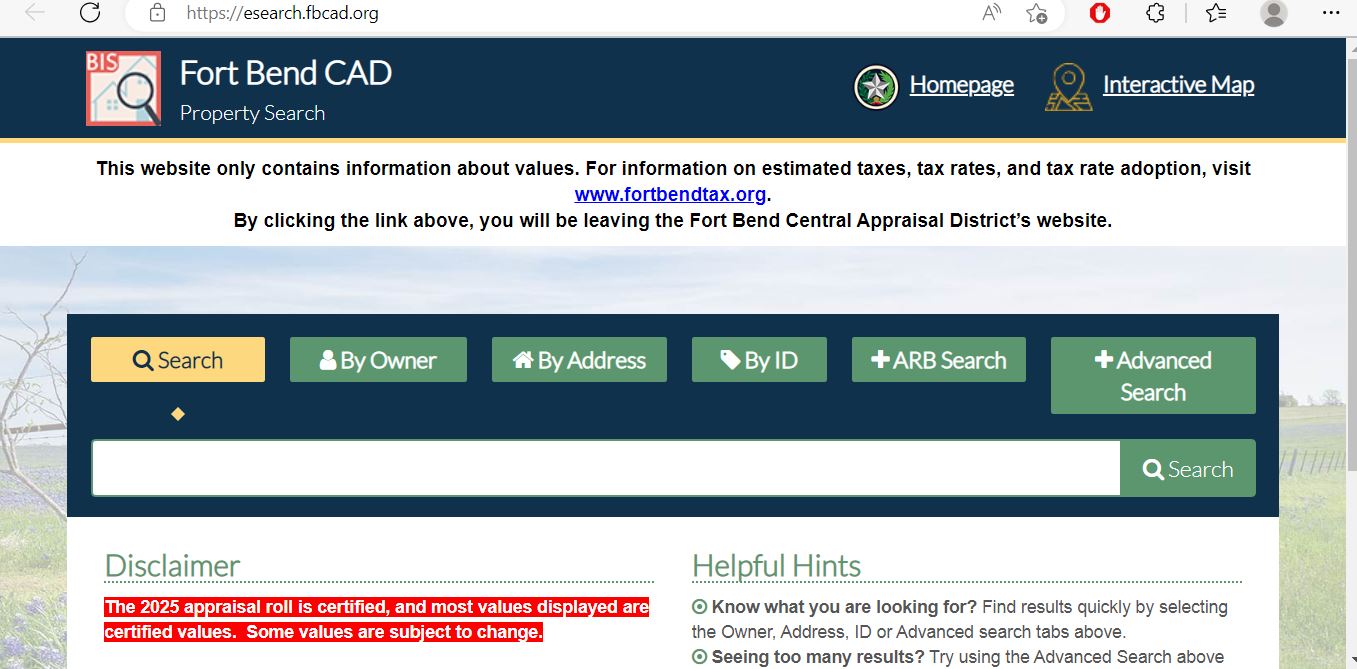
Choose the Fort Bend CAD search method that matches your information
| Search detail | Best use | What to verify |
|---|---|---|
| Property ID | The fastest way to open a known appraisal account. | Tax year, situs, property type and owner. |
| Street address | Homes, commercial buildings and properties with an assigned situs. | Subdivision, city, county and unit number. |
| Owner name | Individuals, trusts, estates, partnerships and businesses. | Similar names and multiple properties. |
| Subdivision | Narrowing similar streets or comparing properties within a master-planned community. | Section, lot, block and legal description. |
| Legal description | Vacant lots, acreage and properties without a reliable street address. | The CAD description may be abbreviated. |
| Business name | Business personal property and commercial accounts. | Legal name, DBA, situs and property type. |
| Prior owner | Recently purchased or inherited property when ownership has not updated. | County Clerk recording and current mailing address. |
| Map location | Large acreage, irregular parcels and subdivision context. | Map lines are not survey boundaries. |
Understand what each Fort Bend CAD field proves—and what it does not
| Field | What it helps identify | What it does not prove | Best next action |
|---|---|---|---|
| Property ID | The FBCAD appraisal account. | That every tax firm uses the same account number. | Use it for CAD calls and tax-account matching. |
| Owner shown | The owner carried for appraisal administration. | Complete legal title, liens, probate rights or ownership percentages. | Search County Clerk records when title matters. |
| Situs address | The physical location carried by FBCAD. | The mailing address, jurisdiction or complete legal description. | Check the map and taxing units. |
| Legal description | The appraisal reference to a lot, block, subdivision, tract or survey. | A complete description suitable for a deed. | Use the recorded deed and plat. |
| Land value | The value assigned to the lot or acreage. | A sale price or surveyed land area. | Review lot size, location, access and land schedule. |
| Improvement value | Value assigned to buildings and other improvements. | That every characteristic is accurate. | Check size, age, class, condition and features. |
| Market value | FBCAD’s opinion of value as of January 1. | The final tax bill or guaranteed sale price. | Review sales and equal-appraisal evidence. |
| Appraised value | Value after an applicable appraisal limitation. | The value after every exemption. | Continue to each unit’s taxable value. |
| Taxable value | Value remaining after applicable exemptions for a taxing unit. | The live balance, payment or receipt. | Open the collector’s current tax account. |
| Taxing units | The local entities associated with the property. | That one tax office collects every listed unit. | Verify the collector for every statement. |
Do not rely on the city name alone in Fort Bend County
Confirm City of Sugar Land, Fort Bend ISD or another school district, county and all special-district lines.
Check whether the parcel is in Fort Bend or Harris County and identify the city, school, MUD, LID and ESD accounts.
A Katy address can lie in Fort Bend, Harris or Waller County. Confirm the appraisal district and county before searching.
A Houston city address may still be inside Fort Bend County and appraised by FBCAD.
Confirm whether the parcel lies in Fort Bend or Brazoria County before relying on the appraisal record.
Review city limits, ETJ, school district, MUD, LID, development and special-district lines carefully.
Confirm whether the situs is inside the city or only uses the city as a mailing address.
Several MUD and LID names can be associated with the broader Sienna area. Match the exact account number.
Compare the exact subdivision section, lot, school district, MUD, LID and management district.
Use FBCAD maps for context without treating the map as a survey
Separate market value, appraised value and taxable value
FBCAD’s opinion of the property’s market value on January 1 for the appraisal year.
The value after an applicable residence-homestead or non-homestead appraisal limitation.
The value after exemptions. It can differ for the county, city, school, MUD, LID and other units.
The limitation generally begins in the tax year after the owner first qualifies for the residence-homestead exemption.
Qualifying non-homestead real property valued at $5.32 million or less may receive the temporary 20 percent limitation.
Exemption treatment can differ by MUD, LID, ESD or other taxing unit, so read every taxable-value line.
Check these items before accepting or protesting the appraisal notice
Confirm the property ID, owner, mailing address, situs address, subdivision and legal description.
Separate the lot or acreage value from the house, commercial building and other improvements.
Review living area, year built, quality, condition, garage, pool and other features.
Identify whether the increase came from land, improvements, new construction, classification or cap calculation.
Check homestead, age, disability, veteran and every other exemption expected on the account.
Use the deadline and online-filing PIN shown on the individual notice.
Fix common FBCAD search problems before contacting the district
| Problem | Likely reason | Practical fix |
|---|---|---|
| Complete address returns nothing | The situs may use another suffix, direction, unit format or street spelling. | Search only the street number and street name. |
| Owner search returns too many results | The name is common or the owner has several accounts. | Add the address, subdivision or property ID. |
| Recently purchased home shows the seller | The deed may still be processing into appraisal records. | Confirm recording with the County Clerk and update the mailing address with FBCAD. |
| Katy, Houston or Pearland address is missing | The parcel may lie in Harris, Waller or Brazoria County. | Confirm the county before searching. |
| Subdivision search shows many sections | Master-planned communities often contain multiple plats and legal sections. | Match lot, block, section and property ID. |
| Business account is missing | The account may use the legal company name, DBA or another situs. | Search business-name variations and personal-property records. |
| Taxing units look different from a neighbor | District boundaries can divide streets, sections or development phases. | Compare property IDs and official unit lists instead of subdivision names. |
| Tax portal does not show a MUD bill | The MUD may use another collection company. | Use the collector printed on the current statement. |
Send each Fort Bend property question to the correct record holder
| Your question | Correct starting point | What to prepare |
|---|---|---|
| What is the appraised value? | Fort Bend Central Appraisal District | Property ID, year and disputed value component. |
| Why is an exemption missing? | FBCAD Exemptions | Application, qualification date, ID and filing proof. |
| How do I protest value? | FBCAD Appeals and the Appraisal Review Board | Notice, deadline, requested value and evidence. |
| How much tax is due? | Collector shown on the current tax statement | Tax account, property ID, year and taxing-unit list. |
| Did my tax payment post? | The collector that received the payment | Receipt, amount, date, account and confirmation. |
| Who legally owns the property? | Fort Bend County Clerk or a title professional | Grantor, grantee, recording date and legal description. |
| Where is a deed, mortgage, lien or plat? | Fort Bend County Clerk Records Division | Names, document type, date range and instrument number. |
| Is the boundary legally correct? | Licensed surveyor, title company or attorney | Deed, plat, survey and title commitment. |
| Who sets the tax rate? | Each elected taxing unit | The unit list and Truth-in-Taxation record. |
| Is an ARB process unfair? | Taxpayer Liaison Officer for qualifying process concerns | Written chronology, names, dates and requested action. |
Correct the Fort Bend record that controls the inaccurate information
Verify every Fort Bend exemption and taxing-unit line
Confirm ownership, principal-residence use and the correct property ID before filing.
Review the additional exemption, school-tax ceiling and possible installment or deferral rights.
Prepare Social Security or other qualifying documentation requested by FBCAD.
Use the form matching the VA disability rating or total-exemption category.
Heir-property applicants may need affidavits, a death certificate, utility information and available court records.
Cities, MUDs, LIDs and ESDs can offer different exemption amounts or percentages.
Prepare these items before filing
Review productivity appraisal separately from full market value
Shows the land’s value without the productivity-appraisal reduction.
Reflects qualifying agricultural or open-space production rather than development value.
A change to nonqualifying use can produce additional tax consequences for prior years.
File a Fort Bend business rendition with the correct account details
A business owning tangible personal property used to produce income generally files an annual rendition.
Inventory, machinery, equipment, furniture, fixtures, computers and income-producing vehicles.
Most business personal property renditions are due April 15, subject to available extensions.
Build a Fort Bend CAD protest around one clear appraisal issue
Evidence checklist
Prepare for the Fort Bend ARB hearing without losing track of the evidence
Use the written notice for in-person, telephone, video or affidavit instructions.
Mark wrong characteristics, unsuitable sales and unsupported adjustments.
Ask for a specific value, exemption, classification or correction.
| Before the hearing | What to do | Why it matters |
|---|---|---|
| Check date and format | Confirm the hearing date, time, location and participation method. | Late arrival or incorrect connection details can disrupt the hearing. |
| Review the evidence packet | Identify inaccurate property facts and questionable comparisons. | Your presentation should answer the evidence actually used. |
| Organise exhibits | Number the photos, sales, estimates and supporting documents. | Clear evidence is easier to follow. |
| Practise a short explanation | State the issue, requested result and strongest proof first. | Hearing time is limited. |
| Keep the order | Save the written ARB order and record the date received. | Further appeal deadlines may run from the order. |
Know when to contact the FBCAD Taxpayer Liaison Officer
Market value, unequal appraisal, exemption eligibility, property corrections and other account-specific appraisal decisions.
Qualifying written complaints about policies, access, conflicts, communications or hearing procedures that are outside the normal valuation decision.
Myron Green
Phone: (281) 727-9111
Email: tlo@fbcad.org
Rosenberg, Texas 77471-5600
The TLO and Board of Directors cannot decide a property value, grant an exemption or replace an ARB protest.
Do not allow a complaint to cause you to miss an appraisal protest or appeal deadline.
Check whether the Fort Bend County Tax Office collects every unit on the account
| Type of taxing unit | Common collection situation | What the property owner should do |
|---|---|---|
| Fort Bend County | Collected by the Fort Bend County Tax Assessor-Collector. | Use the official county tax search and payment portal. |
| Major school districts | The county directory lists Fort Bend, Lamar CISD, Needville, Kendleton, Stafford and Katy ISD among consolidated units. | Confirm the school line on the current tax account. |
| Major cities | The county directory lists many Fort Bend cities under the county collector. | Confirm that the property is actually within the city boundary. |
| MUDs and LIDs | Some are collected by the county, while many use another firm or office. | Read the collector printed on each district statement. |
| ESDs | Several ESDs are listed under county collection, but special arrangements can change. | Verify the live account and payment instructions. |
| Management or development districts | A district may issue a separate statement through a private tax firm. | Do not assume the county receipt covers it. |
Pay Fort Bend County-collected taxes and verify the receipt
| Payment method | Published fee | Practical check |
|---|---|---|
| Consumer credit or debit card | 2.29% of the total, with a $2.75 minimum | Review the final fee before submitting. |
| Commercial or corporate card | 3.95% service fee | Confirm whether the card is classified as non-consumer. |
| International card | 3.95% service fee | Verify currency and issuer charges separately. |
| E-check | No convenience fee | Enter routing and account numbers carefully. |
Use the Fort Bend County Clerk for deeds, mortgages, liens and plats
Complete these checks before relying on a Fort Bend property record
Match the property ID, situs, subdivision, legal description and map location.
Identify the county, city, school, MUD, LID, ESD and other special districts.
Obtain all current statements and receipts instead of relying on one county account.
Review County Clerk records and obtain a title examination when needed.
The seller’s homestead exemption, cap or tax ceiling may not transfer.
The future appraised value may differ after ownership and exemption changes.
Compare listing information with FBCAD area, age, quality, condition and improvements.
Use separate flood, drainage, levee, engineering and survey sources.
Keep the deed, title policy, survey, closing statement, tax certificates and exemption confirmation.
Important appraisal, exemption and payment dates
Fort Bend appraisal, tax and recorded-property offices
Rosenberg, Texas 77471
Phone: (281) 344-8623
Email: info@fbcad.org
Hours: Monday-Friday, 8:00 AM-4:30 PM.
Chief Appraiser: Jordan Wise
The district has published procurement and renovation notices involving a future Sugar Land facility.
The official public office listing reviewed July 31, 2026 remained 2801 B.F. Terry Boulevard in Rosenberg. Verify before travelling.
Richmond, Texas 77469-3623
Phone: (281) 341-3710
Fax: (832) 471-1830
Email: FBCTaxInfo@fortbendcountytx.gov
Tax Assessor-Collector: Carmen P. Turner, MPA
Fort Bend County publishes tax-office branches serving Richmond, Missouri City, Sugar Land, Needville, Katy and Sienna.
Check current wait times, appointments and service availability before visiting because not every location provides every service.
Richmond, Texas 77469
Phone: (281) 341-8685
Email: cclerkrecords@fortbendcountytx.gov
County Clerk: Laura Richard
Hours: Monday-Friday, 8:00 AM-5:00 PM, open during lunch.
Property recording and record services are also published for Missouri City, Sienna and Sugar Land locations.
Not every service is offered at every branch. Confirm the location before visiting.
Official Fort Bend County property resources
Use for official notices, appraisal phases, office information and service routing.
Open FBCADFind owner, address, property ID, values, exemptions and taxing units.
Open property searchFile and track qualifying exemptions, renditions and online appeals.
Open owner loginReview protest filing, withdrawal, agent, correction and arbitration resources.
Open appealsFind homestead, veteran, agricultural, BPP, protest and general forms.
Open formsReview FBCAD parcel, subdivision and other GIS applications.
Open mapsReview the written complaint process for qualifying access or procedural concerns.
Open TLO informationUse for county-collected bills, payments, receipts and property-tax questions.
Open Tax OfficeReview current collection changes, payment methods and online fees.
Open property taxesSearch county-collected accounts, balances and payment history.
Search tax accountsCreate an educational estimate using current county tools.
Open tax estimatorReview proposed rates, estimated taxes, public hearings and unit contacts.
Open tax noticesUse for recording, copies, certifications and property-fraud alerts.
Open County ClerkSearch deeds, mortgages, easements, liens, plats and powers of attorney.
Search official recordsReview active taxing units, collector coverage and official contacts.
Open Fort Bend directoryHow this Fort Bend County guide was rebuilt

Independent research organised around complete property-owner tasks
This version preserves the Fort Bend County image and editor image already used by the article while replacing the earlier short guide with complete search, map, exemption, business-property, protest, ARB, tax-payment and deed-record workflows.
The update adds current 2026 appraisal context, FBCAD’s certified-roll status, exact online tax-payment fees, e-check guidance, Taxpayer Liaison Officer information, County Clerk payment policies and practical collector checks for Fort Bend’s extensive MUD, LID, ESD and management-district network.
Official resources reviewed include Fort Bend Central Appraisal District, the Fort Bend County Tax Assessor-Collector, Fort Bend County Clerk and the Texas Comptroller’s county and property-tax guidance.
AppraisalDistrict.org is an independent informational website and is not operated by FBCAD, Fort Bend County or any local taxing unit.
10 common Fort Bend appraisal and property-tax questions
1. What is the official Fort Bend County Appraisal District website?
The official website is fbcad.org, operated by Fort Bend Central Appraisal District. Use it for property search, forms, exemptions, maps, appeals and official appraisal information.
2. How do I search Fort Bend CAD property records?
Open the official FBCAD property search. Search by property ID, address or owner, then confirm the situs address, legal description, subdivision and taxing units.
3. Why does a Fort Bend property search show no result?
The search may be too specific, the address may use another abbreviation, ownership may still be updating, or the parcel may lie in Harris, Waller or Brazoria County despite using a Fort Bend-area city name. Shorten the search and verify the county.
4. Does Fort Bend CAD collect property taxes?
No. FBCAD appraises property and handles exemptions and protests. The Fort Bend County Tax Assessor-Collector and other district collectors handle bills, payments, receipts and delinquent balances.
5. Does the Fort Bend County Tax Office collect every MUD and special-district tax?
No. The county contains many MUDs, LIDs, ESDs, PIDs and management districts. The county collector serves a published subset, while some districts use separate tax firms. Check the collector shown on each current statement.
6. What is the Fort Bend County online property-tax payment fee?
The county currently publishes a 2.29 percent consumer credit or debit card fee with a $2.75 minimum. Commercial and international cards have a 3.95 percent fee. E-check payments currently have no convenience fee.
7. Can I file a Fort Bend CAD protest online?
Yes, when the property and notice qualify. Use the FBCAD property-owner login and the PIN on the Notice of Appraised Value. Save the confirmation and uploaded evidence.
8. What was the Fort Bend appraisal protest deadline for 2026?
Most 2026 protests were due by May 15 or the 30th day after FBCAD mailed the Notice of Appraised Value, whichever was later. The date printed on the individual notice controlled.
9. Where can I search Fort Bend County deeds and liens?
Use the Fort Bend County Clerk Online Record Search for deeds, mortgages, easements, liens, plats and other Official Public Records.
10. Where is Fort Bend Central Appraisal District located?
The official public office listing reviewed July 31, 2026 is 2801 B.F. Terry Boulevard, Rosenberg, Texas 77471. The main phone number is (281) 344-8623.