Follow the Morris County Property Record From Search to Receipt
Morris CAD combines appraisal records and consolidated property-tax collection services. Its search includes owner, property, legal, acreage, value, mineral and protest-related fields that are easy to miss when using only the homepage search box.
Use the district for appraisal values, exemptions, agricultural appraisal, online protests, tax balances and receipts. Use the County Clerk for deeds, probate and recorded property documents.
Property ID, parcel ID or owner ID.
501 Crockett Street, Suite 1, Daingerfield.
8:00 AM-4:30 PM; closed noon-1:00 PM.
Certified Payments code 6825041.
Local records and links reviewed July 2026.
What do you need from the Morris County property account?
Use an owner, ID, address, legal description, abstract, subdivision or lease detail.
Follow the official search stepsCompare parcel context, acreage, abstract, subdivision and recorded documents.
Research land correctlyReview homestead, senior, disability, veteran, agricultural, timber or disaster relief.
Prepare the applicationRegister, request the property PIN and file before the notice deadline.
Prepare the protest fileVerify the account and year, review the fee and preserve the receipt.
Follow the payment workflowSearch recorded property documents from 1965 forward or contact the Clerk.
Search land recordsSearch Morris CAD without opening the wrong account
Use the Morris CAD screenshot to select the correct search tab
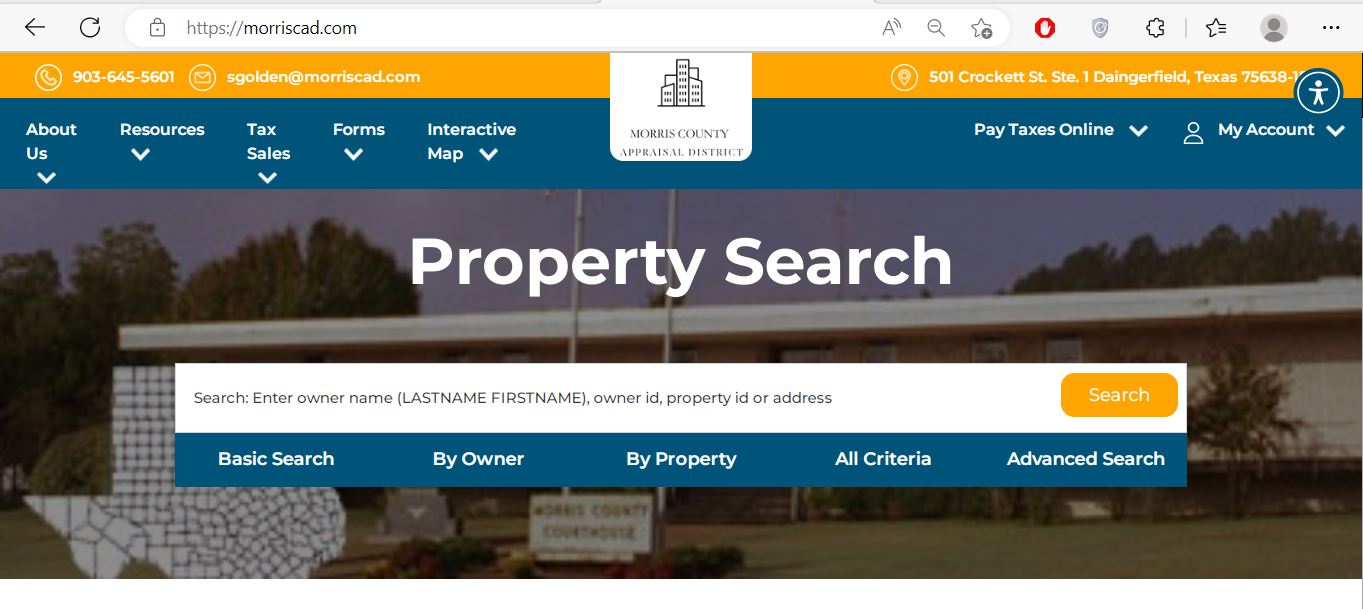
Use owner name, owner ID, property ID or a simple address.
Use geographic ID, legal description, abstract, subdivision or lease information.
Search by category, land acreage or value range when ordinary search is too broad.
Use Morris CAD’s advanced fields for land, minerals and comparison research
Search routes available
Use minimum or maximum acreage to narrow a list of rural parcels or potential comparison accounts.
Use a value range as a research filter, not as proof that another property is truly comparable.
These fields can help locate protest-related records or accounts represented by an authorised agent.
Understand what the Morris CAD result can and cannot prove
| Field | What it identifies | What it does not prove | Best next action |
|---|---|---|---|
| Parcel ID | The parcel record in the Morris CAD system. | That every county system uses the same identifier. | Save it for CAD and mapping questions. |
| Account | The appraisal or tax-collection account shown in results. | That the correct tax year has been selected. | Match it with the statement and receipt. |
| Owner ID | The owner reference used by the online system. | Complete legal title or every ownership interest. | Use it for owner search, PIN and account access. |
| Owner name | The owner carried for appraisal and notice purposes. | Deed history, liens, probate status or clear title. | Search County Clerk records when title matters. |
| Property address | The physical location used in the appraisal record. | Mailing address, legal access or exact boundary. | Compare the map and legal description. |
| Legal description | An abbreviated lot, block, tract, abstract or subdivision reference. | The complete deed description. | Review the recorded deed, plat and survey. |
| Acres | Acreage carried for appraisal purposes. | Surveyed acreage or boundary location. | Compare deed and survey evidence. |
| Market value | The district’s opinion of market value for the selected year. | A guaranteed sale price or tax balance. | Review value evidence and taxable value. |
| Base tax due | A displayed collection amount before every possible fee or update. | The final checkout total or posting status. | Verify the live amount before payment. |
Register before a protest deadline forces a rushed account setup
Use the Morris CAD map for parcel context, not legal boundaries
What to do when Morris CAD returns no result
| Problem | Likely reason | Practical fix |
|---|---|---|
| Owner is not found | The account may use a spouse, trust, estate, LLC or abbreviated name. | Search only the surname or one distinctive business word. |
| Address search fails | The appraisal address may use a rural route, county road or abbreviated wording. | Search only the street number and main street name. |
| Property disappears | “Show only Properties with Tax Due” may be selected. | Turn off the tax-due filter and search again. |
| Rural land is missing | The tract may be indexed by legal description, abstract or subdivision. | Use By Property or All Criteria instead of address. |
| Mineral account is missing | The search is using the wrong property type or no lease information. | Change property type and search owner, lease name or lease number. |
| Business account is missing | The assets may have a separate personal-property account. | Search the business owner, DBA and property type separately. |
| Recently purchased home shows seller | The recorded deed may still be processing into the CAD system. | Confirm the deed with the County Clerk and save the document details. |
| Tax due looks incorrect | The wrong year, property or payment posting may be displayed. | Verify the account, year, receipt and live collection record. |
Local search tips for Daingerfield, Lone Star, Naples and Omaha
Confirm the City of Daingerfield, Daingerfield-Lone Star ISD, county and NTCC jurisdictions.
Check whether the account includes the City of Lone Star and the correct school district.
Confirm the City of Naples, Pewitt CISD and other applicable taxing units rather than relying on mailing city alone.
Match the legal description, parcel location and Pewitt CISD information.
Only the Morris County portion belongs in Morris CAD. Confirm the county and school-district boundary.
Review market value, productivity value, acreage, qualifying use and improvements separately.
Use owner, lease and property identifiers. Pritchard & Abbott appraises mineral, utility and industrial accounts.
Search the deceased owner, estate and heirs and gather deed, probate and heir-property documentation.
Check both the real-estate account and any separate business-personal-property account.
Do not confuse market value, appraised value and taxable value
Morris CAD’s opinion of the property’s market value as of January 1.
The value after an applicable homestead cap, circuit-breaker limit or special appraisal.
The value remaining after exemptions for each applicable taxing unit.
Use Morris CAD, the county Tax Office or County Clerk correctly
| Your question | Correct office | What to prepare |
|---|---|---|
| What is my appraised value? | Morris CAD | Property ID, tax year and disputed value. |
| Why is an exemption missing? | Morris CAD | Application, identification, qualification date and filing proof. |
| How much property tax is due? | Morris CAD collection services | Account, property ID, tax year and payment date. |
| Where is my tax receipt? | Morris CAD | Account, payment date, amount and confirmation number. |
| Who handles vehicle registration? | Morris County Tax Assessor-Collector | Vehicle, title, registration and identification documents. |
| Who legally owns the land? | Morris County Clerk or title professional | Grantor, grantee, legal description and date range. |
| Where can I find a deed or lien? | County Clerk property records | Names, recording period and document type. |
| Who sets the property-tax rate? | Each taxing unit | The jurisdiction list from the CAD account. |
Correct the official system that contains the error
Confirm the deed or probate document with the County Clerk, then provide Morris CAD the ownership evidence it requests.
Contact Morris CAD because notices, tax statements and collection correspondence depend on the CAD mailing record.
Determine whether the correction belongs to CAD, county addressing, a city or the postal service.
Prepare the deed, plat, survey, parcel ID and geographic information.
Use measurements, photographs, permits, plans, condition evidence or demolition records.
Provide the payment confirmation, account, amount, date and tax year to Morris CAD.
File Morris County exemptions without paying a solicitation company
For a qualifying principal residence. Attach the identification and ownership information required by law.
Review the additional school exemption, tax ceiling, payment instalments and possible deferral rights.
Use the form matching the VA disability rating, total disability or surviving-spouse situation.
Use the 1-D-1 open-space or timber application and prepare land-use evidence.
Review the 2026 $125,000 statewide exemption for qualifying income-producing personal property.
Use the official request form when choosing electronic delivery of eligible communications.
What to prepare before filing
Check whether January 2026 storm damage is reflected in the record
Morris CAD published temporary-disaster-exemption guidance after a January 25, 2026 gubernatorial disaster declaration covering Morris County. Qualified property generally had to sustain at least 15% damage.
Improvements to real property, certain manufactured homes and rendered income-producing personal property may qualify under the disaster rules.
The district’s example explains that land value is not included when calculating the exemption for a damaged house structure.
Morris CAD published May 10, 2026 as the temporary-disaster-exemption deadline for that declaration.
Prepare evidence of qualifying use rather than relying on acreage alone
Agricultural, timber and wildlife appraisal depends on qualifying land use and statutory requirements. Rural ownership, vacant acreage or occasional livestock does not automatically create special appraisal.
Document the years, acreage and type of agricultural or timber use.
Keep livestock records, timber plans, crop records, grazing information, receipts and sales.
Prepare written leases, tract maps, legal descriptions and areas excluded from qualifying use.
Prepare the wildlife-management plan, annual report and evidence of qualifying practices.
Review market value and productivity value separately. Special appraisal does not erase market value.
Ask how development, subdivision, timber-use changes or discontinued agricultural use could affect tax.
Search the correct property type before reviewing a business or mineral value
Review equipment, machinery, furniture, inventory, acquisition dates, original cost and business location.
Search by owner, property ID, legal information, lease name or lease number.
Confirm the account type, appraiser, valuation year and exact disputed assets.
Business rendition preparation
File the Morris County protest before perfecting the evidence packet
Evidence packet
Pay Morris County property taxes through Morris CAD’s official route
Use the Morris County Clerk for recorded ownership documents
| Item | Published information | What to do |
|---|---|---|
| Office hours | Monday-Friday, 8:00 AM-noon and 1:00 PM-4:30 PM | Avoid arriving during the lunch closure. |
| Records handled | Land records, deeds, probate and other county records | Use the Clerk instead of CAD for recorded ownership documents. |
| Property-record coverage | Online search link for 1965 forward | Contact the Clerk about older or unavailable documents. |
| Accepted payments | Money orders, cashier’s cheques, cash and credit cards | Confirm current card fees and mailing requirements. |
| Recording fees | The Clerk links its recording-fee schedule | Ask the office to calculate the current total before mailing payment. |
Complete these checks before relying on one Morris County account
Compare parcel ID, account, legal description, acreage and map location.
Review current and prior balances, payment status, penalties and available receipts.
Review deeds, liens, probate, easements, restrictions and releases.
Seller homestead exemptions, tax ceilings and appraisal caps may not continue after transfer.
Confirm the county, school district, city and Northeast Texas Community College District.
Review timber, agricultural or wildlife status and any change-of-use exposure.
Land ownership does not automatically reveal every separate asset or mineral account.
Use title documents, recorded easements and a survey rather than the CAD map alone.
Keep the deed, title policy, survey, closing statement, tax receipt and exemption confirmation.
Important Morris County appraisal and property-tax dates
Morris County appraisal, collection and recording offices
Daingerfield, Texas 75638
Mailing: P.O. Box 563, Daingerfield, Texas 75638-1509
Phone: 903-645-5601
Fax: 903-645-2694
Email: sgolden@morriscad.com
Hours: Monday-Friday, 8:00 AM-4:30 PM; closed noon-1:00 PM.
Chief Appraiser: Summer Golden
Daingerfield, Texas 75638
Phone: 903-645-2446
Fax: 903-645-5351
Email: kim.thomasson@co.morris.tx.us
Tax Assessor-Collector: Kim W. Thomasson
This office handles vehicle and voter-registration services but does not collect real-property taxes.
Daingerfield, Texas 75638
Phone: 903-645-3911
Fax: 903-645-4026
Email: Brittany.andrews@co.morris.tx.us
Hours: Monday-Friday, 8:00 AM-noon and 1:00 PM-4:30 PM.
County Clerk: Brittany Andrews
Morris County, Hughes Springs ISD, Daingerfield-Lone Star ISD, Pewitt CISD, the cities of Daingerfield, Lone Star, Naples and Omaha, and Northeast Texas Community College District.
Morris County appraisal, tax and property-record resources
Search owners, IDs, addresses, legal descriptions, acreage, values and tax due.
Open official Morris CADResearch parcel context, roads and nearby appraisal accounts.
Open interactive mapFind homestead, veteran, agricultural, timber, rendition and protest forms.
Open Morris CAD formsCreate an account before requesting a PIN or using eligible online services.
Register onlineRequest the unique online PIN assigned to the property.
Request property PINSign in and file an eligible property protest.
Open protest portalSearch past hearings, future hearings and open protests.
Search protest hearingsUse the official Certified Payments route with bureau code 6825041.
Open tax paymentReview 2026 rolls, ARB procedures, reports, depreciation and local exemptions.
Open data and reportsReview proposed and adopted local tax-rate information.
Open Morris tax transparencyReview deed, land-record, probate, fee and office information.
Open County Clerk pageSearch Morris County recorded property documents from 1965 forward.
Open property recordsHow this Morris County guide was rebuilt

Independent research with practical official-portal guidance
This version preserves the Morris CAD screenshot and editor image from the original page while correcting the property-tax collection route and adding advanced search fields, account-PIN instructions, receipt guidance, disaster information, local taxing units, agricultural preparation, protest evidence and recorded-property search steps.
The review used Morris County Appraisal District, Morris County Tax Assessor-Collector, Morris County Clerk, the Texas Comptroller county directory and current Texas property-tax resources.
AppraisalDistrict.org is an independent informational website and is not operated by Morris CAD, Morris County or any taxing unit.
10 common Morris County Appraisal District questions
1. What is the official Morris County Appraisal District website?
The official website is morriscad.com. It provides property search, maps, forms, certified rolls, protest access, tax-due information and payment.
2. How do I search Morris County property records?
Search by owner name in last-name-first-name order, owner ID, property ID or address. Use By Property for geographic ID, legal description, abstract, subdivision or lease information.
3. Who collects Morris County property taxes?
Morris CAD performs consolidated property-tax collection services for participating taxing units. The elected County Tax Assessor-Collector does not collect real-property taxes.
4. How do I pay Morris County property taxes online?
Verify the property and year in Morris CAD, then use the official Certified Payments link with bureau code 6825041. Review the processing fee and save the confirmation.
5. How do I get a property-tax receipt?
Morris CAD states that receipts are no longer mailed. Retrieve the receipt through the website or ask the district to email or fax it.
6. What is the normal protest deadline?
The normal deadline is May 15 or the 30th day after the Notice of Appraised Value was delivered, whichever is later. Follow the date printed on the notice.
7. How do I file a Morris CAD protest online?
Create an online account, request the property’s unique PIN, sign in and open the protest portal. Keep the confirmation and uploaded evidence.
8. Does a homestead exemption cost money to file?
No. Morris CAD warns that filing a homestead exemption is free. Use the official form and attach the required colored driver-licence copy or other permitted identification.
9. Where can I search Morris County deeds?
The County Clerk links to County Government Records for property documents from 1965 forward. Contact the Clerk for older, unavailable or certified records.
10. Is the Morris CAD map a legal survey?
No. Use the map for appraisal research only. Verify acreage, boundaries and access through recorded documents and a professional survey.