Navigate Hill County Property Records From Lake-Area Parcel to Verified Tax Account
Start with Hill County Appraisal District when you need the property ID, geographic ID, appraisal owner, situs address, legal description, acreage, market value, taxable value, exemption, agricultural appraisal, mineral account or business-personal-property record.
Hill County uses several tax-collection routes. Hill CAD collects for many jurisdictions, the Hill County Tax Office collects others, and Whitney ISD collects its own taxes. Confirm the collector shown for the exact property before paying.
The official eSearch portal states that 2026 values are certified.
1407 Abbott Avenue, Hillsboro, Texas 76645.
Hill CAD serves 39 taxing entities and collects for 21 jurisdictions.
Mike McKibben.
Links and local procedures reviewed July 28, 2026.
Choose the correct Hill County property route
Use owner, address, ID or Advanced search, then confirm the legal description and parcel map.
Follow the search stepsCompare land, improvements, market value, appraised value, taxable value and exemptions.
Understand the value fieldsHill CAD, the County Tax Office and Whitney ISD do not collect the same set of accounts.
Use the payment workflowIdentify the exact value or account problem, file on time and keep proof of submission.
Prepare a protestSearch recorded deeds and liens rather than treating the CAD owner field as proof of title.
Follow the deed-record routeMineral, agricultural and wildlife accounts require different evidence from a normal residence.
Review special propertySearch Hill CAD without opening the wrong account
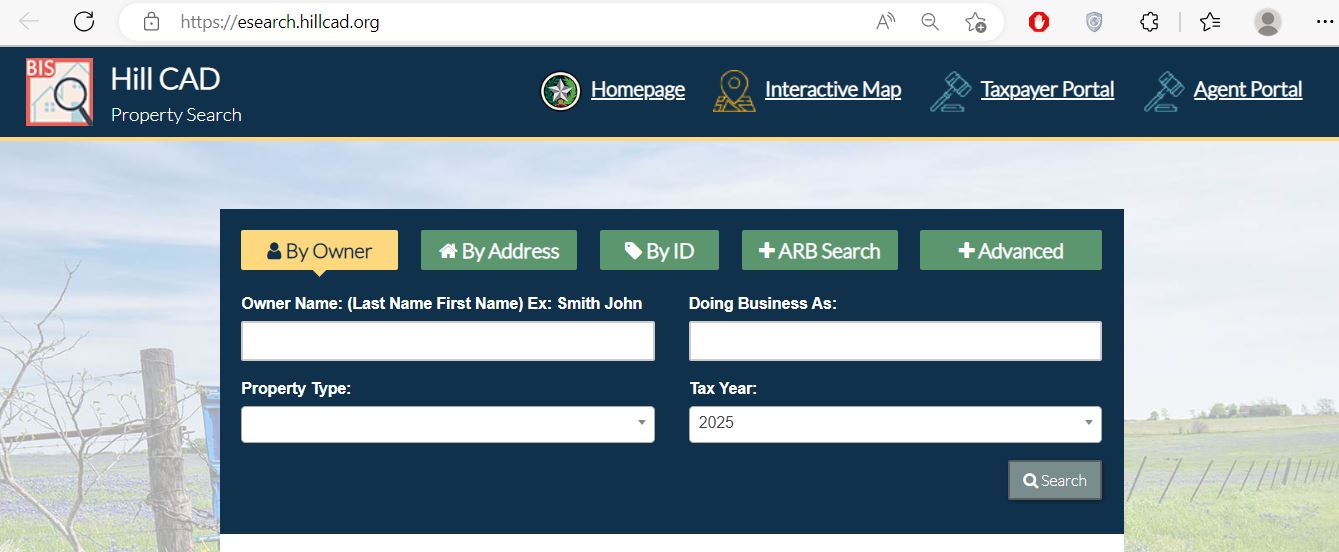
Use the Hill CAD search screen field by field
The existing property-search image from this article is preserved below. It shows the official eSearch layout, including direct access to the homepage, interactive map, taxpayer portal and agent portal.
Choose the Hill CAD field most likely to find the record
| Search method | Best use | How to search | What to verify |
|---|---|---|---|
| Owner name | Homes, land, trusts, estates and business ownership. | Start with the last name or one distinctive entity word. | Property type, legal description and location. |
| Street address | Addressed property in Hillsboro, Whitney, Itasca, Hubbard and other communities. | Try the street name alone if a full address fails. | City, subdivision, property ID and owner. |
| Property ID | Appraisal notices, tax records, prior accounts and office correspondence. | Enter the complete number without extra spaces. | Tax year, geographic ID and property type. |
| Geographic ID | Rural tracts, parcel mapping and legal-description research. | Copy the full ID shown on the account. | Abstract, acreage and map location. |
| Abstract or subdivision | Unaddressed acreage, farms, ranches and platted developments. | Use Advanced search and select the matching list entry. | Survey, lot, block, tract and acreage. |
| Mobile-home park or condo | Accounts sharing one park or building address. | Select the park or condominium and compare individual accounts. | Unit, owner, property type and identifiers. |
| Doing Business As | Business-personal-property and dealer accounts. | Enter the DBA or one distinctive business word. | Legal owner, situs and property type. |
| ARB Search | Protest and hearing research. | Use protest status, informal date, formal date or hearing information. | Property ID, tax year and hearing status. |
Fix a missing or incorrect Hill CAD result
| Problem | Likely reason | Practical fix |
|---|---|---|
| Owner search returns nothing | The record may use a spouse, trust, estate, company or different name order. | Search only the first or last name, then narrow with the address or ID. |
| Address is not recognised | The account may use a shortened street, rural route, county-road number or different situs format. | Use only the street name, then try the map or property ID. |
| Lake-area property opens the wrong parcel | Several lots may share a road name, subdivision or mailing address. | Match the subdivision, lot, block, geographic ID and map shape. |
| Rural acreage has no normal address | The property may be indexed by abstract, geographic ID or legal description. | Use Advanced search and the interactive map. |
| Recently purchased property shows the seller | The recorded deed may still be processing into the appraisal system. | Confirm recording with the County Clerk and save the instrument reference. |
| Mineral account is not under the expected address | Mineral interests can be indexed by lease, operator, owner or separate account identifiers. | Search the owner and property type, then contact the mineral appraiser. |
| Pay Taxes button is missing | The account may be collected by another office, or the tax detail has not been opened. | Open the full account and confirm the collecting entity. |
| Values differ from an older notice | The saved notice may show preliminary data or a different tax year. | Select 2026, confirm the certified status and compare the complete value history. |
Use the Hill CAD map for rural and Lake Whitney-area property
Understand what the Hill CAD account does and does not prove
| Field | What it identifies | What it does not prove | Best next action |
|---|---|---|---|
| Property ID | The Hill CAD appraisal account. | That every collector uses the same account number. | Save it for forms, calls, protests and payment matching. |
| Geographic ID | A parcel identifier associated with appraisal mapping. | A surveyed boundary. | Compare it with the interactive map. |
| Owner shown | The owner carried for appraisal and tax administration. | Complete legal title or lien status. | Use County Clerk land records when ownership matters. |
| Situs address | The physical location assigned to the appraisal account when available. | The mailing address or complete deed description. | Compare the map and recorded deed. |
| Legal description | The abstract, subdivision, lot, block, tract or other property reference shown. | The entire legal description or exact boundary. | Match it with the deed, plat or survey. |
| Market value | CAD’s opinion of market value as of January 1. | A guaranteed sale price or final tax bill. | Compare local sales, condition and equal-appraisal evidence. |
| Appraised value | The value after an applicable appraisal limitation. | The amount taxed by every entity. | Continue to taxable value and exemptions. |
| Taxable value | Value after applicable exemptions for a taxing unit. | The current balance, penalties or payment status. | Open the collecting office’s live tax record. |
| Property type | Whether the account is real, personal, mineral, mobile-home or another category. | That the classification and characteristics are correct. | Document any incorrect type, use or improvement detail. |
| Taxing units | The entities that may impose tax on the property. | That one office collects every line. | Confirm the collector for each account before payment. |
Separate market value, appraised value and taxable value
Hill CAD’s opinion of what the property would sell for under normal market conditions as of January 1.
The value after an applicable appraisal limitation, such as a qualifying residence-homestead limitation.
The value after exemptions. It may differ for the county, school district, city, college and emergency-service district.
Use the correct route for mineral, agricultural and lake-area property
Hill CAD contracts with Thomas Y. Pickett & Company to appraise mineral accounts. Save the mineral account, owner, lease, operator and tax year before calling.
1-d-1 open-space appraisal values qualifying land according to agricultural productivity rather than ordinary market value.
Match the subdivision, lot, block, road, lake proximity and parcel map. Do not treat shoreline appearance as proof of legal access or boundary.
Wildlife use has eligibility, prior-qualification and management requirements. Undeveloped land does not qualify automatically.
Search the owner, park, property type and ID. Ownership changes may require manufactured-housing documentation.
Hill CAD publishes a low- and moderate-income housing capitalisation-rate resource for qualifying appraisal matters.
Maria May
Thomas Y. Pickett & Company
(972) 430-9115
mariam@typco.com
Hill CAD publishes local agricultural qualification guidelines, a 1-d-1 application and a farm-and-ranch survey guide.
Open agricultural guidanceApply for the correct Hill County exemption or special appraisal
For a qualifying principal residence. Confirm ownership, occupancy, identification and the tax year requested.
Review the additional exemption, school-tax ceiling and possible instalment or deferral rules.
Use the residence-homestead application and provide the documentation required for disability qualification.
Use the correct veteran or surviving-spouse application and attach current Veterans Affairs documentation.
Prepare land-use history, acreage, leases, maps, production records and the local agricultural questionnaire or evidence.
Religious, charitable, vehicle, pollution-control and other applications have separate qualifications and documents.
Build a Hill County protest around one clear issue
Evidence checklist
Present a concise case to the Hill County Appraisal Review Board
| Part | What to present | What to avoid |
|---|---|---|
| Opening | Property ID, protest reason and requested value or correction. | A long introduction unrelated to the disputed year. |
| Property facts | Correct size, acreage, use, improvements and condition. | Unsupported estimates or assumptions. |
| Value evidence | Adjusted sales, equal-appraisal comparisons, income evidence or land-use records. | Comparables without dates, locations or property details. |
| Response to CAD | The specific district evidence you dispute and why. | Arguments based only on the total tax bill. |
| Closing | Repeat the requested decision and strongest supporting fact. | Leaving the board to guess what result you want. |
Pay the correct Hill County account without losing the receipt
| Method or situation | Published detail | What to verify |
|---|---|---|
| Credit or debit card | 2.3% service fee | Review the live fee before final submission. |
| Electronic check | $1.50 service fee | Check account and routing numbers carefully. |
| Telephone payment | Call 866-549-1010 and use bureau code 8020114 | Electronic checks are not available through the phone route. |
| Partial payment | An amount other than the full balance can be entered online | A partial payment does not extend the delinquency date or create a payment agreement. |
| Posting time | Usually two to three business days; electronic checks may take longer | Recheck the account and retain the confirmation. |
Find which Hill County office collects each tax line
| Collector | Examples of entities collected | Contact or next step |
|---|---|---|
| Hill CAD Tax Collections | Abbott, Aquilla, Blum, Bynum, Covington, Hillsboro, Hubbard, Itasca, Malone, Mount Calm and Penelope school or city accounts; Whitney city; Carl’s Corner and other listed entities. | Search the Hill CAD account and use the Pay Taxes button when available. |
| Hill County Tax Office | Hill County, lateral road, ESD #1, ESD #2, Hill College, Tehuacana WCID, City of Mertens and City of Penelope. | Use the Hill Tax property-search and payment portal. |
| Whitney ISD | Whitney Independent School District | Contact Whitney ISD Tax Office at 254-694-2409. |
Use the Hill County Clerk for deeds, liens, releases and plats
The owner displayed by Hill CAD is an appraisal entry. The Hill County Clerk maintains real-property records and provides online land-record searches.
Hillsboro, Texas 76645
Mailing:
P.O. Box 398
Hillsboro, Texas 76645
(254) 582-4030
(254) 582-4012
Fax: (254) 582-4003
countyclerk@co.hill.tx.us
Send each Hill County correction to the office that controls it
Search, render and verify a Hill County business account
Use Doing Business As in Advanced search if the legal owner name does not locate the account.
Separate business-personal-property accounts from real, mineral, mobile-home or automobile records.
Check where the assets were located and used on January 1 of the tax year.
Compare equipment, furniture, machinery, inventory and other taxable assets with the account.
Most business-personal-property renditions are due April 15, with an extension available after a timely written request.
Motor vehicle, vessel, heavy equipment and manufactured-housing dealers use separate declaration and monthly statement forms.
Download Hill CAD appraisal exports and map files
Hill CAD publishes downloadable appraisal information for researchers, consultants, developers and advanced property users. At the time of review, the page listed map shape files updated July 1, 2026 and a 2024 appraisal-data export updated July 20, 2026.
Useful for GIS analysis, parcel mapping and spatial research. Review the file date and coordinate information before use.
Useful for bulk property analysis, but the published file name and data year may differ from the update date.
Bulk data can become stale. Verify any decision-sensitive parcel through the live eSearch record.
Important Hill County appraisal and tax dates
Hill County appraisal, tax and land-record offices
Hillsboro, Texas 76645
Mailing:
P.O. Box 416
Hillsboro, Texas 76645-0416
Phone: (254) 582-2508
Fax: (254) 582-3654
Email: hcad@hillcad.org
Hours: Monday-Friday, 8:00 AM-5:00 PM.
Chief Appraiser: Mike McKibben
Krystal A. Hightower, PCC
126 South Covington StreetHillsboro, Texas 76645
Mailing:
P.O. Box 412
Hillsboro, Texas 76645
Phone: (254) 582-4000
Fax: (254) 582-4001
Email: khightower@co.hill.tx.us
Hours: Monday-Friday, 8:00 AM-5:00 PM.
Hillsboro, Texas 76645
Mailing:
P.O. Box 398
Hillsboro, Texas 76645
(254) 582-4030
(254) 582-4012
Fax: (254) 582-4003
countyclerk@co.hill.tx.us
Maria May
Thomas Y. Pickett & Company
(972) 430-9115
mariam@typco.com
Official Hill County property resources
Find notices, reports, forms, staff, tax collections and public information.
Open official Hill CADSearch owner, address, ID, ARB and advanced property fields.
Open property searchCompare parcel location, nearby property and appraisal-map context.
Open parcel mapAccess property details, documents, electronic communications, applications and eligible protest services.
Open taxpayer portalFind homestead, veteran, agricultural, rendition, dealer and protest forms.
Open official formsCheck collection assignments, payment instructions, fees and telephone payment information.
Open collection informationSearch accounts collected by the county office, obtain receipts and review tax-office services.
Open Tax OfficeReview estimated taxes, proposed rates and adopted taxing-unit information.
Open tax-rate portalSearch recorded deeds, liens, releases and plats.
Open County ClerkHow this Hill County guide was rebuilt

Existing images preserved and official workflows expanded
This version retains the property-search screenshot and editor image already published on the page while replacing the shorter article with complete search instructions, screenshot guidance, parcel verification, certified-value explanation, exemption filing, protest preparation, tax-collector routing, mineral assistance, deed research and record-correction steps.
Official information was reviewed through Hill County Appraisal District, Hill CAD eSearch, the taxpayer portal, Hill CAD Tax Collections, the Hill County Tax Assessor-Collector, the Hill County Clerk and Texas Comptroller county-directory resources.
AppraisalDistrict.org is an independent informational website and is not operated by Hill County Appraisal District or Hill County.
10 common Hill County appraisal questions
1. What is the official Hill County property-search website?
Use the official Hill CAD eSearch portal. It provides By Owner, By Address, By ID, ARB Search and Advanced options.
2. Can I search Hill County property by owner name?
Yes. Select By Owner and begin with the last name. If the search fails, Hill CAD recommends trying only the first or last name, then narrowing the result with an address or identifier.
3. Why does a Hill CAD address search return no result?
The account may use an abbreviated street, rural route, county-road format, subdivision description or different situs address. Try only the street name, then use the property ID or interactive map.
4. Are Hill County 2026 appraisal values certified?
Yes. The official Hill CAD eSearch portal currently states that 2026 values are certified. Confirm the selected tax year before comparing the account with an older notice.
5. How do I protest a Hill County appraisal?
Use the Hill CAD taxpayer portal when eligible or submit a written Notice of Protest. Most protests are due by May 15 or 30 days after the appraisal notice was delivered, whichever is later. The notice deadline controls.
6. Where can I apply for a Hill County homestead exemption?
Use the official Hill CAD forms page. Homestead applications must include a driver licence copy or other information required by the Tax Code, and an affidavit may be required in certain situations.
7. Where can I pay Hill County property taxes online?
Search the property through Hill CAD eSearch and use the green Pay Taxes button when Hill CAD collects the account. Some tax lines are collected by the Hill County Tax Office, while Whitney ISD collects its own taxes, so verify the collector first.
8. Who handles Hill County mineral appraisal questions?
Hill CAD contracts with Thomas Y. Pickett & Company for mineral appraisals. Contact Maria May at (972) 430-9115 or mariam@typco.com.
9. Does the Hill CAD owner field prove legal ownership?
No. It is an appraisal record. Use the Hill County Clerk’s land-record services for deeds, liens, releases, plats and other recorded legal instruments.
10. Who should I call for a Hill County tax receipt or delinquent balance?
Contact the collector shown for the account. Hill CAD Tax Collections can be reached at (254) 582-2508. The Hill County Tax Assessor-Collector can be reached at (254) 582-4000.