
Search, Verify and Pay a Nacogdoches County Property Account
Nacogdoches Central Appraisal District is unusual because it handles both appraisal records and property-tax collection for the local taxing units it serves. The same official portal can help you find a parcel, review value and exemptions, check taxes and continue toward payment.
This guide also explains the GIS map, homestead filing, timber and agricultural appraisal, business renditions, protest evidence, online-protest restrictions, deed research and the exact office to contact when a record looks wrong.
Owner, Address, ID, ARB Search and Advanced tabs.
Nacogdoches Central Appraisal District collects local property taxes.
216 W. Hospital Street, Nacogdoches.
Timber, agricultural, wildlife and rural acreage records.
Links and local procedures checked July 2026.
What do you need from the Nacogdoches County property record?
Use the property ID when available. Otherwise start with Owner or Address and verify the legal description.
Follow the search stepsOpen the correct account, confirm the tax year and balance, review the payment screen and save the receipt.
Review the payment workflowRural, timber and agricultural accounts may not have a normal address.
Review rural-land guidanceHomestead, age, disability, veteran, agricultural, timber and wildlife filings require different evidence.
Open the filing guideStarting an inquiry or filing another way may prevent online protest access.
Prepare the protestThe CAD owner field is not a substitute for a recorded deed, lien release or title search.
Search legal recordsSearch the Nacogdoches CAD account without selecting the wrong parcel
Use the official Nacogdoches CAD search tabs correctly
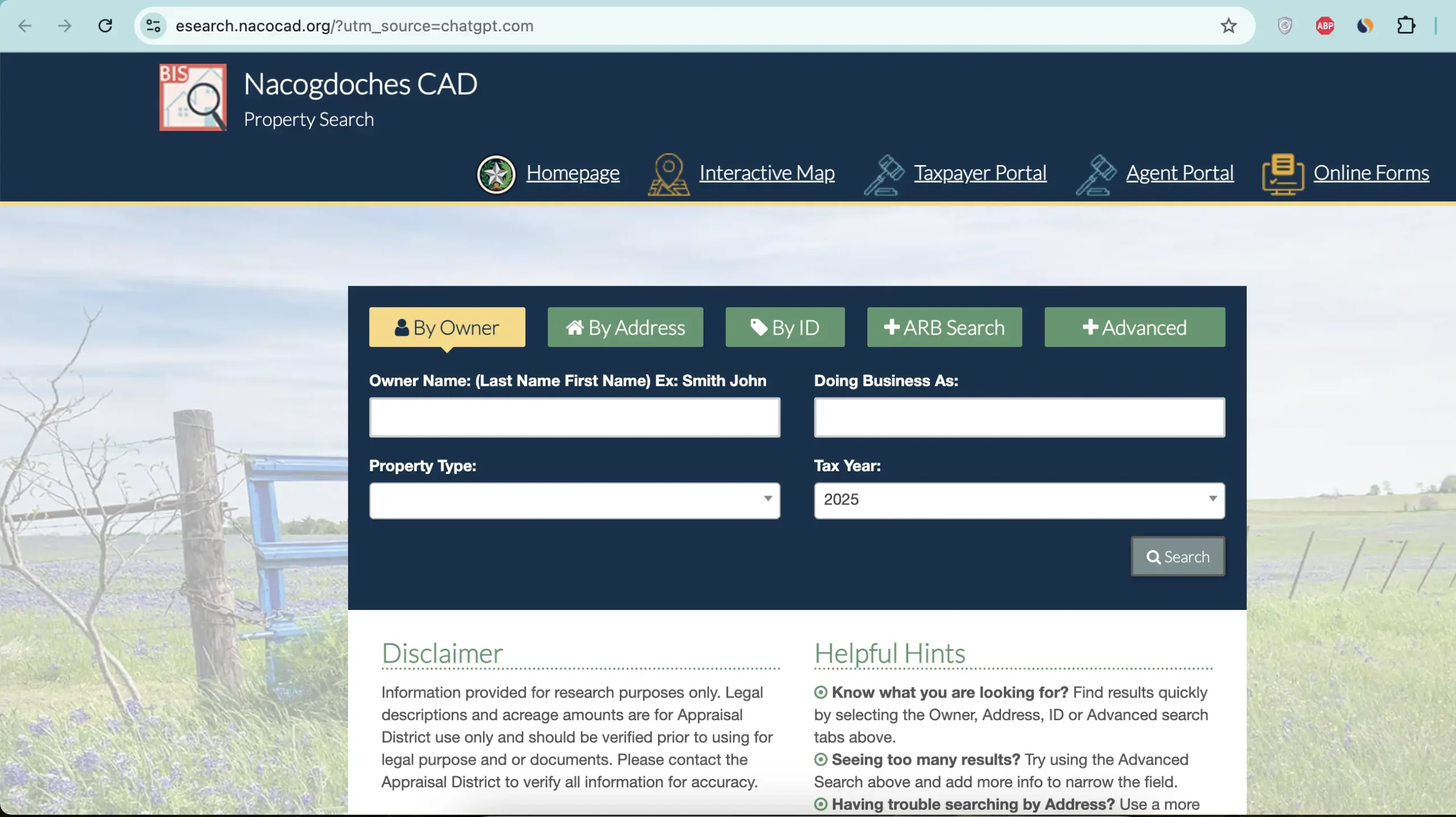
Enter the surname first. Add the first name or business name when the result list is too large.
Use the street number and name. Remove suffixes or city information when the portal does not recognise the full address.
Use this when the property or account ID appears on a notice, tax statement, prior record or closing document.
Use this only for appraisal-review or protest-related account research when the portal makes that option available.
Narrow a large result set using additional property, owner, tax-year or classification filters.
Check that the selected year matches the appraisal notice, tax statement, protest or payment you are researching.
Understand what the Nacogdoches CAD record does and does not prove
| Field | What it helps identify | What it does not prove | Next action |
|---|---|---|---|
| Property ID | The appraisal and tax account in the local CAD system. | That another agency uses the same identifier. | Save it for calls, forms, payments and protests. |
| Owner shown | The owner carried for appraisal and tax administration. | Clear title, lien status or complete deed history. | Use County Clerk records when legal ownership matters. |
| Situs address | The physical location used in the CAD record when one is assigned. | A legal description or surveyed boundary. | Compare it with GIS, deed and survey information. |
| Legal description | The tract, abstract, subdivision, lot, block or other legal reference. | That an abbreviated CAD description is sufficient for a legal transaction. | Open the recorded deed or plat. |
| Market value | The district’s opinion of market value as of January 1. | A guaranteed sale price or final tax bill. | Compare sales, condition and unequal-appraisal evidence. |
| Appraised value | The value after an applicable appraisal limitation or special appraisal calculation. | The final taxable value for every taxing unit. | Review exemptions and each taxing-unit line. |
| Taxable value | The value remaining after applicable exemptions. | The live amount due after payments, penalties or credits. | Review the tax-balance and payment section. |
| Productivity value | A qualifying agricultural, timber or wildlife value based on productive use. | That the land can change use without rollback consequences. | Review qualification history before changing use or buying. |
| Taxing units | County, city, school, hospital, emergency-service and other local units attached to the account. | That every unit applies the same exemption or rate. | Check each line and use Truth in Taxation for rate information. |
Follow the property value from market appraisal to the tax amount
The district’s opinion of market value as of January 1 for the tax year.
The value after an applicable limitation or qualifying agricultural, timber or wildlife appraisal.
Taxable value reflects exemptions. The bill then applies each taxing unit’s adopted rate and account adjustments.
Check and pay Nacogdoches County property taxes through the CAD portal
Nacogdoches Central Appraisal District states that it collects property taxes for the taxing units it serves. This means the appraisal account and tax-payment workflow are more closely connected than they are in many Texas counties.
Use the GIS map for parcel context, not legal boundary proof
Locate acreage, road access, adjoining parcels and property near city or school-district boundaries.
Compare tract location, surrounding land use and parcel shape before reviewing special appraisal.
Confirm the lot position and nearby accounts when several properties share similar addresses.
Fix common Nacogdoches property-search problems
| Problem | Likely reason | Best fix |
|---|---|---|
| Owner search shows too many results | A common surname, family ownership, rentals or business entities can produce many matches. | Use property ID, street name or Advanced search. |
| Address returns nothing | The portal may use a county-road format, rural description, old situs address or abbreviation. | Use the street number and name only, then switch to owner, ID or GIS. |
| Rural tract has no normal address | The account may be indexed mainly by owner, property ID, abstract or legal description. | Use ID, owner, legal description and the map. |
| Recently purchased property shows former owner | The recorded deed may not yet have completed processing into the CAD system. | Confirm recording with the County Clerk and save the instrument number. |
| Tax balance seems incorrect | The wrong year, partial payment, penalty, credit or separate account may be involved. | Review every year and contact CAD with the receipt and account ID. |
| GIS acreage differs from deed or survey | Map layers are informational and may not reflect surveyed legal boundaries. | Use the deed, recorded plat and professional survey. |
| Online protest is unavailable | The filing window may be closed, the property may not be eligible or another protest method may already have been started. | Call CAD immediately and ask which filing method remains available. |
Review timber, agricultural and wildlife property differently from a normal home
Check acreage, timber classification, productivity value, use history and whether the correct application remains active.
Prepare land-use history, leases, livestock or crop evidence, maps, photographs and ownership information.
Review the required prior qualification, wildlife-management plan and annual activity evidence.
Use the official brochure and application to determine whether the special restricted-use category fits the property.
Ask about rollback-tax exposure before converting qualified land to residential, commercial or another nonqualifying use.
Do not assume the seller’s special appraisal will automatically continue after sale or a change in use.
Evidence worth keeping
Choose the correct Nacogdoches CAD form and prepare the required evidence
| Situation | Starting form or resource | What to prepare |
|---|---|---|
| Principal residence | Residence homestead exemption application | Texas driver licence or state ID, ownership details and matching property address. |
| Age 65, disability or veteran status | Applicable exemption application and supporting affidavit | Qualification date, identification and required disability or veteran evidence. |
| Agricultural land | Agricultural-use application | Use history, acreage, leases, production records, photographs and maps. |
| Timberland | Timber-land application or restricted-use timber application | Timber use, management, harvest and ownership records. |
| Wildlife management | Wildlife-management plan and guidelines | Prior qualification and documented wildlife-management activities. |
| Business equipment or inventory | Business personal property rendition | Asset description, acquisition year, original cost, inventory and business location. |
| Disaster damage | Property damaged by disaster application | Dated photographs, repair estimates, damage dates and insurance documentation. |
| Electronic communication | Request for electronic delivery of communications | Owner, representative, property and delivery information. |
Protect your Nacogdoches CAD protest deadline and filing method
Strong local evidence
Separate business assets from the real-property account
Do not assume a building or land account includes business furniture, machinery, equipment or inventory.
Record each asset’s description, acquisition year, original cost, location and current use.
Compare the rendered property with the official depreciation schedule and prior-year account.
Make sure the account is associated with the correct business location and taxing units.
Save the online confirmation, mail receipt or stamped rendition copy.
A BPP protest may require invoices, asset records, obsolescence evidence and photographs rather than home-sale comparables.
Use the County Clerk when the question is legal ownership, deeds or liens
Important Nacogdoches CAD dates to verify
Nacogdoches property offices and where to direct the question
Nacogdoches, Texas 75961-4873
Phone: (936) 560-3447
Fax: (936) 560-1894
Email: hello@nacocad.org
Hours: Monday-Friday, 8:00 AM-5:00 PM.
Chief Appraiser: Jason Malott
Use this office for appraisal records, property taxes, exemptions, special valuation, renditions, GIS and protests.
Nacogdoches, Texas 75961
Phone: (936) 560-7767
Fax: (936) 564-2217
Hours: Monday-Friday, 8:00 AM-4:30 PM; open during lunch.
Tax Assessor-Collector: Kim Morton
This county office handles vehicle and other assessor-collector services but directs property-tax questions to the CAD.
Use the official public-record portal for recorded deeds, deeds of trust, liens, releases and other real-property documents.
Open County Clerk recordsUse the official transparency portal to review property-tax notices, taxing units and rate-related information.
Open Truth in TaxationOfficial Nacogdoches County appraisal and tax resources
Start here for current notices, tax information, reports and contact details.
Open Nacogdoches CADFind accounts, values, exemptions, taxing units, balances and payment options.
Search property and taxesReview parcel location, neighbouring properties and rural-land context.
Open county mapsFind homestead, timber, agricultural, wildlife, rendition and other applications.
Open official formsSubmit eligible forms through the CAD-operated portal.
Open online formsReview online-protest eligibility and filing-method restrictions before starting.
Open protest guidanceSearch deeds, liens, releases and recorded ownership documents.
Search official recordsReview tax-rate notices and taxing-unit information.
Open tax transparencyVerify the CAD, chief appraiser, collecting unit, contacts and taxing units.
Open state directoryHow this Nacogdoches County guide was improved

Existing images preserved, practical gaps filled
This regenerated guide preserves the property-search screenshot and editor image already used on the existing article. It adds clearer tax-collection guidance, screenshot instructions, account-field decoding, payment verification, GIS steps, timber and wildlife guidance, online-protest restrictions, business rendition help, deed research and local troubleshooting.
The official-source review included Nacogdoches Central Appraisal District, the Nacogdoches County Tax Assessor-Collector, the Texas Comptroller and the County Clerk public-record portal.
AppraisalDistrict.org is an independent informational website and is not operated by Nacogdoches Central Appraisal District or Nacogdoches County.
10 common Nacogdoches CAD and property-tax questions
1. What is the official Nacogdoches County property search website?
Use the official Nacogdoches CAD property-search and tax portal. It provides Owner, Address, ID, ARB Search and Advanced search options.
2. Can I pay Nacogdoches County property taxes through the appraisal district?
Yes. Nacogdoches Central Appraisal District states that it collects property taxes for the taxing units it serves. Open the correct account, verify the year and balance, read the payment terms and save the receipt.
3. Why does a Nacogdoches address search show no result?
The record may use a county-road format, abbreviated street name, former address, rural description or no normal situs address. Try the street number and name only, then use owner, ID, legal description or GIS.
4. How do I search Nacogdoches timberland or rural acreage?
Use the property ID, owner or legal description, then confirm the parcel with the official GIS map. Review acreage, market value, productivity value and land-use classification separately.
5. Does the Nacogdoches CAD owner name prove legal ownership?
No. It is an appraisal and tax-collection record. Use the County Clerk public-records portal for deeds, liens, releases and recorded ownership history.
6. What are the main Nacogdoches CAD filing deadlines?
The CAD states that renditions are generally due April 15, most exemption and special-appraisal applications are due April 30 and written protests are generally due May 15. Follow the date on the notice or official form.
7. How do I file a Nacogdoches CAD protest online?
Open the official online-protest page while the service is active, search for the property and follow the instructions. The CAD warns that initiating an inquiry or filing by another method may remove online eligibility.
8. How do I check whether a homestead exemption is active?
Open the full property account and review the exemption and taxable-value sections. If the exemption is missing, use the official forms page or online forms portal and save proof of submission.
9. Who is the Nacogdoches CAD chief appraiser?
The Texas Comptroller’s county directory lists Jason Malott as Chief Appraiser for Nacogdoches Central Appraisal District.
10. Where is Nacogdoches Central Appraisal District located?
The office is at 216 W. Hospital Street, Nacogdoches, Texas 75961-4873. The phone number is (936) 560-3447, and published hours are Monday-Friday, 8:00 AM-5:00 PM.